
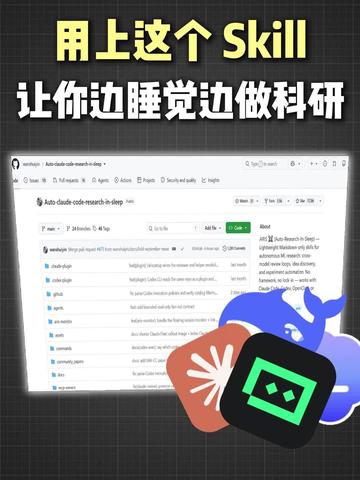
Use this Skill — do research while you sleep!
This guide explains how to start checking a repository shown as Auto-claude-code-research-in-sleep: clone the repo, read README, look for Dockerfile or dependency lists, configure possible API keys, and run controlled test scripts. It lists prerequisites and security/license checks to evaluate whether the repo can be used for overnight automated research (service/model requirements must be verified in the repository docs).
Image Analysis
Image 1 — Facts and observations (recorded top-to-bottom, left-to-right)
Observable facts (directly readable or directly observable content):
- Large headline (top of image, large font):
- “用上这个 Skill” (note: “Skill” is in English, with a different font size)
- “让你边睡觉边做科研” (translation: “let you do research while you sleep”)
- Center shows a webpage screenshot; the interface resembles a GitHub repository page (top navigation, repository name, tabs, file list, right-side info panel).
- Partially readable text in the webpage screenshot:
- Repository or page title on the top-left: “Auto-claude-code-research-in-sleep” (this text appears in the repository title position)
- Top tabs (partially readable): “Code”, “Issues”, “Pull requests”, “Actions”, “Projects”, “Security and analysis”, “Insights”
- A green button visible on the page (commonly the “Code”/clone button on GitHub)
- Right-side info card title readable as “About”
- The main page body shows a column of files/directories (left column listing multiple file or folder entries with blue or gray icons).
- Three illustrations/icons overlap the webpage screenshot at the lower right:
- A blue whale-shaped illustration (near the upper-right center)
- A black square icon with a green smiling face or pixel-like pattern inside
- An orange-red petal- or book-shaped graphic (overlapping the black square)
- Background is a dark grid texture; headline text uses high-contrast yellow/white colors.
Partially legible or unclear text/elements (blurred or incomplete):
- Some file names in the file list show fragments but not full names (e.g., a README.md position is visible but not all file names can be confirmed).
- The descriptive text under the About panel on the right exists but is too small to fully read (likely contains repository description or links).
- The top of the page may include a search box, user avatar, and other standard GitHub controls, but specific text or icon details are blurred.
Layout / visual order:
- Top: large Chinese headline covering the top of the image (promotional)
- Center: webpage/repository screenshot
- Top bar: site navigation (search, icons, user area) — visible but details blurred
- Repo header: repository name (Auto-claude-...), possibly followed by stars/forks counts (numbers unreadable)
- Tabs row: Code / Issues / Pull requests / Actions / Projects / Security and analysis / Insights (visible)
- Main left column: list of files/directories (multiple entries with icons)
- Main right column: About info card (title “About”, body text unreadable)
- Green action button present (likely “Code” or “Clone”)
- Lower right overlay: three illustrations/icons placed on top of the screenshot
Data charts
- No clear tables or numeric charts are readable in the image (only file lists and UI elements).
- If there are stars, forks, or commit counts, those numbers cannot be read at the image resolution.
Visible phenomena (visual features, without subjective inference)
- The image uses a collage layout: headline on top, webpage screenshot center, illustrations in lower-right overlay.
- High color contrast: yellow headline, dark background, white subtext, and a light-colored webpage.
- The webpage screenshot follows a typical code-hosting repository layout (left file list, right project/description).
Speculations (marked as such; not directly read from the image)
- It is likely a promotional image for a repository or project named “Auto-claude-code-research-in-sleep”, implying some automation to “do research while sleeping” based on the title and repository name.
- The black square with a green smile may represent an AI/model service or app icon; the whale illustration could be a visual cue for Docker, but this is only a visual association.
- The green button is likely the repository “Code” (clone/download) button, and common actions like “Go to file / Add file” may be present nearby, per typical GitHub layout.
Unreadable or uncertain items (explicitly noted)
- Full names of all files/folders in the file list cannot be read (only fragments visible).
- Descriptive text and links under the About panel are not fully legible.
- Any stars, forks, contributor counts next to the repo header cannot be read.
- Small icons or gray text (e.g., commit history, recent update) are not legible in this image.
Notes (compliance)
- No interactive operations from the image were executed; observations are restricted to visible text and UI phenomena.
SkillPI Creation Analysis
Purpose and core judgment:
- The image appears to advertise or point to a repository-like project titled “Auto-claude-code-research-in-sleep” and uses the slogan “Use this Skill — do research while you sleep!”. The image is promotional in nature and does not itself provide verifiable, runnable instructions.
Evidence summary from the image (verifiable visual clues):
- The central screenshot strongly resembles a GitHub repository page: repository name, common tabs (Code, Issues, Pull requests, etc.), file list, an About card, and a green action button are visible.
- Three overlay illustrations (blue whale, black square with green face, orange-red petal/book shape) appear on top of the screenshot. The whale could visually suggest Docker, but that is an association and not confirmed by the image alone.
Suggested steps to check or attempt to reproduce (general checklist for a repository-based automation project; specific repo details must be verified in the actual repository):
1. Clone the repository: git clone <repo-url> — obtain the exact URL from the source page.
2. Read documentation: open README, INSTALL, and any docs to learn intended workflow, dependencies, and required credentials.
3. Inspect repository files: look for Dockerfile, docker-compose.yml, requirements.txt, package.json, scripts/, or CI/workflow definitions to determine deployment mode.
4. Prepare environment: install required runtimes (Python, Node, etc.) or Docker if containerized deployment is provided.
5. Configure credentials: if external models or APIs are needed, set up environment variables or config files with API keys (the image suggests a model-related name but does not confirm which service; verify in repo docs).
6. Run a small test: execute a contained test or example script and monitor logs before scheduling any automated/overnight runs.
7. Security and license checks: confirm LICENSE, check for exposed secrets, and review third-party dependencies for security issues.
Reproduction prerequisites (assumptions to verify):
- Git installed and access to the repository URL.
- Runtime environments indicated by the repo (e.g., Python/Node) and Docker if the repository provides container support.
- Access credentials or API keys if the project requires external model/service access; the image’s repository name contains “claude”, but the actual service requirements must be confirmed in the repository documentation.
- Basic familiarity with command-line usage and log debugging to run initial tests safely.
Items that must be verified (risks and unknowns):
- Actual repository content and documentation (image is a screenshot and may not reflect full or current repo state).
- Which external services, if any, the project depends on, and whether those services are public, private, paid, or subject to usage limits.
- Licensing and whether the code can be used for the intended automated workflows.
- Safety and privacy aspects: whether data handled by the project is protected and whether keys or sensitive data are exposed in code.
Conclusion and recommendation:
- The image gives a lead (likely repository name) but does not prove that the project enables “research while you sleep.” To proceed, visit the actual repository page, read the README and documentation, and follow the checklist above. If you provide the repository URL or the README text, I can produce a precise reproduction plan and a step-by-step checklist tailored to that repository.