
27.7k⭐️ GitHub Skill — Extremely Capable Design Tool!
Learn how to install the huashu-design skill via npx and run it locally with a compatible agent to produce deliverable designs: HTML/CSS webpages, editable PPTs, app prototypes, infographics and short animations. Covers the one-line install, the required post-install self-check (references, assets, scripts, demos), the six-thumbnail → pick-three workflow, the 84-style library concept, and license/local-run considerations to verify.
Image Analysis
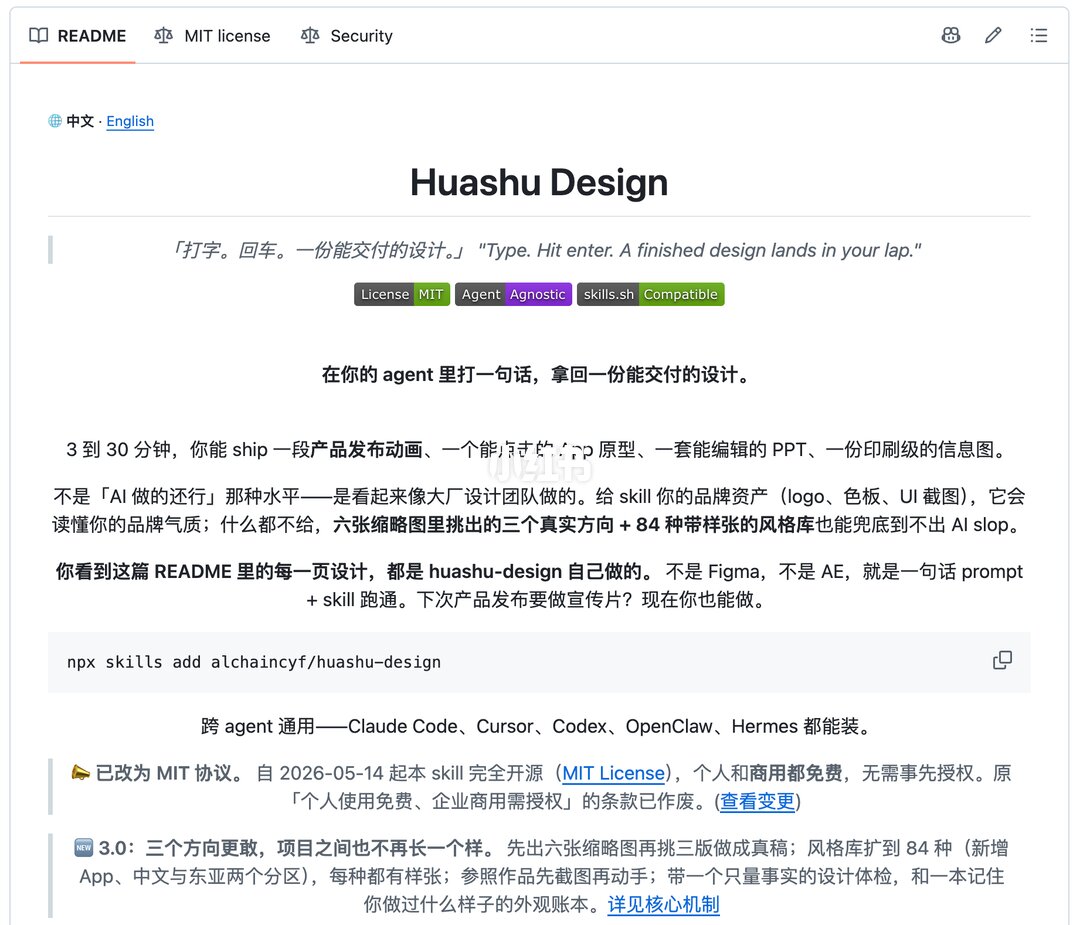
Image 1 — Observable facts (readable text, UI elements, chart data and visible phenomena, in page order)
- Top bar (left shows tabs):
SkillPI Creation Analysis
Use cases:
- The visible README positions huashu-design as a skill to quickly produce deliverable design artifacts from prompts: webpages (HTML/CSS), editable PPTs, app prototypes, product-release animations and print-grade infographics. The README claims 3–30 minute turnaround for such materials.
Image evidence summary (items verifiable in the screenshot):
- Title "Huashu Design" and bilingual tagline; badges show MIT license, Agent Agnostic, skills.sh Compatible; the installation command npx skills add alchaincyf/huashu-design is shown; the README text mentions 84 style libraries, a workflow that first generates six thumbnails and then produces final drafts, and an "appearance ledger"; a license change dated 2026-05-14 is visible.
- The screenshot lists example agents: Claude Code, Cursor, Codex, OpenClaw, Hermes.
Steps to use the skill (derived from visible README text, presented as a high-level reproducible flow):
1) Install the skill using the visible command: npx skills add alchaincyf/huashu-design (from screenshot).
2) After installation, perform a self-check: confirm the presence of four subdirectories—references, assets, scripts, demos—as the README emphasizes they must all be present.
3) Invoke the skill from a compatible agent with a natural-language prompt (e.g., "make a travel guide PPT"). According to the README, the skill first generates six thumbnail directions (two designer-approach, two referencing award-winning examples, two random from the style library).
4) Select preferred directions from the thumbnails (pick e.g., three) and request the skill to render final deliverables for the chosen directions.
5) Optionally provide brand assets (logo, color palette, UI screenshots) to improve brand consistency; if none are provided the skill uses its 84 style libraries with sample assets.
Prerequisites to reproduce or validate the flow:
- A local environment with Node.js / npx available to run the shown installation command.
- The skills CLI or runtime that supports npx skills add (note: the README warns older CLI versions had a bug syncing only single files; confirm CLI version).
- A compatible agent/platform to invoke the skill—agents listed in the screenshot should be tested individually to confirm actual support.
- File system access to verify references, assets, scripts, demos directories exist post-install.
- Verification whether runs are fully local (README states core flows run locally and do not upload), which must be confirmed in practice.
Items requiring verification before claiming full functionality:
- Cross-agent compatibility in practice: the screenshot lists multiple agents, but each agent's actual ability to install and run the skill must be tested.
- Output formats and fidelity: claims such as "print-grade infographic", "app prototype", and "product release animation" should be validated by examining produced files and their editable/source formats; note the README caveat that complex 3D animation is unsupported.
- Contents and mapping of the 84 style libraries: the README names subcategories (App, Chinese, East-Asian) and some example styles; confirm these are present in the installed references/demos.
- The MIT license change and effective terms: screenshot shows the license change note and date; verify LICENSE file and repository history for confirmation.
- The skills CLI bug: confirm current CLI behavior to ensure full directories sync rather than only single files.
Summary conclusion (based on screenshot evidence vs. required verification):
- The README provides concrete installation text, a described workflow (thumbnail-based selection then final draft), and explicit constraints (local runs, not for complex 3D animation, recommended self-check directories). These items form a practical checklist for reproducing the described behavior, but actual cross-agent support, style-library contents, and output quality must be validated by installing the skill and running it in the intended agent environments.