
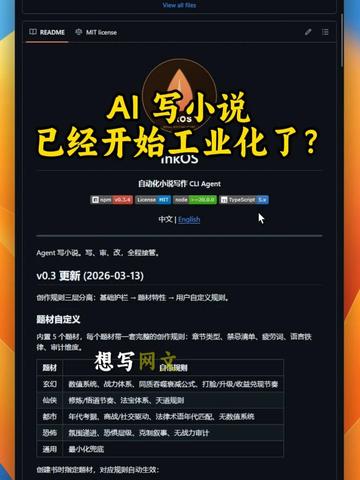
Want to write web novels for high daily income but can't write? The 'inkos' project presents a proposed industrialized novel production line
Learn how to inspect and run an open-source README-style project that presents an automated web‑novel production pipeline: check repository README and LICENSE, prepare Node/npm and TypeScript, run the CLI Agent per project instructions, customize genre templates, and enable a human review step. The page shows npm/TypeScript badges and a v0.3 update; the guide lists prerequisites and verification items (project name, model runtime, exact commands).
Image Analysis
Image 1 — Extracted visual evidence
Directly readable facts (visible content)
- Top text in English: "View all files"
- Two tabs/options visible: "README", "MIT license"
- Large yellow text central overlay: "AI写小说 已经开始工业化了?" ("Has AI novel writing begun industrialization?")
- A circular icon (flame-like) in the page center; below it a line of text appears to be the project/product name (looks like "inkOS" or similar but not fully legible; see “Illegible content”)
- Immediately under the icon is a mixed Chinese/English description: "自动化写作 CLI Agent" ("CLI Agent" in English)
- A language switch option visible: "中文 | English"
- Several badges near the icon/description; partially legible badges include: npm, license, TypeScript (other badge text is obscured or too small to read)
- A readable version/update note: "v0.3 更新 (2026-03-13)"
- A subsection title lower on the page: "题材自定义" ("Genre/Theme customization")
- Under "题材自定义" there is a table or list layout: left column lists genres/types, right column contains descriptive text (multiple rows/columns present)
- Mid-table visible short text/button-like text: "想写网…" (truncated/incomplete)
- The page uses a dark theme and overall layout resembles a README page for a code/project repository
Illegible or partially readable content (explicitly uncertain)
- The exact spelling of the project name under the circular icon cannot be fully discerned (suspected "inkOS" or similar)
- Many small texts on badges are not fully legible; only npm, TypeScript, and license are identifiable
- The short Chinese line under the icon contains small words after commas that are not fully clear (some functional descriptions of the Agent are missing)
- Most of the cells in the "题材自定义" table are small or obscured; the full content of each row cannot be read
- The visible short text "想写网…" is truncated; it might be "想写网文" but this cannot be confirmed
- Small icons/buttons in page corners and hover texts are not fully readable
Reasonable inferences (not direct evidence)
- The page appears to be a software or open-source project README (elements like README / MIT license / badges / View all files are typical of GitHub or similar hosting)
- The project/page relates to automated writing or novel creation (based on the large heading and the phrase "自动化写作 CLI Agent")
- The "题材自定义" table likely lists selectable writing genres and their descriptions
- Badges likely indicate the tech stack or compatibility (npm, TypeScript) and license type
Source identifier
- Image source: Image 1 (user provided)
(Note: The above is strictly based on readable content in the image. Unreadable text is marked as such; inferences are separated from direct evidence.)
SkillPI Creation Analysis
Intended use
- The visual evidence indicates this is a project README-style page intended to present an automated novel-writing production line: a CLI Agent for automated writing, plus genre/template customization and a human review checkpoint to create a studio-like workflow.
Key evidence to verify
- Repository-style UI elements ("View all files", "README", "MIT license") suggest source code and documentation are available in a code hosting repository.
- Visible badges reference npm and TypeScript; page shows a version note "v0.3 更新 (2026-03-13)" and a language selector "中文 | English".
- A "题材自定义" (genre customization) section and table imply configurable templates or genre parameters.
Steps to use the related tools/skills (based on typical README workflows and visible cues)
1. Open the project repository and read the README and LICENSE (page includes "README" and "MIT license").
2. Confirm version/release notes (image shows "v0.3 更新 (2026-03-13)").
3. Prepare runtime environment: install Node.js and npm, and ensure TypeScript support if required (badges indicate npm/TypeScript).
4. Follow repository instructions to run the CLI Agent—commonly: git clone → npm install → npm run or specific CLI commands. (Exact commands must be taken from the repository; the image only shows the presence of a "CLI Agent" label.)
5. Use the language switch and the "题材自定义" configuration to select language and genre templates.
6. Configure or enable the human review checkpoint per repository guidance to complete the production workflow.
Reproduction prerequisites and environment
- Node.js and npm installed (npm badge is visible).
- TypeScript toolchain or configuration if the project uses TypeScript (TypeScript badge visible).
- If the system generates text via large language models, have access to the model: either a local model runtime or external API credentials (the image does not specify which approach is used).
- Permissions to clone, install dependencies, and run CLI tools.
Items requiring verification (cannot be asserted from image alone)
- Exact project name spelling and repository URL (project name under icon is not fully legible).
- Whether the system runs entirely locally or requires external LLM APIs and API keys.
- Exact installation and run commands (image does not show command examples).
- Whether the AI writer/editor/reviewer roles are fully implemented modules or conceptual components described in the README.
- Full license terms (image shows "MIT license" label; verify LICENSE file for details).
- Any commercial claims (e.g., income promises) are not supported by the README screenshot and must be independently validated for legality and platform compliance.
Source
- Original media page provided by user: https://www.douyin.com/video/7616764223741250850
Conclusion (facts, outcomes, verification tasks)
- The screenshot supports the presence of an open-source-style project page for an automated writing pipeline with a CLI Agent, genre customization, language switch, npm/TypeScript badges and a v0.3 update note. To reproduce or validate capabilities, access the repository to read README, run the listed install/run commands, inspect LICENSE, and confirm whether an external model or local runtime is required.