
300+ Hand-Drawn Styles (handraw-style)
Step-by-step: locate the handraw-style GitHub repo (github.com/yang0/handraw-style), browse the style specimen (local HTML or repo assets), record style IDs such as FA-001, and learn how to reference them in AI image prompts or scripts when your generator supports style tokens or reference images. Notes on prerequisites and verification (compatibility, license, asset source).
Image Analysis
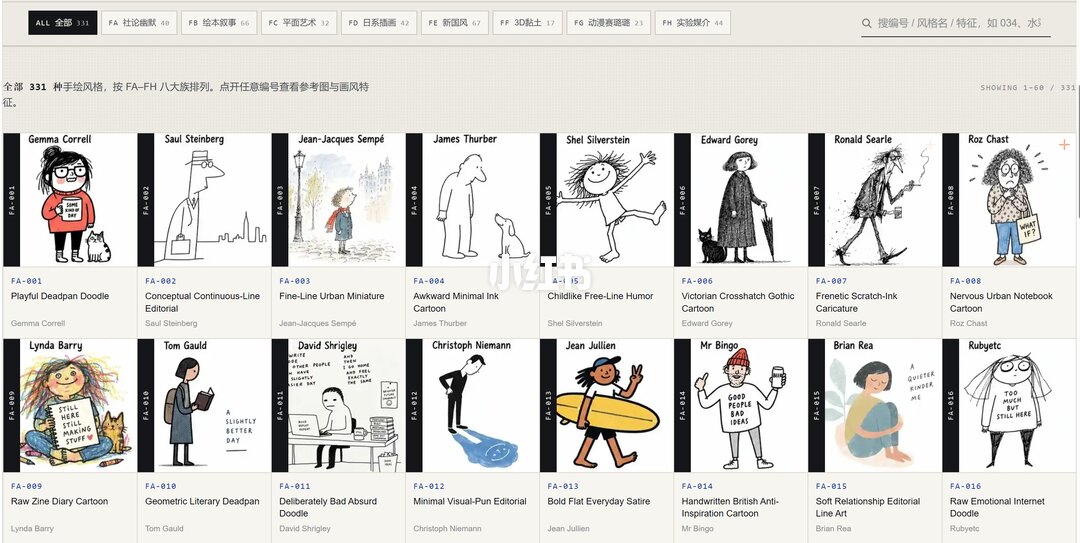
Facts (Image 1: visible text/UI elements/images, recorded left-to-right, top-to-bottom):
- Top-level interface
- Top-left label: “ALL 全部 331”
- A row of category tabs across the top (some characters clear, some not; see “Unclear content” below)
- Top-right text: “SHOWING 1–60 / 331”
- A search input at top-right; placeholder partially readable as: “搜索编号 / 风格名 / 特征, 如 034、 水” (rest of placeholder is unclear)
- Main area is a thumbnail grid; each item includes a black vertical bar with an ID label, the author name in English, and an English style description/title. 16 recognizable thumbnail items (in reading order):
1. Top-left item
- Black vertical bar ID (small blue text): “FA-001”
- Title (uppercase white-on-black): “Playful Deadpan Doodle”
- Author: “Gemma Correll”
2. Item 2
- ID: “FA-002”
- Title: “Conceptual Continuous-Line Editorial”
- Author: “Saul Steinberg”
3. Item 3
- ID: “FA-003”
- Title: “Fine-Line Urban Miniature”
- Author: “Jean-Jacques Sempé”
4. Item 4
- ID: “FA-004”
- Title: “Awkward Minimal Ink Cartoon”
- Author: “James Thurber”
5. Item 5
- ID: “FA-005”
- Title: “Childlike Free-Line Humor”
- Author: “Shel Silverstein”
6. Item 6
- ID: “FA-006”
- Title: “Victorian Crosshatch Gothic Cartoon”
- Author: “Edward Gorey”
7. Item 7
- ID: “FA-007”
- Title: “Frenetic Scratch-Ink Caricature”
- Author: “Ronald Searle”
8. Item 8
- ID: “FA-008”
- Title: “Nervous Urban Notebook Cartoon”
- Author: “Roz Chast”
9. Item 9 (second row, first column)
- ID: “FA-009”
- Title: “Raw Zine Diary Cartoon”
- Author: “Lynda Barry”
10. Item 10
- ID: “FA-010”
- Title: “Geometric Literary Deadpan”
- Author: “Tom Gauld”
11. Item 11
- ID: “FA-011”
- Title: “Deliberately Bad Absurd Doodle”
- Author: “David Shrigley”
12. Item 12
- ID: “FA-012”
- Title: “Minimal Visual-Pun Editorial”
- Author: “Christoph Niemann”
13. Item 13
- ID: “FA-013”
- Title: “Bold Flat Everyday Satire”
- Author: “Jean Jullien”
14. Item 14
- ID: “FA-014”
- Title: “Handwritten British Anti-Inspiration Cartoon”
- Author: “Mr Bingo”
15. Item 15
- ID: “FA-015”
- Title: “Soft Relationship Editorial Line Art”
- Author: “Brian Rea”
16. Item 16
- ID: “FA-016”
- Title (partially readable): “Raw Emotional Internet Doodle”
- Author (partially readable): “Rubyetc”
- Page layout and visual notes
- Grid has 8 columns per row (current view shows two rows, total 16 thumbnails)
- Each thumbnail has a left vertical black bar containing the ID (white or blue text, e.g., “FA-001”)
- Under each thumbnail are blue small-text IDs and below them grey/black small-text title and author
- Thumbnails are cartoon/illustration previews showing typical linework or coloring; internal image text (e.g., speech bubbles) is not transcribed due to resolution/scale
- Overall page style: light grey background, white thumbnail cards, grey divider text
Unclear / uncertain text or areas (not asserted as facts):
- The full set of top category tabs cannot be fully read; some fragments suggest category labels like “FA editorial humor” but complete tab names and suffix numbers (e.g., FB, FC, etc.) are not certain.
- The tail of the search placeholder text is blurred (it looks like “e.g. 034, watercolor” but whether more text follows is unclear).
- Any tiny auxiliary text under thumbnails (if present) is too small or blurred to read fully.
- Fine text within the thumbnail images themselves (such as comic bubble text) was not transcribed due to resolution.
Notes/assumptions (based on common UI patterns, explanatory only):
- The blue small-text ID and the black vertical bar ID likely match and serve as the same index (e.g., FA-001 appears in both), used for indexing and quick navigation. (assumption)
- “SHOWING 1–60 / 331” suggests pagination where the view is for items 1–60 out of 331, though the screenshot only shows the first 16 items. (assumption)
- Top tabs are likely style/category groupings (e.g., FA–FH as major groups); this is an inferred layout, not directly readable in full from the image. (assumption)
SkillPI Creation Analysis
Use case:
- The screenshot evidences an indexed specimen list of hand-drawn styles with stable IDs (e.g., FA-001). Such an index is useful for selecting visual references or recording style choices when preparing AI illustration prompts or building a style library for repeated use.
Key evidence from the image:
- Readable facts: the page shows “ALL 全部 331”, “SHOWING 1–60 / 331”, a searchable specimen grid, and at least the first 16 style IDs (FA-001 through FA-016) with English titles and attributed authors. The evidence is a UI screenshot, not a direct proof that these IDs are recognized by any specific image generation model.
Practical steps to use the associated resource (high-level; concrete syntax depends on your tool):
1. Visit the GitHub repository at github.com/yang0/handraw-style and review README, assets, and any usage notes provided there.
2. Open the specimen list (if provided by the repo) or the local specimen HTML: file:///C:/Users/annab/Downloads/handdraw-style-specimen%20(1).html to browse IDs and examples.
3. Note the desired style ID(s), e.g., FA-001, FA-007, etc., and save references (images or IDs) for prompt engineering.
4. Determine how your chosen AI generator accepts style references: some tools accept textual tokens in prompts, some require reference images, and some need custom model weights or fine-tuning. Map the handraw-style ID to the appropriate input method (prompt token, reference image, or model weight) according to your tool’s capabilities.
5. Test and iterate: apply the chosen reference in a controlled test prompt and compare outputs to the specimen. Adjust prompt phrasing or use additional prompt engineering techniques if direct ID references are not supported.
Reproduction prerequisites and cautions:
- Obtain and read the repository files and license at github.com/yang0/handraw-style to confirm what assets are provided and whether their use is permitted (copyright/attribution matters).
- The specimen shown in the screenshot is a local file (file:// path); it may not be publicly accessible. For sharing or automated use, obtain canonical asset locations from the repo or source.
- Verify whether the target image-generation model or front-end supports directly referencing style IDs (e.g., FA-001) as tokens. If not, you may need to supply the example image as a reference or implement a custom mapping (script or fine-tune) to replicate the style.
- The screenshot alone does not demonstrate an automated integration path; it documents an indexed catalog that can be used as a reference.
Items to verify (do not assume):
- Whether github.com/yang0/handraw-style includes scripts, tokens, or direct instructions for integrating these style IDs with common image generators (e.g., Stable Diffusion frontends, other services).
- The licensing and author attribution requirements for each listed style and corresponding example images.
- The exact count of styles (the UI shows 331; confirm in the repo or data source).
- The provenance of the local specimen HTML (file:///...), whether it is an export of repository content or a third-party/user-compiled index.
Summary recommendation:
- Use the GitHub repo as the authoritative source (github.com/yang0/handraw-style). Treat the specimen UI screenshot as an index reference. For practical application in AI workflows, first confirm license and technical compatibility, then map IDs to your generator’s accepted input method (prompt token, reference image, or custom model mapping).