
Codex super-useful skills — high-frequency use, won't gather dust
Based on the anysearch-skill GitHub contents visible in the screenshot, learn how to fetch the AnySearch Skill repository, read README.md and SKILL.md, populate env.example and runtime.conf.example, install dependencies, and integrate the skill into Codex or other AI agents to enable real-time web/vertical/parallel-batch search and full-page extraction. Verify exact install commands and API/configuration details inside the repository.
Image Analysis
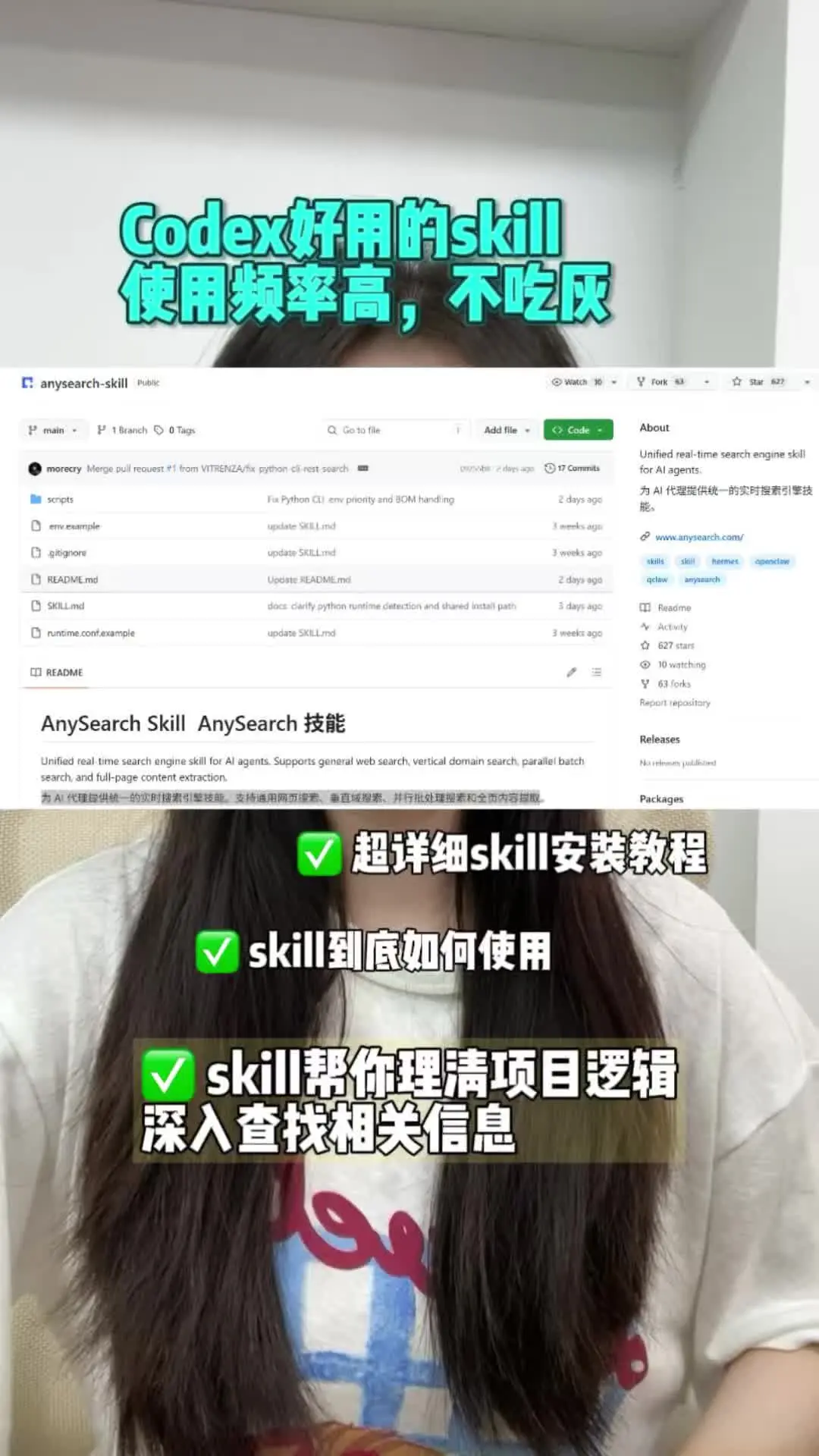
Image 1 — Facts (only readable text, UI elements, chart/data and visible phenomena recorded)
Readable text (listed top-to-bottom, left-to-right)
- Large overlay text (top, teal bold):
- “Codex好用的skill”
- “使用频率高,不吃灰”
- Screen capture (GitHub repository page, top-left repo name):
- “anysearch-skill” (repository name)
- Repository file list (identifiable filenames):
- “scripts”
- “env.example”
- “.gitignore”
- “README.md”
- “SKILL.md”
- “runtime.conf.example”
- Beginning of page body (README title area):
- “AnySearch Skill AnySearch 技能”
- English description (partially readable): “Unified real time search engine skill for AI agents. Supports general web search, vertical domain search, parallel batch search, and full-page content extraction.”
- Chinese description (partially readable): “为 AI 代理提供统一的实时搜索引擎技能…” (remaining text truncated or not fully visible)
- Right-hand About panel (readable text):
- “Unified real-time search engine skill for AI agents.”
- visible link text (partly readable): “www.anysearch.com” (likely an external link listed in the repo)
- tags (identifiable words): “skills” “skill” “hermes” “openai” (some tags readable)
- Right-side stats (identifiable numbers):
- “627 stars”
- “10 watching”
- “63 forks”
- Top menu area (some buttons identifiable):
- “Watch”, “Fork”, “Star” buttons (numbers next to them match the above)
- “Go to file” (file search placeholder)
- “Add file” button
- green button: “Code”
- Commit messages beside file list (partly readable):
- One commit summary includes: “Fix Python CI, env priority and BOM handling” or similar (adjacent to “2 days ago”)
- Other commit phrases like “update SKILL.md” / “Update README.md” / “docs: clarify python runtime detection and shared install path” (parts readable; timestamps include “2 days ago”, “3 weeks ago”, etc.)
Overlay text below (white bold text next to green check icons):
- “超详细skill安装教程”
- “skill到底如何使用”
- “skill帮你理清项目逻辑 深入查找相关信息”
Visible UI elements and phenomena
- The screenshot is of a GitHub repository page (file list, README content, right-hand About/stats panel, top action buttons).
- The screenshot is overlaid on a half-body photo of a person (visible from neck to waist, long hair, wearing a printed white T-shirt).
- Large overlay text appears at top and middle (teal and white), and white bold text with green check icons appears at the bottom.
- Background is an indoor white-corner wall (room corner visible).
- Timestamps/commit times are shown in English relative format like “days ago”, “weeks ago”.
Image 1 — Uncertain or partially unreadable items (listed)
- Some finer details of the teal overlay text are partially obscured by hair; overall content recorded above is high-confidence but exact spacing/casing may be slightly uncertain.
- Some commit summary lines in the file list are truncated or blurred and cannot be transcribed exactly (e.g., a line beginning “morecry Merge pull request #1 from VITRENZA/…” where the rest is unclear).
- In the About panel, some small icons and the full URL (e.g., whether https:// is present) are not fully readable; only “www.anysearch.com” is clearly legible.
- Exact positions of small top icons and numeric labels (e.g., the precise association of “10 watching” with the Watch control) are slightly uncertain in some zoom levels.
- Longer Chinese paragraphs in the README are truncated or wrapped and cannot be fully reconstructed.
Image 1 — Inferences (marked as inference, not direct readout)
- Inferred the repo likely represents AnySearch or a mirror (based on repo name anysearch-skill and README heading “AnySearch Skill”).
- Inferred the white bold lines with green check icons are short-form summary points for a social post or tutorial.
- Inferred the “627 stars / 10 watching / 63 forks” represent GitHub stars, watchers and forks for the repo (typical GitHub display).
- Inferred the screenshot reflects the repo state at the capture time; recent commit timestamps like “2 days ago” and “3 weeks ago” suggest recent activity.
SkillPI Creation Analysis
Intended use and deliverables:
- The visible repository anysearch-skill is described (in the README header text visible in the screenshot) as a “Unified real time search engine skill for AI agents” supporting general web search, vertical domain search, parallel batch search, and full-page content extraction. The deliverable implied by the repo is a skill package (code, config examples, and documentation) intended to add real-time search capabilities to AI agents such as Codex-driven agents.
Key image evidence relevant to usage and verification:
- Repository name anysearch-skill and files README.md, SKILL.md, env.example, runtime.conf.example are visible in the file listing.
- README header includes the English description of capabilities noted above.
- Right-hand panel shows a visible link text www.anysearch.com and repository stats “627 stars / 10 watching / 63 forks”.
- Commit messages visible include references to Python CI and runtime handling (e.g., “Fix Python CI, env priority and BOM handling”), suggesting Python-related runtime requirements or CI configuration.
Suggested steps to use the associated skill (based on visible files and common practice; exact commands must be confirmed in repo docs):
1. Clone or download the anysearch-skill repository from GitHub.
2. Open README.md and SKILL.md to read feature descriptions and the installation/integration instructions provided by the authors.
3. Inspect env.example and runtime.conf.example; copy and populate these files (e.g., copy env.example to .env) with required environment variables and runtime parameters.
4. Install dependencies and set up the runtime environment per SKILL.md (the screenshot’s commit messages reference Python, so prepare an appropriate Python environment if indicated by the repo).
5. Configure any required service endpoints or API keys (the About panel shows www.anysearch.com — if this is the service endpoint, populate its URL and any credentials as required by the skill).
6. Integrate the skill into the target AI agent (for example, a Codex-based agent) following the integration examples or hooks in SKILL.md or README.
7. Run example requests to validate general web search, vertical domain search, parallel batch search, or full-page extraction behavior.
Prerequisites and items to verify before reproduction:
- Prerequisites: access to the anysearch-skill GitHub repository; a runtime environment matching the repo’s requirements (the screenshot suggests Python-related configuration); ability to set environment variables and, if needed, API keys or external service endpoints such as www.anysearch.com.
- Items to verify (not fully visible in screenshot; must be checked within the repository):
- Exact installation commands, dependency list and version constraints (check SKILL.md / README.md).
- Specific integration details for Codex or the target AI agent (example code, hooks, or adapters).
- Precise env variable names and runtime.conf options required for operation.
- Whether www.anysearch.com is an official endpoint required for operation and the authentication method for any external service.
- Exact Python version or other runtime requirements indicated by the project’s CI or docs.
Closing verification notes (facts and actions to complete):
- The screenshot confirms the presence of anysearch-skill, README.md and SKILL.md, env.example and runtime.conf.example, and a README description claiming the listed search capabilities. To perform an installation and integration, open SKILL.md/README.md in the repository to obtain the verified installation commands, dependency versions, and the precise integration steps and configuration details; also verify service endpoint and authentication requirements for www.anysearch.com if applicable.