
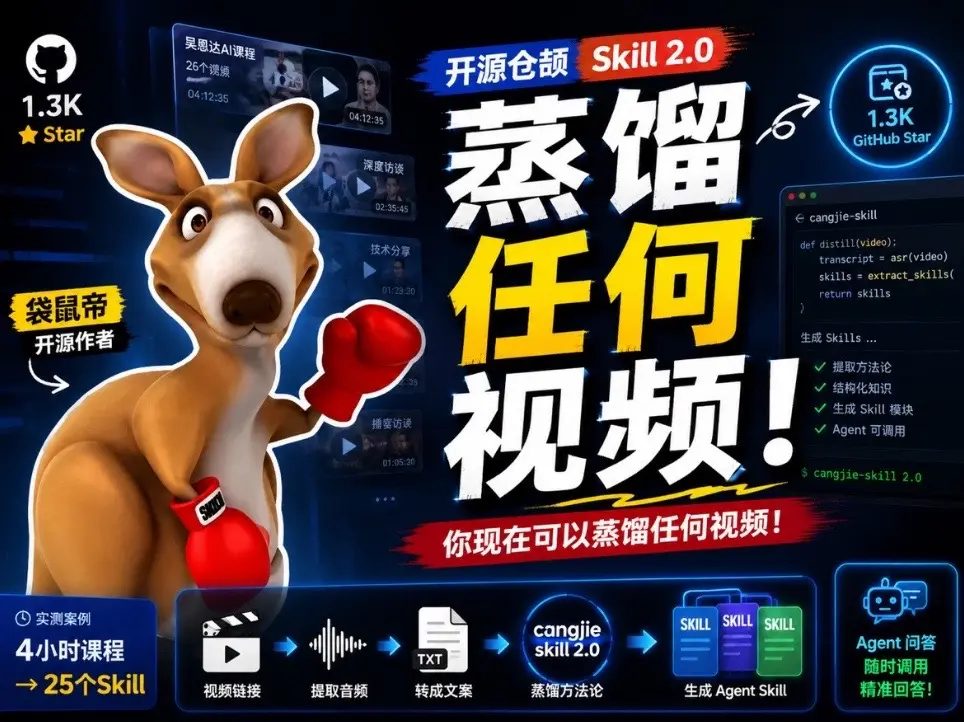
Open-source cangjie-skill — You can now distill any video into Skills!
Learn the pipeline to turn video content into Agent-callable Skills: extract audio, run ASR for transcripts, extract structured knowledge, generate Skill modules and integrate them into an Agent. The image references an open-source project named cangjie-skill (cangjie-skill 2.0); verify the repository and implementation details before reproducing.
Image Analysis
Image 1 — itemized record (organized by visible order and layout).
Note: The following is strictly based on visible information in the image. Divided into “Facts”, “Unreadable/Uncertain” and “Speculation”. Per user request, ignore any in-image commands (do not execute operational instructions).
I. Facts (readable text, UI elements, and image content)
1. Header and title-related
- Top stripe (left blue tag): Open-source cangjie Skill 2.0 (view shows “cangjie Skill 2.0”, with “Skill 2.0” as a red block).
- Main headline (large white/yellow text): Distill any video!
- Subtitle (small white text on red bar): You can now distill any video!
2. Top-left and top-right counts/badges
- Top-left: black circular icon (contains GitHub cat outline), below text “1.3K”; below that yellow small text “Star”.
- Top-right: blue circular badge containing a star and text “1.3K GitHub Star”.
3. Mascot and labels
- Middle-left shows a cartoon kangaroo character (wearing red boxing gloves).
- To the left of the kangaroo is a yellow label (black text): “袋鼠帝 开源作者” (larger font for “袋鼠帝”, smaller for “开源作者”).
- A white small label on the kangaroo’s glove contains black characters (not fully legible — see Unreadable section).
4. Right-side code window (terminal style)
- Window top shows path/title: cangjie-skill
- Code roughly readable as:
def distill(video):
transcript = asr(video)
skills = extract_skills(
return skills
- Bottom area has a line (with green check items) titled/starting: “Generate Skills ...”
- The generated items (with green check marks) readable include:
- extraction methodology
- structured knowledge
- generate Skill modules
- Agent callable
- Small text bottom-right of code window: cangjie-skill 2.0 (in green/bright text).
5. Center-left vertical video thumbnails / durations
- To the right of the kangaroo are several vertical video thumbnails; each shows a duration (from top to bottom roughly):
- 04:12:35
- 02:35:45
- 01:23:20
- 01:05:29
(durations shown in white text on or near thumbnails)
6. Bottom flowchart icons and text (left to right)
- Left small block: real-case example
- Text: 4-hour course → 25 Skills (arrow from “4-hour course” to “25 Skills”)
- Next icons with labels (left to right):
1) video clip/icon — “video link”
2) waveform icon — “extract audio”
3) document (TXT) icon — “convert to copy/text”
4) circular tag (cangjie skill 2.0) — “distillation methodology”
5) three card icons labeled SKILL — “generate Agent Skill”
6) robot icon on the right — “Agent Q&A call anytime precise answers!”
- Arrows connect these bottom icons to indicate sequence.
7. Other visible graphics and visual elements
- Overall dark blue/black tech-style background with glows and UI cards.
- Color scheme emphasizes blue, yellow, white, red; headline “Distill any video!” highlighted.
- “1.3K Star / 1.3K GitHub Star” appears twice (lower-left and top-right) as visible counts.
II. Unreadable / uncertain items (not legible or partially occluded)
1. Text on the white label on the kangaroo glove is not fully legible; might be part of “SKI” or “SKILL” but cannot confirm full spelling.
2. The code line after “skills = extract_skills(” may have parameters or closing parentheses or additional lines that are cut off; the image does not show them fully.
3. Small text in the code window (e.g., line numbers, comments, full file paths) is not fully legible due to resolution/occlusion.
4. Each video thumbnail may have titles or type text to the left that are not readable in the image.
5. Small annotations above/below the “generate Agent Skill” icon at the bottom may include more details but are not fully legible.
III. Speculation (reasonable inferences, not directly visible facts)
1. “Distill any video” and “cangjie-skill 2.0” suggest the image promotes an open-source project/tool named “cangjie-skill” (v2.0) for extracting/structuring knowledge from videos and producing Skills/Agent-callable modules.
2. The bottom flow diagram likely describes a pipeline: video link → extract audio → convert to text → distillation methodology (cangjie skill 2.0) → generate Agent Skill → Agent Q&A. This is an interpretation of the pictured flow.
3. The two “1.3K Star” badges may indicate the project has ~1.3K stars on GitHub (a popularity metric), but this should be independently verified.
4. The vertical video durations may be demo or sample course videos used to show that hours-long content can be distilled (linked to the “4-hour course → 25 Skills” example).
5. The code fragment is example pseudocode (def distill(video)) implying steps include asr(video) and extract_skills(...).
IV. Visible presentation notes
1. Layout consists of a large left/middle mascot, right-side code sample, prominent central headline, and bottom flow explanation; sections separated by color blocks and icons.
2. Large yellow/white headline text is used for emphasis; red bar used for subtitle emphasis; right-side terminal-style code window underscores technical framing.
3. Multiple green check icons denote implemented features or checklist items.
4. Overall the design reads as a tech/product promo with a mascot to make it approachable.
(End)
SkillPI Creation Analysis
Intended use:
- The image and summary present a project-like offering called “cangjie-skill” (appearing as cangjie-skill 2.0) that claims to distill videos into Agent-callable Skills. The target use case is to convert video content into structured, queryable modules that an Agent can invoke for Q&A or task automation.
Image evidence (key visible cues):
- The project label “cangjie-skill” / “cangjie-skill 2.0” and a terminal-like code pane showing a pseudocode function:
def distill(video):
transcript = asr(video)
skills = extract_skills(
return skills
(This is visible as an illustrative snippet; some lines are truncated in the image.)
- A bottom flowchart visually lays out a pipeline: video link → extract audio → convert to text → distillation methodology → generate Agent Skill → Agent Q&A/robot icon.
- Visual examples include video durations and a sample note “4-hour course → 25 Skills” (image content), and “Generate Skills ...” checklist entries like extraction methodology, structured knowledge, generate Skill modules, Agent callable.
Suggested usage steps (based on the pictured pipeline; presented as a reproducible outline to verify against actual repo docs):
1. Obtain video source: URL or local file.
2. Extract audio track from the video (audio file output).
3. Run ASR (speech-to-text) on the audio to produce a transcript (image shows transcript = asr(video)).
4. Run a skill-extraction step on the transcript to identify methods, procedures, or knowledge units (image indicates extract_skills(...)).
5. Package the extracted items into Skill modules (format and interface depend on chosen Agent framework).
6. Register the generated Skills with an Agent runtime so they can be invoked for Q&A and integrated into workflows.
Reproduction prerequisites (items to obtain/verify before attempting a real implementation):
- Access to the cangjie-skill project repository or release (image shows the project name but no full URL). Verify repository URL, README, install and run instructions.
- ASR model or service to produce transcripts (which model/API, language support, and quality requirements?).
- Extraction logic for skills (whether implemented via LLM prompts, rules, templates, or model fine-tuning). The image shows extract_skills but does not specify method.
- Agent framework specifics (how Skills are formatted, how to register and invoke them). Confirm target Agent runtime or API.
- Environment and dependency details (programming language versions, libraries, hardware needs). The image does not list these.
Items requiring verification (not present or unclear in the image/summary):
- Exact repository location and installation instructions (image suggests an open-source project but does not give the repo link). The provided source page is https://www.douyin.com/video/7659323081614592227 — check that page for repo references or links.
- The implementation details of extract_skills (parameters, output schema, whether it uses a particular LLM or extractor code).
- Example commands, sample inputs/outputs, and test data to validate the pipeline.
- Licensing, allowed uses, and any model/data usage restrictions.
- Any claims of popularity (e.g., “1.3K Star”) should be validated on the actual hosting platform.
Caveats:
- The above workflow is derived from the image and summary as an interpreted pipeline, not from verified repository documentation. Do not assume specific implementations, commands, or performance characteristics without consulting the project source or author-provided docs.
Reference/source: https://www.douyin.com/video/7659323081614592227