
VibeCoding Awards | nature-skills usage tutorial is here — watch to learn Nature-style research plotting (PRs welcome)
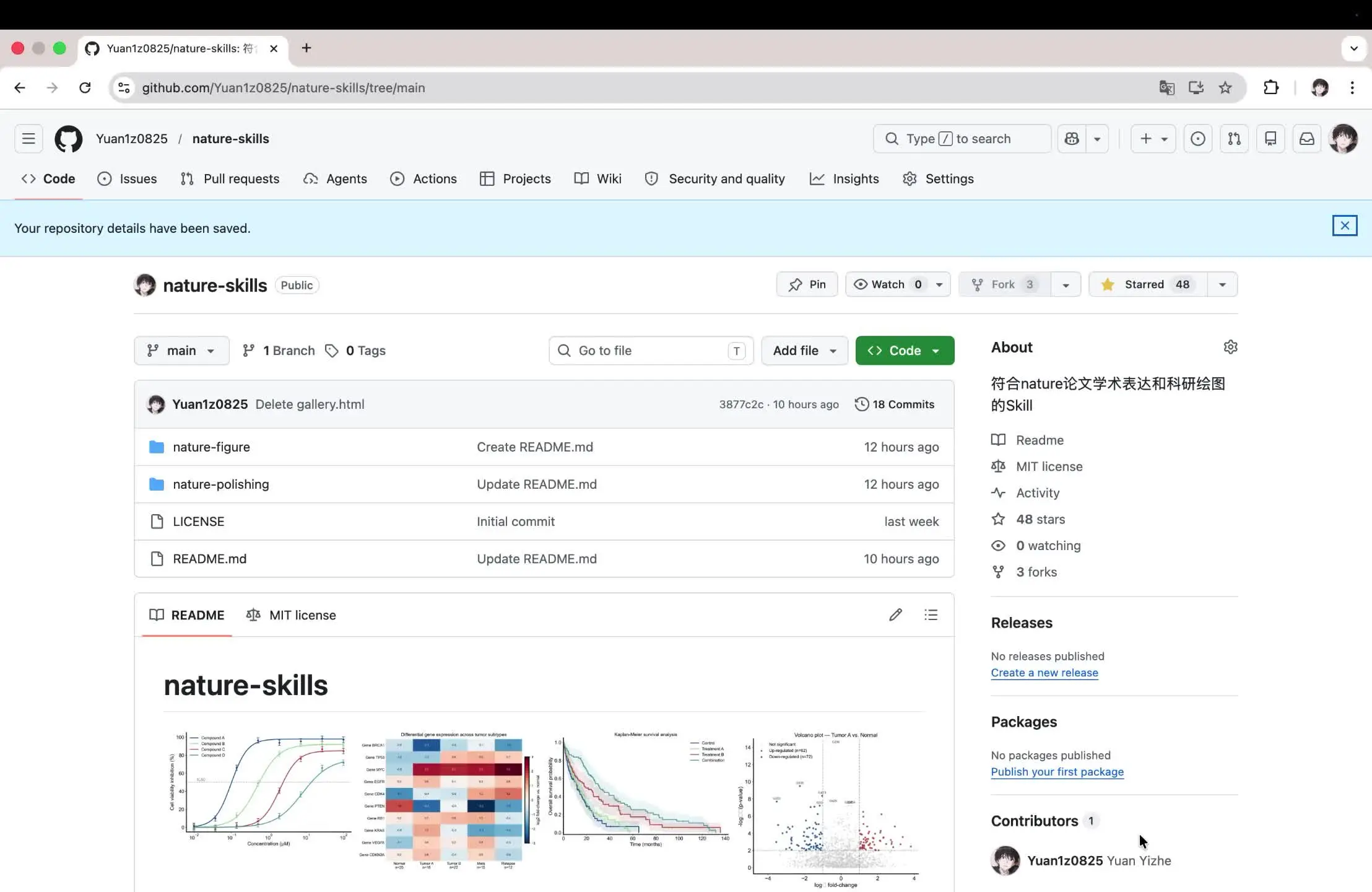
A practical guide to accessing and running examples from the nature-skills GitHub repository (github.com/Yuan1z0825/nature-skills/tree/main). Learn how to locate example scripts (folders like nature-figure, nature-polishing), check LICENSE and commit info, install dependencies listed in README, and run example code to generate dose–response curves, heatmaps, Kaplan–Meier survival plots and volcano plots. Verify example data, dependency versions, and commit hash (e.g. 3877c2c) before reproduction.
Image Analysis
Facts (top-to-bottom, left-to-right; readable text, UI elements, chart labels and visible phenomena)
- Browser tab and address bar
- Tab title (partially visible): "Yuan1z0825/nature-skills: 符…" (truncated)
- Address bar URL (fully readable): github.com/Yuan1z0825/nature-skills/tree/main
- Browser controls visible (back/forward, refresh); top-right shows user avatar (small circular) and several extension icons.
- Page top navigation (GitHub repository page)
- Top-left shows GitHub icon (cat silhouette) and text "Yuan1z0825 / nature-skills"
- Main nav items (left to right) readable: Code, Issues, Pull requests, Agents, Actions, Projects, Wiki, Security and quality, Insights, Settings
- Right side has a search box with placeholder readable as "Type / to search" (or similar)
- Page banner (blue background)
- Text: "Your repository details have been saved."
- Repository header area
- Repo name: nature-skills (with small avatar)
- Visible label: "Public"
- Branch/tags info line: shows "main", "1 Branch", "0 Tags"
- Right-side buttons: Pin, Watch 0, Fork 3, Starred 48 (icons and numbers visible)
- Green button: Code (with dropdown arrow)
- Gray button: Add file (with dropdown)
- Go to file / file finder button: "Go to file"
- Commit line (above file list)
- Recent commit info readable: "Yuan1z0825 Delete gallery.html"
- Commit hash/time/count small text: "3877c2c • 10 hours ago • 18 Commits"
- Main file/folder list (names and latest commit messages)
- Entries and short commit messages:
- folder icon nature-figure —— "Create README.md" —— "12 hours ago"
- folder icon nature-polishing —— "Update README.md" —— "12 hours ago"
- file icon LICENSE —— "Initial commit" —— "last week"
- file icon README.md —— "Update README.md" —— "10 hours ago"
- README area (left page content)
- Large title: "nature-skills"
- Below it, several example/thumbnail images displayed (four side-by-side):
- First: dose–response-like curve (x-axis labeled "Concentration (uM)", y-axis partially visible with text starting "Cell …")
- Second: heatmap (with row/column labels and color bar)
- Third: Kaplan–Meier survival curve (x-axis labeled Time (months) is readable)
- Fourth: volcano plot (x-axis appears as "log2 fold-change", y-axis as "-log10(p-value)" or similar)
- Thumbnails are small; many legend texts and numeric details are not readable (see “unreadable content” section).
- Right-side About / sidebar information
- About text (Chinese): "符合nature论文学术表达和科研绘图的Skill" (readable in Chinese; see uncertainties)
- About items (each with icon and text):
- Readme
- MIT license
- Activity
- 48 stars
- 0 watching
- 3 forks
- Releases section:
- Text: "No releases published"
- Link text: "Create a new release"
- Packages section:
- Text: "No packages published"
- Link text: "Publish your first package"
- Contributors section:
- Number "1"
- Contributor entry: avatar + "Yuan1z0825 Yuan Yizhe" (username and name)
- Bottom/scroll area (truncated, partially visible)
- README lower area shows image/chart thumbnails (as above); page bottom is truncated so README full text and larger figure details are not visible.
Inferences (reasonable deductions based on visible elements)
- The banner "Your repository details have been saved." suggests recent save/update to repository settings or description (inference, not an action performed from the screenshot).
- The four thumbnails in README likely represent example research figures: dose–response, heatmap, Kaplan–Meier survival analysis, and a volcano plot—implying the repository provides scripts or examples to produce such plots.
- The About text in Chinese likely reads something like "符合 nature 论文学术表达和科研绘图的 Skill" (inference; exact phrasing uncertain).
- Timestamps like "10 hours ago", "12 hours ago" indicate recent commit activity (inference that repo is recently active).
Unreadable or uncertain details
- Browser tab full title is truncated: only "Yuan1z0825/nature-skills: 符…" visible.
- Precise legend texts, numeric axis ticks, and small-font annotations in the README images are not readable due to thumbnail size/resolution.
- Minor spacing/punctuation in the Chinese About text may differ from the inferred full sentence.
- Several small extension icons at top-right are visible but not identifiable.
- Commit hash "3877c2c" is readable, but whether this short form is sufficient for full reference is uncertain.
- README body text beyond the large title and thumbnails is truncated; full README content is not visible here.
SkillPI Creation Analysis
Intended use
- The screenshot documents a GitHub repository named nature-skills and shows the README area with thumbnails of example figures. It appears intended to provide materials or scripts for producing Nature-style research figures. Video source: https://www.douyin.com/video/7634264317622651750.
Key evidence to verify
- Explicit repository URL visible: github.com/Yuan1z0825/nature-skills/tree/main — use this to open the full repository for inspection.
- Repo metadata visible in the screenshot: 48 stars, 3 forks, a LICENSE file (marked MIT license), and commit line showing "3877c2c • 10 hours ago • 18 Commits". Contributor shown as "Yuan1z0825 Yuan Yizhe".
- README thumbnails show typical figure types (dose–response curve, heatmap, Kaplan–Meier survival curve, volcano plot), implying example scripts or templates exist for those plots.
Practical steps to use (derived from repository UI elements; must be validated inside the repo)
1) Visit or clone the repository: git clone https://github.com/Yuan1z0825/nature-skills.git (page path shown as github.com/Yuan1z0825/nature-skills/tree/main).
2) Read README.md in the repo root to find installation instructions, example usage, and links to example data or scripts (folders visible: nature-figure, nature-polishing).
3) Confirm license and contributor info (LICENSE shown as MIT; check contributor and commit history for maintenance status).
4) Install required dependencies listed in README (the screenshot does not show dependency lists; verify inside repo). Typical steps may include installing R or Python libraries if scripts are in those languages.
5) Run example scripts (once dependencies and example data are available) to generate the thumbnail figure types (dose–response, heatmap, Kaplan–Meier, volcano). Adjust style/template files in nature-polishing or nature-figure as needed.
Prerequisites and items to check before reproducing
- Verify the repository actually includes runnable example scripts and either example data or links to download data. The screenshot only shows thumbnails; full files must be opened.
- Verify explicit dependency list and version requirements (e.g., specific R/Python packages and versions) in README or a requirements file.
- Confirm whether plotting code is organized into reusable functions/templates or requires manual parameter tuning.
- Check commit hash (3877c2c) and timestamps to ensure you are using the intended version of the repository for reproduction.
- Confirm the MIT license terms if you plan to reuse or modify the code.
Caveats
- This interpretation is based solely on a repository-page screenshot. It does not confirm that scripts execute successfully or exactly reproduce the thumbnail images. To reproduce outputs, clone the repository and follow the README-provided instructions, verify dependencies, and run example scripts on the provided data (if any).