
Viral HTML skill on X — "answer-me-with-html"
Learn the steps to convert agent/LLM Markdown into polished, auto‑layout HTML using answer-me-with-html: find the skill/CLI, configure the agent to output Markdown, apply ASD‑STE100 concise prompts, and run the CLI to generate card-style HTML. Also notes which performance and video-generation claims need verification.
Image Analysis
Image 1 — verifiable text, UI elements, chart data, visible phenomena
- Top-of-page UI elements
- A circular black tag with white text “推广” (Promoted) is visible at top-right.
- Multiple account avatars show a blue checkmark (verified badge) next to them.
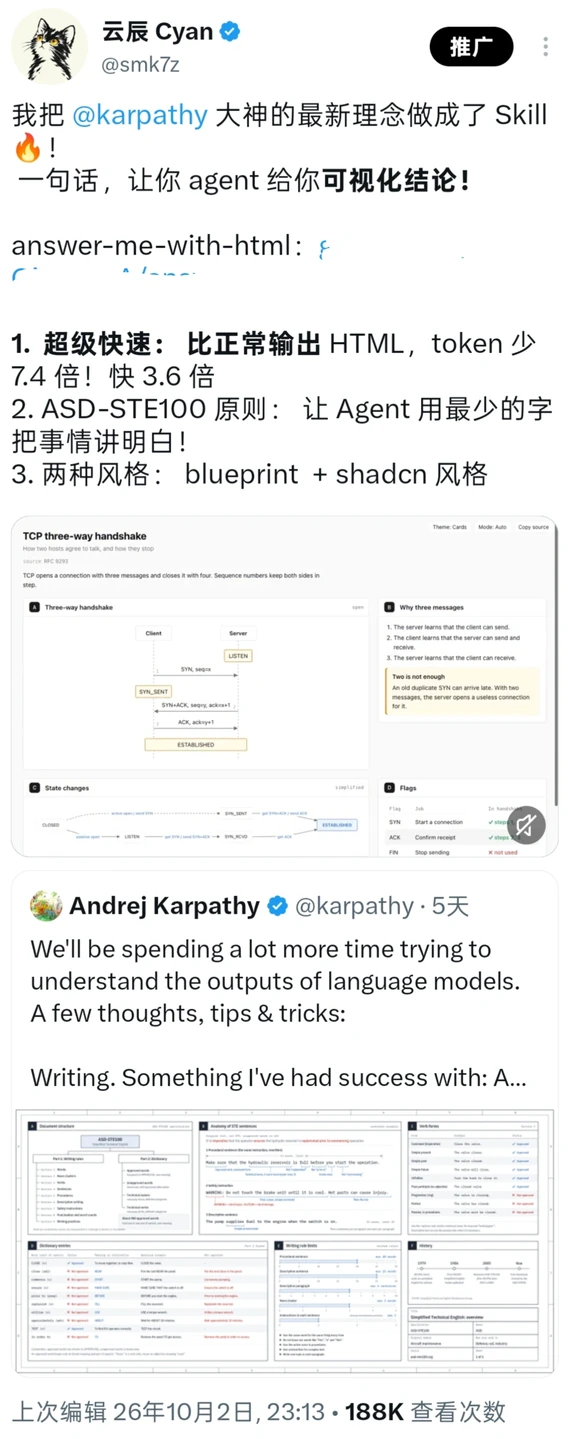
- The topmost tweet/post is in Chinese (from the first account; account name/handle omitted for privacy). Visible lines (preserving original line breaks):
- 我把 @karpathy 大神的最新理念做成了 Skill 🔥!
- 一句话,让你 agent 给你可视化结论!
- answer-me-with-html: { (the remainder on this line is partly cropped or blurred and not fully legible)
- 1. 超级快速: 比正常输出 HTML,token 少 7.4 倍! 快 3.6 倍
- 2. ASD-STE100 原则: 让 Agent 用最少的字把事情讲明白!
- 3. 两种风格: blueprint + shadcn 风格
- The first post embeds one or more thumbnails (cards/illustrations). Readable content includes:
- Card top English title: “TCP three‑way handshake”
- Subtitle/description (visible): “How two hosts agree to talk, and how they stop”
- Card content area (left) title: “Three‑way handshake”
- Diagram shows two column labels: “Client” and “Server”
- Above the Server column is the state “LISTEN”
- There are arrow/message path labels (partly legible): “SYN, seq=…”, “SYN_SENT”, “SYN+ACK, seq=x, ack=…”, “ACK, ack=y+1”, ending at “ESTABLISHED”
- A small box on the right side titled: “Why three messages”
- Inside lists several points (partly legible):
1. The server learns that the client can send.
2. The client learns that the server can send and receive.
3. The server learns that the client can receive.
- A small note box lower-right (partly legible): “Two is not enough” and a short English note (rest cropped or blurred)
- A lower card area titled: “State changes” (shows a timeline/state transition with names such as LISTEN, SYN_SENT, SYN_RECEIVED, ESTABLISHED)
- A bottom-right small circle icon shows a speaker/muted icon (speaker with a slash)
- Middle/lower part of the image contains a screenshot of a second post (from a second account; account name/handle omitted). Readable English lines (preserving breaks):
- We'll be spending a lot more time trying to understand the outputs of language models.
- A few thoughts, tips & tricks:
- Writing. Something I've had success with: A...
- Underneath is a larger embedded image/document preview (appears to be multiple cards/info panels; fine text is not legible in the thumbnail but the overall layout shows many tables and explanatory cards)
- A line of Chinese UI text is visible below: “上次编辑 26年10月2日, 23:13 · 188K 查看次数” (Last edited Oct 2, 2026, 23:13 · 188K views)
Non-legible or incomplete items (marked as cropped/blurred in the image)
- The code or JSON after “answer-me-with-html: {” in the first post is cropped/blurred and not fully readable; exact code/links cannot be extracted.
- Several English details in the embedded card (e.g., specific sequence numbers or the second half of some annotation lines) are too small or blurred to read.
- The large embedded image in the second post (multiple cards) contains small text and tables that cannot be read from the thumbnail.
- Some small icons or UI text near the top-left are partially cropped and unreadable.
Inferred (not directly readable; flagged as inference)
- It is inferred the first post is a paid promotion because of the “推广” (Promoted) tag, but payment details are not shown in the image.
- It is inferred that the embedded images are technical/teaching cards (based on the “TCP three‑way handshake” card and the structured card layout), but the exact purpose is not explicitly labeled.
- It is inferred that “188K 查看次数” refers to view statistics for the second post or its embedded resource, but the exact target of the stat is not indicated in the screenshot.
Notes (privacy and integrity)
- Account names and @handles visible in the image were omitted in this transcription for privacy; identities are not asserted.
- Areas that are cropped or blurred are explicitly labeled as such; no missing text was invented.
SkillPI Creation Analysis
Use case and main points
- The source presents a skill named “answer-me-with-html” that reportedly makes an agent output Markdown while a CLI renders that Markdown into polished HTML. Claimed features in the source include auto-layout, two visual styles (blueprint and shadcn), use of ASD‑STE100 writing principles to force concise outputs, and a claimed ability to generate 3b1b-style videos from complex conclusions.
Image evidence (what can be corroborated visually)
- The screenshot shows a promoted post label, verified badges on accounts, and two posts: the first explicitly names “answer-me-with-html” and lists feature claims; an embedded card displays educational content (e.g., “TCP three‑way handshake”) suggesting the tool can produce card-like visualizations. The second post shows multiple info cards/tables as thumbnails and UI metadata including “上次编辑 26年10月2日, 23:13 · 188K 查看次数.” These items support the claim that the Skill is presented as a tool for producing structured visual outputs, but they do not by themselves validate performance numbers or video generation capability.
Steps to try or reproduce (based on the source claims — actual commands and parameters must be obtained from the Skill‘s documentation/repository)
1. Locate the Skill‘s repository or distribution and read its README/docs for installation and runtime requirements (the source only shows the skill name and screenshots; use the provided source link to find the official location).
2. Install the CLI component if provided (the screenshots mention a CLI that auto-layouts HTML). The exact runtime requirements (Node.js, Python, etc.) and install commands must be confirmed in the project docs.
3. Configure an agent or LLM to output Markdown only. The Skill reportedly expects Markdown input from the agent so that the CLI can convert it to HTML.
4. Apply ASD‑STE100–style prompts to get concise, structured outputs from the agent. ASD‑STE100 is a known controlled-English standard for clarity, but the source does not include specific prompt templates — verify whether sample prompts are provided by the Skill.
5. Use the CLI to render the agent’s Markdown into HTML and select a visual style (blueprint or shadcn) if provided. Verify auto-layout behavior and output structure on representative prompts.
6. If video generation (3b1b style) is desired, verify in the repo/docs how video output is produced: whether the Skill directly generates animations, exports frame descriptions, or integrates with external rendering tools.
Prerequisites and items to verify
- Prerequisites: access to the Skill repository or distribution and its documentation; a runtime environment matching the CLI requirements; access to an LLM/agent that can be prompted to emit Markdown.
- Items that must be verified before accepting the claims:
* The token and speed improvement claims (the screenshot mentions specific multipliers). These require reproducible benchmark tests comparing the Skill workflow against a baseline.
* The presence and implementation details of 3b1b-style video generation (whether built-in or achieved via integration with other tools).
* Concrete examples or prompt templates for applying ASD‑STE100 to agent prompts (are templates provided, or must users craft them?).
* Whether blueprint and shadcn are built-in themes/styles or require additional integration (CSS, component libraries, etc.).
* Any installation/runtime commands, dependencies, or API keys required by the CLI or Skill.
Conclusion and caution
- The source and screenshot provide an overview and visual indications that the Skill aims to convert agent-generated Markdown into well-styled HTML with auto-layout and concise outputs guided by ASD‑STE100 principles. However, performance metrics and video generation claims are assertions shown in the post and must be validated against the Skill’s documentation and reproducible tests. To proceed, obtain the Skill’s official repository/docs via the source link and follow the documented installation and usage examples to verify features and benchmarks. Source URL: https://www.xiaohongshu.com/discovery/item/6ac614f000000000150125b6?app_platform=ios&app_version=9.28.1&share_from_user_hidden=true&xsec_source=app_share&type=normal&xsec_token=CBM4e91FJlMCjyqFLyuVHUs_oVFvt_LReWPSc98mPOdSA=&author_share=1