
Six Research Skill Categories: Overview of the Most Popular Research Skills (Practical Guide)
A screenshot-based categorization of six AI research skill types (automatic research agents, trustworthy academic assistants, deep literature-review agents, AI for Science, paper visualization, top-journal expression). Learn practical steps to map tasks to categories, evaluate candidate tools, verify outputs, and prepare for academic submission.
Image Analysis
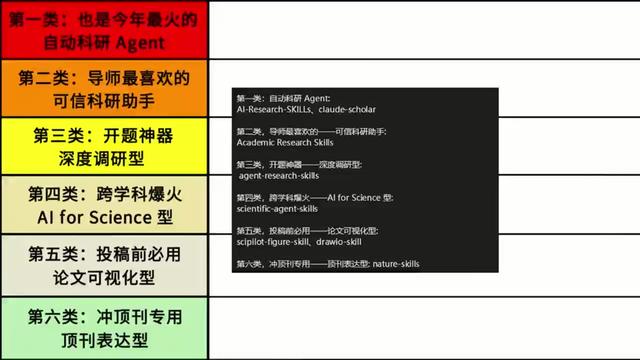
Figure 1 — Evidence summary
1. Overall visible layout (facts)
- The image is a slide/screenshot formatted as a table. Left side: a vertical colored column with 6 rows. Right side: a black rectangle containing white text lines. Far right column is blank.
- The left 6 rows top to bottom are colored: red, orange, yellow, light yellow/light orange, light green, and paler green (near mint).
- The black rectangle sits in the middle-right of the table and contains multiple lines of mixed English and Chinese white text.
- The blank column on the far right contains no visible text.
2. Readable text (facts, recorded line by line in visual order; case and punctuation preserved)
- Left colored column (each row one cell, top to bottom):
1. 第一类:也是今年最火的
自动科研 Agent
2. 第二类:导师最喜欢的
可信科研助手
3. 第三类:开题神器
深度调研型
4. 第四类:跨学科爆火
AI for Science 型
5. 第五类:投稿前必用
论文可视化型
6. 第六类:冲顶刊专用
顶刊表达型
- Right black rectangle text (line by line, preserving original case and symbols):
第一类:自动科研 Agent:
AI-Research-SKILLS, claude-scholar
第二类:导师最喜欢的——可信科研助手:
Academic Research Skills
第三类:开题神器——深度调研型:
agent-research-skills
第四类:跨学科爆火——AI for Science 型:
scientific-agent-skills
第五类:投稿前必用——论文可视化型:
scipilot-figure-skill, drawio-skill
第六类:冲顶刊专用——顶刊表达型:
nature-skills
3. Uncertain or unreadable parts (facts — explicitly noted)
- Small fonts, contrast or cropping at the edges of the black rectangle create slight blur, which may affect precise rendering of hyphens or underscores. The lines above capture the main readable content.
- The white-space between the black rectangle and the table's right blank column shows no visible icons or annotations.
4. Interface steps and interactive elements (facts)
- The image is a static slide/screenshot with no obvious interactive buttons, menus, or step indicators.
5. Chart data and numbers (facts)
- No numeric tables, axes, percentages, or plotted data present—content is text-based categorization.
6. Observable phenomena (facts)
- Color columns emphasize six classification levels.
- The black box lists corresponding tool/skill names (many are English phrases or hyphenated lowercase words).
- Each left-row title is two lines: first line a category heading, second line a short descriptor.
7. Inference (explicitly labeled as inference)
- The slide likely classifies AI-related research tools or “skill packs”; left column labels categories and the right black box lists corresponding tool/skill names (based on text semantics).
- "nature-skills" likely refers to language/expression tools intended for preparing submissions to top journals (e.g., Nature), but this is inferred, not verified.
- The table appears to be a single slide from a presentation intended to teach or present categories of research AI/tools.
(End)
SkillPI Creation Analysis
Purpose and source notes:
- The screenshot summarizes six categories of research-related skills/tools to help researchers or students identify types of AI-assisted workflows for tasks such as literature review, visualization, and manuscript preparation. Source: https://www.douyin.com/video/7682994315010028219. The full video transcript or speaker notes are not provided in the materials supplied (source incomplete; requires verification).
Key evidence from the image (readable items):
- Six categories: Automatic Research Agents, Trustworthy Academic Research Assistants, Deep Literature-Review/Project-Planning Agents, AI for Science (cross-disciplinary agents), Paper Visualization tools, and Top-Journal Expression tools.
- The black-box list includes several named items as they appear in the screenshot: AI-Research-SKILLS, claude-scholar, Academic Research Skills, agent-research-skills, scientific-agent-skills, scipilot-figure-skill, drawio-skill, nature-skills. These names are recorded from the image and should be treated as “items listed in the screenshot” rather than independently verified tools or plugins.
Practical steps to apply categories (actionable, general-purpose):
1) Define the research task and desired outputs (e.g., systematic literature review, figure generation, manuscript language polishing, simulation analysis).
2) Map the task to one of the six categories (e.g., choose a visualization tool for figure creation; choose a deep-research agent for exhaustive literature mapping).
3) Shortlist candidate tools/services and run a pilot with representative inputs (one paper, one dataset) to evaluate output quality and workflow fit.
4) Manually verify outputs: check citations, factual claims, data transformations, and figure accuracy; do not accept automatically generated references without confirmation.
5) Check integration and export capabilities (SVG/PNG/CSV/LaTeX/Word) and ensure the tool fits your writing and submission workflow.
6) Confirm compliance: licensing, data privacy, reproducibility requirements, and journal-specific formatting or disclosure rules.
Reproduction prerequisites (what you need before trying to reproduce results):
- Access to the original video or accompanying documentation for precise definitions and examples of each listed category (current input is a screenshot only).
- Access rights or credentials for any specific tools (API keys, subscriptions) if the listed items correspond to third-party services.
- Domain expertise to assess the scientific correctness of tool outputs and to perform final human validation.
Items to verify (must be checked before operational use):
- Whether the specific names seen in the screenshot (e.g., "claude-scholar", "scipilot-figure-skill", "drawio-skill", "nature-skills") refer to officially published tools, internal demo labels, or hypothetical/placeholder skill names used in the presentation. The screenshot records names verbatim but does not prove availability or function.
- Each tool’s documented features, API/interface requirements, supported export formats, pricing/licensing, and data handling policies.
- How each tool handles references and factual claims (generation vs. retrieval of verifiable citations) and whether outputs are reproducible and auditable.
Recommendations (next steps you can execute):
- Retrieve the full video or speaker notes to confirm the author’s definitions and examples for each category;
- Create a short evaluation checklist (accuracy of citations, export formats, manual correction effort, cost) and run small pilot tests for candidate tools mapped to your tasks;
- Keep a record of input prompts and outputs during testing to document reproducibility and to support later verification.
(Notes: the above guidance is derived from the screenshot text. Specific tool names from the image are recorded as-is but are unverified and must be checked independently before operational use.)