
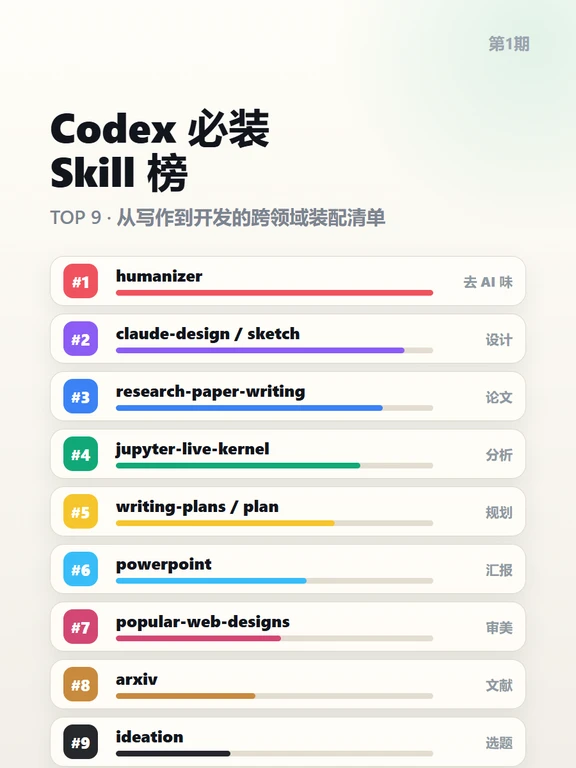
Don't Leave Codex Bare — Must‑Install Codex Skills
Identify Codex’s Top 9 must‑have skills (including humanizer, claude‑design / sketch, jupyter‑live‑kernel, research‑paper‑writing) and learn a practical checklist: how to locate official skill entries, what info to provide when requesting installation, compatibility and security checks, and basic enablement & verification steps.
Image Analysis
Figure 1 — Evidence summary
1) Readable text (recorded verbatim in visual order)
- Small text at top-right: Issue 1
- Large title (upper-left, centered): Codex Must‑Install Skill List
SkillPI Creation Analysis
Purpose of the piece:
- The infographic is intended to present a recommended “Top 9” list of Codex skills for users across disciplines—writing, design, analysis, paper writing, presentations, etc.—to help readers identify candidate skills worth enabling or exploring.
Image evidence highlights (verifiable visual facts):
- Static infographic with title “Codex Must‑Install Skill List” and subtitle “TOP 9 · A cross‑domain assembly checklist from writing to development.”
- Nine listed skills with short right‑hand Chinese tags: humanizer (remove AI flavor), claude-design / sketch (design), research-paper-writing (papers), jupyter-live-kernel (analysis), writing-plans / plan (planning), powerpoint (presentations), popular-web-designs (aesthetics), arxiv (literature), ideation (topic selection).
- Colored indicator bars show relative visual prominence but lack numeric labels or data sources.
Associated skill usage and verification (general steps; original source does not include step‑by‑step install instructions — further verification needed):
1) Confirm exact skill identifiers and source: match the names from the image (e.g., humanizer, jupyter-live-kernel, research-paper-writing) with entries in Codex’s skill/plugin repository or official documentation to locate the authoritative package.
2) Verify prerequisites and dependencies: some skills may require additional infrastructure (for example, jupyter-live-kernel likely requires access to a Jupyter server or kernel environment, research‑paper‑writing may depend on templates or language models), so check environment, runtime, and permission requirements.
3) Locate installation/enablement flow: use Codex’s skill/plugin management UI or official install docs to enable the skill, paying attention to authentication, tokens, and granted scopes.
4) Perform basic acceptance tests: after enabling, run simple verification prompts or example tasks to confirm the skill responds as expected (document inputs and expected outputs for reproducibility).
5) Validate provenance and security: confirm publisher/source, review privacy policy or code repository if available, and avoid uploading sensitive data to untrusted third‑party skills.
Reproduction prerequisites and items to verify:
- The image provides only names and visual ranking; it does not supply installation commands, configuration files, or explicit compatibility notes. To reproduce an enabled skill environment, you must obtain official installation documentation for each skill and have access to Codex’s skill management interface.
- Verify each skill’s official name, publisher, hosting location, required environment (e.g., Jupyter server for jupyter‑live‑kernel), and any external API credentials needed.
- Confirm whether there are multiple implementations with the same name; avoid installing untrusted variants.
- The colored bars’ meaning (popularity, recommendation strength, usage share, etc.) is not specified—do not treat them as hard metrics without source confirmation.
Conclusion (facts vs. limits):
- This summary and interpretation are based solely on the visible text and UI elements in the image; the infographic lists recommended skills but does not include executable installation instructions. Direct installation and functional verification require consulting each skill’s official documentation or the Codex platform.