
This Week's GitHub Viral Top 7 | 2026-05-24
Find and evaluate the GitHub repository academic-research-skills: clone the repo, inspect README and MIT license, install Python dependencies, verify Claude Code CLI integration, and run example workflows to produce literature-review drafts, writing assistance outputs, and peer-review suggestions (confirm prompt templates and exact commands in the repo).
Image Analysis
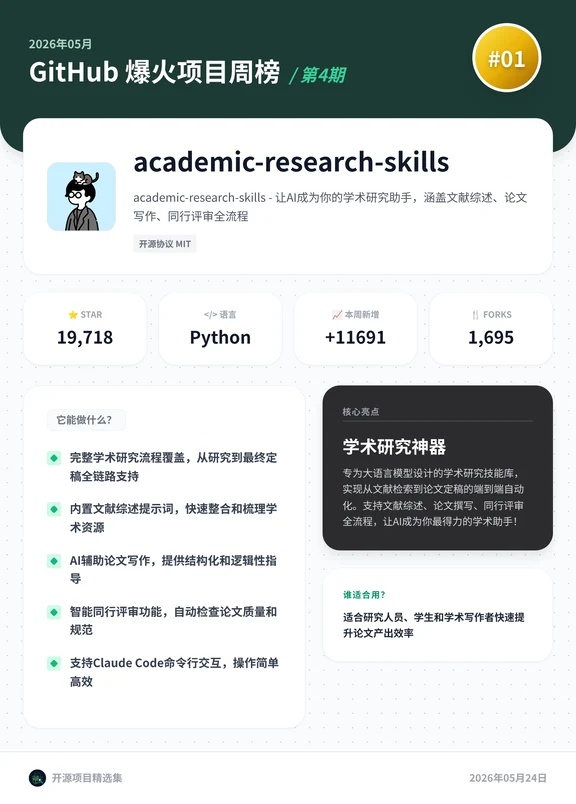
Image 1 — Readable text, UI steps, chart data and visible phenomena (separate facts and inferences, mark unreadable items)
Facts (directly readable UI elements and values):
- Top text on page:
- "May 2026"
- "GitHub Viral Projects Weekly / Issue 4"
- Top-right badge text: "#01"
- Repository name and description:
- Repo title: "academic-research-skills"
- Subtitle/description: "academic-research-skills - Turn AI into your academic research assistant, covering literature review, paper writing, and peer review workflows"
- Open-source license label: "Open-source license MIT"
- Key metrics (displayed as cards):
- "STAR" 19,718
- Language: "Python"
- "New this week": +11691
- "FORKS": 1,695
- Left module title and content:
- Module title: "What can it do?"
- Five bullet points (each with a green check icon):
1. "Covers the full academic research workflow, from research to final draft support"
2. "Built-in literature review prompts to quickly consolidate and organize scholarly resources"
3. "AI-assisted paper writing, providing structured and logical guidance"
4. "Intelligent peer review features that automatically check paper quality and standards"
5. "Supports Claude Code command-line interaction, simple and efficient operation"
- Right dark information box:
- Title: "Core Highlights"
- Subtitle/tagline: "Academic research toolkit"
- Description (paragraph, readable): "A workflow library designed for large language models to automate end-to-end academic research from literature retrieval to paper writing. Supports literature review, paper writing, and peer review workflows, making AI your most capable research assistant!"
- Bottom-right small module:
- Small title (green): "Who is it for?"
- Text: "Suitable for researchers, students, and academic writers to quickly improve and optimize paper output efficiency"
- Footer and date:
- Bottom-left: "Open-source project selection"
- Bottom-right date: "2026-05-24"
- Visual/UI elements (visible facts):
- Page uses a dotted background (light gray dots)
- Top-left repo avatar: simple cartoon person (black/white or dark outline)
- Icons: star, fork, language tag, etc.
- Information blocks are card-style with a two-column layout: left features, right highlights and target users
Unreadable / Missing (not shown or illegible in the image):
- No complete URL visible on the image (e.g., clickable repo link or external references are not present in the image).
- Small text under the repo avatar may include author name or buttons but is not legible or is cropped.
- Some characters or spacing in the right dark box are slightly unclear at micro level; overall sentence meaning is readable but individual glyphs may be uncertain for exact transcription.
Inferences (reasonable deductions based on UI elements but not directly readable):
- The page appears to be a cover or summary for an issue of a weekly top-projects list; "#01" and layout suggest this repo is ranked #1 for the issue.
- "New this week +11691" likely refers to stars gained this week (or newly added stars), showing recent popularity growth alongside STAR 19,718.
- The mention of "Supports Claude Code command-line interaction" suggests the repo provides integration scripts or CLI hooks to interact with Claude models, but the exact implementation and commands are not shown.
- The left-side "What can it do?" points are a feature overview and likely correspond to more detailed usage instructions or examples in the repository's README (details are not shown in the image).
(end)
SkillPI Creation Analysis
Use cases summary:
- The image documents a weekly GitHub highlights page listing academic-research-skills as the top entry, claiming it provides an end-to-end academic research workflow: literature review prompts, AI-assisted paper writing, and intelligent peer review. It also states support for Claude Code CLI interaction. The repository link shown in the source is https://github.com/Imbad0202/academic-research-skills.
Image evidence and verifiable facts:
- Verifiable items from the image: repository name academic-research-skills, license MIT, language Python, STAR 19,718, this-week increase +11691, FORKS 1,695, date 2026-05-24, and the listed feature bullets (literature review prompts, AI writing assistance, intelligent peer review, Claude Code CLI support).
- Items requiring repository inspection: concrete CLI commands, example scripts, prompt templates, dependency lists, and exact Claude Code integration code—these are not present in the image and must be confirmed by viewing the repo.
Associated tools/skills and practical reproduction steps (high-level, based on claims in the image):
1. Clone the repository: git clone https://github.com/Imbad0202/academic-research-skills and inspect README.md and LICENSE.
2. Set up a Python environment and install dependencies from requirements.txt or setup instructions in the repo.
3. Search the repository for keywords: "prompt", "literature", "review", "peer review", "Claude Code" to locate prompt templates, example workflows, and CLI integration code.
4. If the repo uses external LLM services, configure the necessary API keys (e.g., Anthropic/Claude) and environment variables per the repo documentation.
5. Run provided example scripts or demo notebooks to generate a literature summary, draft writing output, or an automated peer review report, then evaluate outputs manually for quality and citation correctness.
6. If CLI integration is offered, test the command-line interface per documented commands and verify interactions with Claude Code (check version compatibility and command syntax in the repo).
Reproduction prerequisites and items to verify before trusting outputs:
- Required environment: Python runtime, repository dependencies, and any required external API credentials (Anthropic/Claude or other LLM providers) must be available and configured.
- Verify that example scripts and prompt templates are included and executable without modification, or document the necessary changes.
- Confirm Claude Code integration details: which CLI commands are provided, expected inputs/outputs, and compatible Claude Code versions.
- Check license (MIT shown) and whether any bundled datasets or third-party code impose additional restrictions.
Checklist of specific things to confirm in the repository after cloning:
- Existence and reproducibility of quick-start commands and runnable examples.
- Availability and format of prompt collections (are they editable, licensed for reuse?).
- Exact instructions for integrating with Claude Code (file paths, command examples, environment vars).
- Peer review module behavior: what checks it performs, output format, and how configurable it is.
Final notes and verification actions (facts and items to validate):
- The page asserts that academic-research-skills provides end-to-end academic research automation and Claude Code CLI support; these are claims visible on the page but must be validated by reviewing https://github.com/Imbad0202/academic-research-skills and executing the repository's examples.
- Recommended next steps before adoption: clone the repo, read README/LICENSE, run the provided examples in an isolated environment, and verify API/key requirements and Claude Code compatibility.