
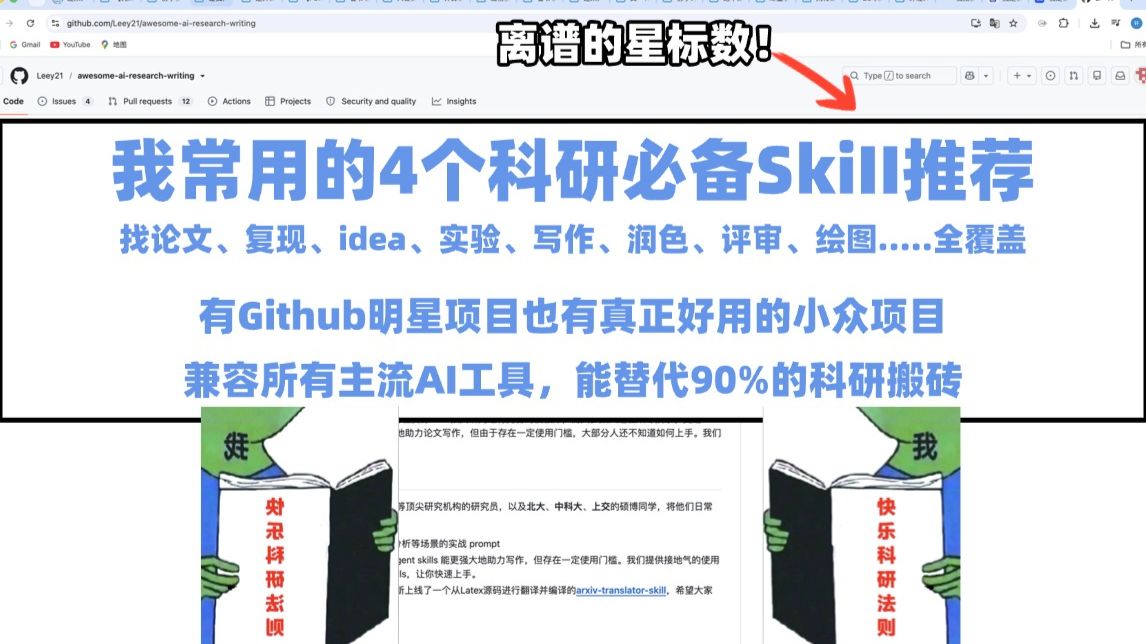
Only recommend research skills I've actually used and that really work! These four research skills can replace 90% of academic grunt work!
Step-by-step guidance on how to find and use four general research skills/tools to speed up manuscript writing, experiment reproducibility, text polishing and research plotting. Covers how to locate items in a repository README, install and run examples, integrate with mainstream AI tools, and what deliverables to expect (scripts, polished drafts, reproducible experiment records, figures).
Image Analysis
Image 1 — Readable text, UI elements, chart data and visible phenomena (separated into visible facts and inferences; mark unreadable items)
I. Facts (content that is clearly readable or directly identifiable in the image)
- Browser address bar / tabs
- Visible address/path (verbatim): github.com/Leey21/awesome-ai-research-writing
- Text visible in the browser top tab (partial): Leey21 / awesome-ai-research-writing ·
- Left browser tabs (partially visible): Gmail, YouTube, Maps
- Prominent overlaid text at page top
- Black arrow annotated text (white bubble with black border): Ridiculous star count!
- Main page headline (large blue text)
- My 4 must-have research skills recommendations
- Page subheadline (blue, medium size, two lines)
- Find papers, reproduce, idea, experiment, writing, polishing, review, plotting..... fully covered
- Next line of bold blue text
- Includes GitHub star projects and genuinely useful niche projects
- Next line of bold blue text
- Compatible with all mainstream AI tools, can replace 90% of research grunt work
- Visible snippet of page body (small black text below)
- At the end of the snippet, a blue link text is visible: arxiv-translator-skill
- GitHub repo navigation bar (near the top, below the address bar)
- Visible items and counts: Code Issues 4 Pull requests 12 Actions Projects Security and quality Insights
- GitHub page upper-right UI elements
- Search box placeholder (readable): Type / to search
- Several GitHub icons (visible but not all labels readable)
- Images on both sides of the page (left and right)
- Two green humanoid figures (green person holding a book)
- Right green figure top text (readable): Me
- Right figure book cover vertical red text (readable): Happy Research Rules
- Left figure top text (not legible/uncertain)
- Left figure book cover vertical red text (not legible/uncertain)
- Overall visual style
- White background, large blue fonts for title/key sentences, black-framed sections, embedded body screenshot or text block in middle
II. Unreadable or partially readable content (explicitly marked)
- Left green figure top text: blurred, cannot confirm exact wording (unreadable)
- Left figure book cover vertical red text: partially blurred, not fully readable (unreadable)
- Several small icons/buttons in the browser tab bar right side: specific meanings/tooltips unclear (partially unreadable)
- Most other lines of the lower body text are reduced or cropped and cannot be fully read (unreadable/incomplete)
III. Inferences (reasonable inferences based on visible elements, labeled as inference)
- The page is inferred to be a GitHub repository README or repo homepage (based on the top address and layout).
- The "Ridiculous star count!" arrow is inferred to point at the repo star count or Star button in the upper right (based on typical GitHub layout).
- The main content is inferred to present the author's collection of "research assistance" tools and skills, including AI-related popular and niche projects (based on headline and subheadline semantics).
- "arxiv-translator-skill" is inferred to be a subproject link or related component within the repo (based on visible blue link text).
IV. URLs / source identifiers visible in the image (kept verbatim)
- github.com/Leey21/awesome-ai-research-writing
- (blue link in page body) arxiv-translator-skill
V. Other visible phenomena (UI/visual details)
- Top area contains a black thick-bordered rectangle encapsulating the headline region.
- Layout emphasizes large blue headline/slogan with a mid-lower body screenshot or example and decorative comic-style green character illustrations at sides.
- Topmost screen area shows Windows window controls (minimize, maximize, close) and browser extension icons (small icons to the right of the address bar).
SkillPI Creation Analysis
Purpose of the source: The video/page claims to recommend four "must-have" research skills that the author uses in practice, intended to cover common research tasks across the full workflow (paper finding, reproducing experiments, idea generation, experiments, writing, polishing/‘de-AI’ing text, expanding content, peer review, plotting, etc.). The provided summary does not list the four specific skill names; the screenshot points to a GitHub repository (github.com/Leey21/awesome-ai-research-writing) and shows a link label arxiv-translator-skill within the page.
Image evidence summary: The screenshot is of a GitHub repository page. Readable elements include the repo path, main headline and subheadline, highlighted lines asserting broad coverage and compatibility with mainstream AI tools, repo navigation items (Code, Issues, Pull requests, etc.), and an in-body blue link labeled arxiv-translator-skill. Some text lines are cropped or blurred and not fully legible.
Steps to use the referenced skills (general, based on typical GitHub/tool workflows; specific skill names and commands are not provided in the summary and must be checked in the repo):
1) Open the repository URL shown in the screenshot (github.com/Leey21/awesome-ai-research-writing) and locate the README or table of contents to identify the four listed skills/tools.
2) For each listed skill/tool, read its individual README or documentation to confirm purpose, inputs/outputs, dependencies, and compatibility notes.
3) Follow documented installation steps (e.g., pip/conda install, Docker run, git clone + setup scripts) and run any provided example or test to verify the tool works in your environment.
4) Integrate the tool into your research workflow as intended (e.g., use for paper discovery/translation, experiment reproducibility scripts, manuscript polishing, plotting pipelines).
5) Review outputs manually to ensure quality (especially for text polishing / removing AI artefacts), and adjust parameters or add human editing as needed.
Preconditions and cautions before attempting reproduction:
- You must inspect the repo to learn the concrete names, installation commands, example data, and runtime requirements—these are not provided in the summary.
- Verify licensing and maintenance status of each tool, plus platform compatibility (OS, Python version, required external APIs or keys).
- If integration involves third-party AI services, confirm service availability, API usage limits, cost, and data/privacy considerations.
Items needing verification (not present in the provided summary):
- Exact names and functions of the four skills/tools recommended.
- Per-tool installation and execution steps, example inputs/outputs, and whether demo notebooks or sample datasets are provided.
- Claims such as “compatible with all mainstream AI tools” and “can replace 90% of research grunt work” are summary-level statements that require verification against each tool’s documented capabilities and real-world testing.
Preserved references (verbatim):
- Video page: https://www.bilibili.com/video/BV1x6j26JEBv/
- Repo URL visible in screenshot: github.com/Leey21/awesome-ai-research-writing
- In-page link text: arxiv-translator-skill
Concluding note: The source is a recommendation summary and a repo screenshot indicating a curated collection of AI-related research tools. To adopt the suggested skills, open the referenced repository, inspect each subproject’s documentation, and validate installation and function in your environment before relying on them in production research workflows.