
63k⭐️! This GitHub Skill Is Pretty Useful
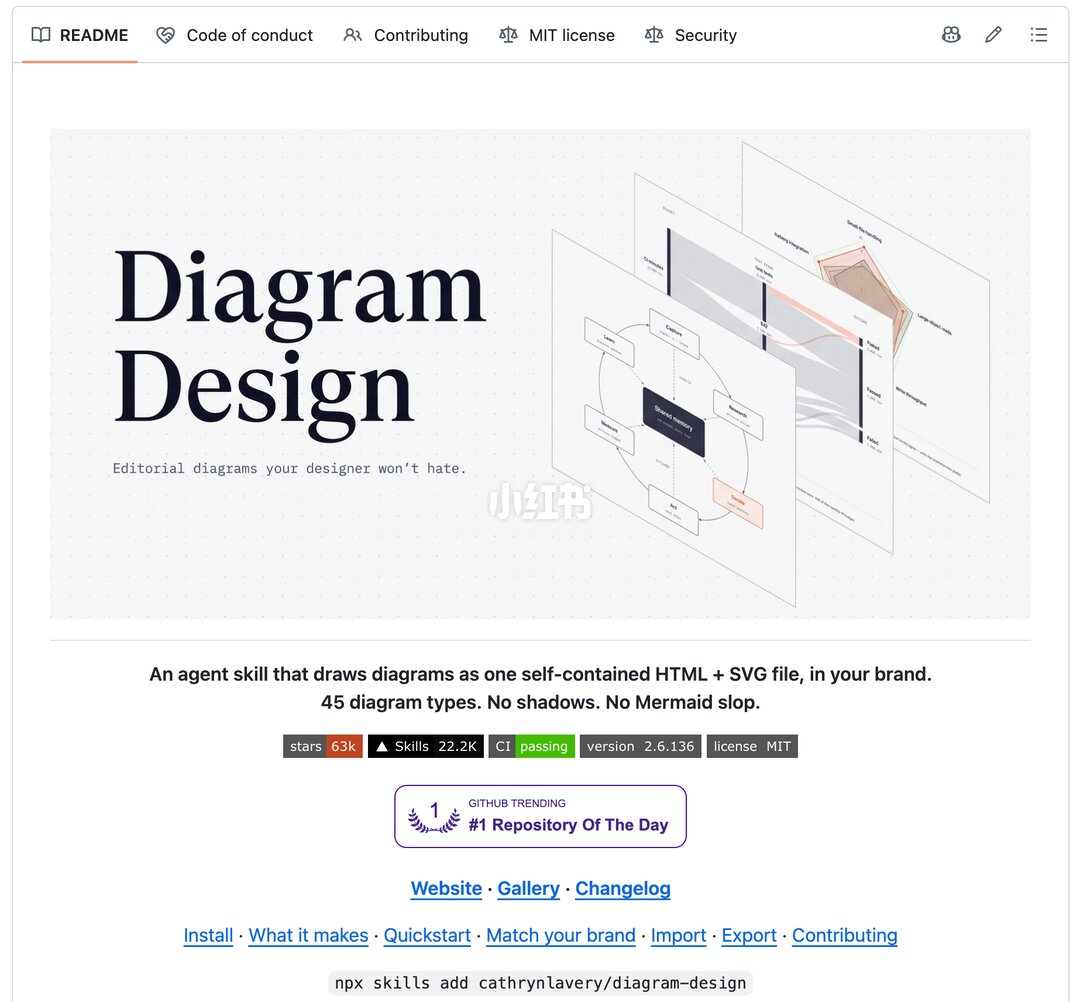
Step-by-step overview: install Diagram Design via npx, use it inside a Skills-enabled AI assistant to generate 45 diagram types from text prompts, match site brand (colors/fonts), import Mermaid/draw.io/Excalidraw sources for reflow, and export self-contained HTML or PNG/SVG. Lists prerequisites (Node.js, a Skills-capable AI) and verification items before use.
Image Analysis
Image evidence — notes from screenshot 1
1) Readable text on page (top-to-bottom, left-to-right, preserving case/punctuation)
- Top navigation tabs (left, horizontal): README Code of conduct Contributing MIT license Security
- Large title (left): Diagram Design
- Subtitle (under title, small English): Editorial diagrams your designer won't hate.
- Central paragraph (English): An agent skill that draws diagrams as one self-contained HTML + SVG file, in your brand. 45 diagram types. No shadows. No Mermaid slop.
- Badge row (multiple small badges, visual order): stars 63k ▲ Skills 22.2K CI passing version 2.6.136 license MIT
- Purple badge (center): GITHUB TRENDING #1 Repository Of The Day
- Link row (blue clickable text, in order): Website · Gallery · Changelog
- Lower link row (blue clickable text, in order): Install · What it makes · Quickstart · Match your brand · Import · Export · Contributing
- Command-line code block (bottom, grey code style): npx skills add cathrynlavery/diagram-design
- White watermark text visible lower-right/center-right (Chinese): 小红书
2) Visible UI steps, chart data and visual observations (objective)
- Layout: left side has title and description; right side shows layered example images (about three semi-transparent pages in perspective).
- Right-side examples: multiple stacked sheets/panels, each containing boxes, connectors, flow elements or radar/spider-chart-like visuals (many small labels unreadable). Colors used include grey, light pink, deep blue.
- Background is a light grey dotted grid.
- Several badges use colored backgrounds (e.g., “CI passing” in green, “stars 63k” in orange/brown), the purple badge includes laurel imagery.
- Top-left has a book icon (next to README); top-right near nav are small icons (pencil, list, etc.).
- Overall page style resembles a GitHub README with badges, links, install code block and example images.
3) Unreadable or uncertain elements (explicitly noted)
- Many small labels inside the stacked example images are unreadable due to size, perspective or overlap; exact text inside boxes cannot be transcribed.
- A radar/polygon chart on the far right has axis labels that are unreadable.
- It's unclear whether a few icons in the top-right have adjacent text labels (e.g., user, edit); icon meanings are not fully legible.
- In the badge row, some small decorative symbols near the ▲ may be unclear.
4) Reasonable inferences (marked as inferences)
- Likely a GitHub repository README page (because of README/Code of conduct/Contributing/MIT license/Security tabs, badges, install command and a “Repository Of The Day” badge).
- The command npx skills add cathrynlavery/diagram-design is likely the project's installation/usage command (recorded as text only, not executed here).
- The stacked example images are likely output examples from the project (different diagram styles).
- Badges like “stars 63k” and “Skills 22.2K” appear to indicate repository stars or related metrics, but exact meaning is not defined on the image itself.
(End)
SkillPI Creation Analysis
Intended use
- Diagram Design is presented as an “agent skill” that helps AI produce visually improved diagrams from text descriptions. Intended scenarios include PPT visuals, technical documentation, and workflow diagrams where layout and visual hierarchy (whitespace, alignment, emphasis) matter more than decorative effects.
Image evidence that supports claims
- The README text visible in the screenshot states: “An agent skill that draws diagrams as one self-contained HTML + SVG file, in your brand. 45 diagram types. No shadows. No Mermaid slop.” This supports claims of producing self-contained HTML+SVG output, supporting 45 diagram types, and avoiding shadow-based styling.
- An install command shown in the page: npx skills add cathrynlavery/diagram-design, which is provided as the installation example.
- Navigation and links (Install · Import · Export · Match your brand · Quickstart) indicate features around installation, import/export, and brand/style matching.
Practical steps to try (based on the provided documentation text)
1. Prerequisites: have Node.js (with npx) installed locally or in your environment; prepare an AI assistant/platform that supports a “Skills” mechanism. (The source mentions Claude Code, Codex, Cursor — compatibility should be verified with each platform.)
2. Install: run npx skills add cathrynlavery/diagram-design to add the skill as shown in the README screenshot.
3. Generate: in the Skills-enabled AI assistant, supply a natural-language description of the desired diagram or provide an existing diagram source file (Mermaid, draw.io, Excalidraw) to trigger redesign/layout.
4. Brand matching: optionally provide a website URL so the tool can sample colors and fonts to match your brand.
5. Export: use the export options to get a self-contained HTML file (with inline SVG) or export PNG/SVG for use in presentations and articles.
Reproduction prerequisites and verification points
- Compatibility: confirm whether specific assistants (Claude Code, Codex, Cursor) actually support installing/using this Skill and what configuration (API keys, platform settings) is required.
- Environment: the npx command implies Node.js dependency; verify Node version requirements and any additional runtime dependencies.
- Feature scope and limits: validate the claimed “45 diagram types” (get a list) and test how the tool handles complex diagrams or heavy data-driven charts for semantic correctness.
- Import/export fidelity: verify which Mermaid/draw.io/Excalidraw formats/versions are supported and whether content/annotations are preserved.
- Output format claims: test that outputs are indeed self-contained HTML + SVG and evaluate cross-browser behavior and editability.
Caveats
- The source material (post and README screenshot) describes capabilities and provides an install command, but I have not executed the command or integrated the Skill into an AI assistant here. Do not assume full reproducibility without performing the environment setup and validation steps above.
- The original post URL for reference (from the user-supplied material): https://www.xiaohongshu.com/discovery/item/6ae55123000000000602ea62?source=webshare&xhsshare=pc_web&xsec_token=ABa7Dy8Ds_CVAHMbZjZm6oYbGoKYB_UL6ehQBFRgk-JiI=&xsec_source=pc_share