
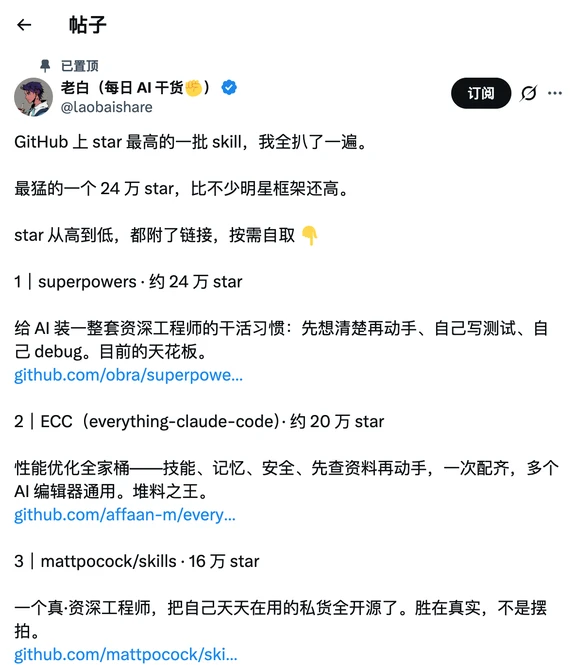
Roundup of the highest-starred skills on GitHub
Learn how to locate the GitHub repos for popular AI skills (superpowers, ECC/everything-claude-code, mattpocock/skills), read their README, clone and install dependencies, integrate the skill into your AI editor, and validate with sample prompts. The guide highlights where to verify full repo URLs, licenses and runtime requirements.
Image Analysis
Image 1 — readable items, UI elements, charts/data, visible phenomena (facts / inferences / unreadable parts)
Facts (only record text, UI elements and data visible in the image; keep original image URLs including ellipses):
- Top UI elements (left to right visible):
- Back arrow icon (←)
- Page title: 帖子 (Post)
- Pinned label text: 已置顶 (Pinned)
- Post header (user area):
- Account shown as verified (blue check visible)
- Subscribe button (text: 订阅)
- Three-dot menu icon
- (Display name / username area is obscured or a person; due to identification limits the poster’s real name/username is not disclosed)
- Post body (line-by-line readable text, preserved as-is):
- GitHub 上 star 最高的一批 skill,我全扒了一遍。
- 最猛的一个 24 万 star,比不少明星框架还高。
- star 从高到低,都附了链接,按需自取 👇
- 1 | superpowers · 约 24 万 star
- 给 AI 装一整套资深工程师的干活习惯:先想清楚再动手、自己写测试、自己 debug。目前的天花板。
- github.com/obra/superpowe...
- 2 | ECC(everything-claude-code):约 20 万 star
- 性能优化全家桶——技能、记忆、安全、先查资料再动手、一次配齐、多个 AI 编辑器通用。堆料之王。
- github.com/affaan-m/every...
- 3 | mattpocock/skills · 16 万 star
- 一个真·资深工程师,把自己天天在用的私货全开源了。胜在真实,不是摆拍。
- github.com/mattpocock/ski...
Visible details / layout facts:
- The body is presented as short paragraphs and a numbered list starting at 1; each item shows a project name and an estimated star count (e.g., "约 24 万 star").
- Each item is followed by a link text beginning with "github.com/", but these links are truncated with ellipses in the image.
- The emoji “👇” is used to point to links below (recorded as visible glyph).
- Some text (such as links) is truncated on the right and ends with "...".
- The post UI appears to be a mobile app or mobile web layout (back arrow at top-left, top bar, subscribe button, three-dot menu).
- The post is pinned (shows “已置顶”).
Unreadable or incomplete parts (marked as “unreadable / incomplete”):
- The poster’s display name and username are present but, per identification limits, are not provided.
- Three GitHub links are truncated and shown as:
- github.com/obra/superpowe...
- github.com/affaan-m/every...
- github.com/mattpocock/ski...
These are incomplete URLs (ellipses in the image), and the full addresses cannot be confirmed from the screenshot.
- It is unclear whether additional items exist below the visible area; the image may be cropped.
Inferences (clearly labeled as inferences and not confirmed facts):
- The listed star counts appear to be the author’s estimates (the text uses “约”), not exact live counts.
- The post likely originates from a common social platform (e.g., a Chinese social app) based on UI elements, but the platform name is not visible and thus this is an inference.
- The links likely point to the corresponding GitHub repositories (based on the github.com/ prefix and project names), but because the URLs are truncated, exact repository paths must be verified.
Readable excerpt (verbatim, preserving ellipses and formatting):
- GitHub 上 star 最高的一批 skill,我全扒了一遍。
- 最猛的一个 24 万 star,比不少明星框架还高。
- star 从高到低,都附了链接,按需自取 👇
- 1 | superpowers · 约 24 万 star
- 给 AI 装一整套资深工程师的干活习惯:先想清楚再动手、自己写测试、自己 debug。目前的天花板。
- github.com/obra/superpowe...
- 2 | ECC(everything-claude-code):约 20 万 star
- 性能优化全家桶——技能、记忆、安全、先查资料再动手、一次配齐、多个 AI 编辑器通用。堆料之王。
- github.com/affaan-m/every...
- 3 | mattpocock/skills · 16 万 star
- 一个真·资深工程师,把自己天天在用的私货全开源了。胜在真实,不是摆拍。
- github.com/mattpocock/ski...
(end)
SkillPI Creation Analysis
Intended use:
- The post is a curated list of widely used “skills” or configuration bundles on GitHub intended to be copied and reused to extend AI editors or assistants. Items named include superpowers, ECC (everything-claude-code), mattpocock/skills, Anthropics PDF/DOCX/PPTX/XLSX tools, karpathy skills, gstack, ui-ux-pro-max, caveman, and graphify.
Image evidence summary (what the screenshot supports):
- The screenshot is a mobile post that enumerates projects with an estimated star count and a truncated github.com/ link for each item. Because links are truncated in the image, you must locate the full repository URLs in the post text or via direct GitHub search.
Concrete steps to use the listed skills (general, reproducible workflow based on standard open-source repo usage):
1. Search for the repository by project name or author (e.g., search “obra superpowers”, “affaan-m everything-claude-code”, “mattpocock skills”) to find the full GitHub repo.
2. Open the repository and read README, installation instructions, and LICENSE to confirm features, dependencies, and legal constraints.
3. Clone or download the repo (git clone <repo-url>) and inspect examples and configuration files locally.
4. Install required dependencies as documented (commands may use Python, Node.js, pip, npm, etc. — follow the repo’s README for exact commands).
5. Integrate the skill’s configuration or scripts into your AI editor or runtime according to the repository’s integration guidance (integration method varies by project).
6. Run provided sample prompts or tests to validate that the skill behaves as described.
7. Review safety/privacy considerations (e.g., external API calls, memory modules, API keys) before using in production.
Prerequisites for reproduction:
- Internet access and ability to reach GitHub; basic command-line skills (git, package managers).
- Appropriate runtime environments installed (e.g., Python, Node.js) as required by each repo.
- Ability to read repository documentation and adapt provided scripts/configs to your specific AI editor or environment.
Items that need verification (cannot be confirmed from the screenshot or summary alone):
- Full repository URLs for each listed item (the image shows truncated links).
- Exact installation and integration commands, supported AI editors or platforms, and runtime requirements — verify these in each repo’s README.
- Repository LICENSE and restrictions for commercial or private use.
- The star counts shown in the post are approximate; check the repo page for real-time star numbers.
Limitations and disclosure:
- This interpretation is derived from the post summary and screenshot and includes reasonable, general steps to locate and use the referenced repositories. It does not substitute for checking each repository’s README and running the actual installation steps; those must be followed to obtain executable results.