
10 Game‑Changing Creator Skills — Save If You’re Stuck
Learn how to split your creator workflow by task: use MoneyPrinterTurbo to generate scripts and assets, MediaCrawler for competitor/comment collection, Remotion for batch rendering, and Postiz for unified scheduling. This guide summarizes the 2026 creator Skill checklist and the verification steps needed to make an automated workflow.
Image Analysis
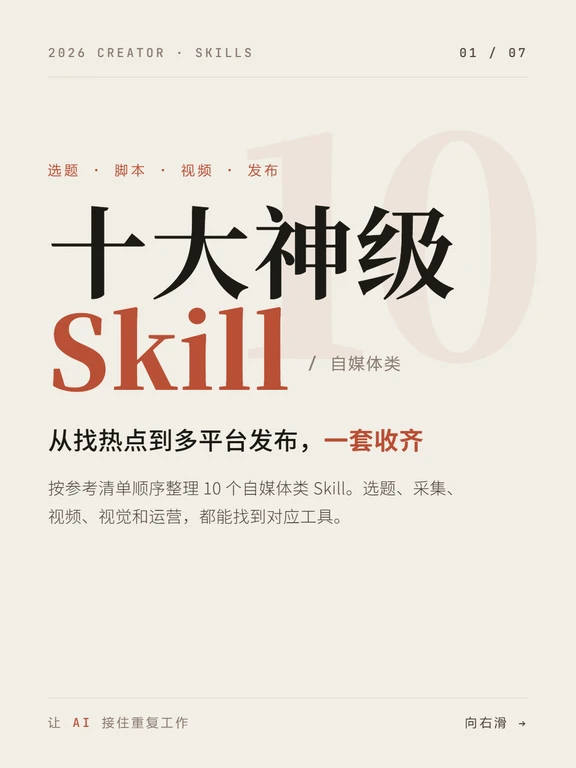
Slide 1 — Readable facts (text, UI elements, layout)
- Header (top left): "2026 CREATOR · SKILLS"
- Header (top right): "01 / 07"
- Divider (thin horizontal line under header)
- Small top line (red): "选题 · 脚本 · 视频 · 发布" (Ideation · Script · Video · Publish)
- Main title (large, Chinese): "十大神级"
- Main English title (large, different font): "Skill"
- Subtitle (small, after slash): "/ 自媒体类" (/ Creator category)
- Background element: a large faded number "10" on the right as decoration
- Tagline under main titles (black and orange): "从找热点到多平台发布,一套收齐" (From trend finding to multi‑platform publishing, all in one)
- Descriptive short paragraph (smaller font): "按参考清单顺序整理 10 个自媒体类 Skill。选题、采集、 视频、视觉和运营,都能找到对应工具。"
- Note: there is an extra space or line break between "采集、 视频" in the original
- Footer small left text (very small, low readability): likely reads "让 AI 接任重复工作" or similar (uncertain; see unreadable notes)
- Footer right small text (readable): "向右滑 →" (Swipe right →)
- Overall colors and typography:
- Background: light beige/cream
- Chinese main title: black; English "Skill" set in brick red/ochre
- Accent text: orange/red
- Mix of serif for Chinese headline and sans‑serif for English
Slide 1 — UI hints / interaction elements (readable but interface prompts):
- "向右滑 →" indicates touch/slide interaction
- No other clear buttons or step lists visible
Slide 1 — Charts/data
- No charts or numeric tables readable; only decorative large "10"
Slide 1 — Visual/typographic observations
- Single cover‑style page with left text and right faded number "10"
- Strong size contrast between Chinese headline, English headline, and smaller descriptive text
- Color contrast uses black, brick red/orange on cream background
- Generous white space; magazine/poster layout
- Thin horizontal divider used for separation near header and footer
Slide 1 — Unreadable/uncertain items (annotated)
- Footer left tiny line: too small and partly blurred; likely contains phrase about letting AI take over repetitive work; exact wording uncertain ("接任" vs "接住" etc.).
- Descriptive paragraph shows an abnormal space/line break between "采集、 视频"; unclear if intentional.
Slide 1 — Inferred but not directly readable
- The page appears to be a cover/overview for a multi‑page series (page indicator "01 / 07").
- Theme is a summary of 10 creator Skills for social media, intended to list or introduce tools/processes.
- Design intention emphasizes cross‑platform publishing and a set of tools creators can use, aimed at creators and social media operators.
- "Swipe right" suggests a mobile touch interface rather than printed media.
Source and metadata
- The image is a screenshot/photo of page 1; no external image source number or URL provided in the image metadata.
SkillPI Creation Analysis
Purpose:
- This item is a compact, task‑oriented tool list for social media creators. Its stated purpose is to separate repetitive tasks (trend finding, asset collection, scripting, subtitling, editing, scheduling) and map them to candidate Skills/tools so creators can choose by the most time‑consuming step.
Evidence from the image (Slide 1):
- The slide functions as an overview for a seven‑page series ("01 / 07") and visually groups tools by task areas: ideation, collection/trends, video production, ops/persona, and content/visual assets. A footer prompt "Swipe right →" indicates mobile swipe navigation. A small footer caption appears to reference letting AI take over repetitive work, but exact wording is unclear (marked as uncertain in image_text).
Practical steps to use the listed Skills (limited to claims in the source; do not assert unverified features):
- Ideation & short video
- MoneyPrinterTurbo (per source): Input a topic → receive generated script, assets, voiceover, subtitles and music → review and export assets for editing.
- Agent-Reach (per source): Connect an Agent to multiple content platforms → configure monitoring/keywords → aggregate trend candidates into an idea pool.
- Collection & trends
- MediaCrawler (per source): Define target notes/videos/accounts and keywords → run collection → export structured comments and user data for competitor analysis.
- TrendRadar (per source): Aggregate RSS/keyword/trend sources → apply filters/translation → push curated trend alerts to chosen destinations.
- Video production
- Remotion (per source): Prepare data and React components → bind data to animation/subtitle/audio components → perform batch rendering.
- OpenMontage (per source): Input planning/script/assets/voiceover/edit rules → configure Agent production pipeline with review nodes → run pipeline and monitor results.
- Ops & persona
- Postiz (per source): Import calendar and media → connect platform accounts and publishing rules → schedule posts and check analytics.
- nuwa-skill (per source): Compile persona data → create reusable idea templates and expression frameworks → generate candidate topics or briefs.
- Content & visual assets
- baoyu-skills (per source): Select output type (article, thumbnail, infographic, subtitle, translation) → feed original text/assets → generate target asset → proofread and publish.
- huashu-design (per source): Use HTML + Agents to prototype → generate animations/PPT/infographics → export visual deliverables.
Prerequisites and verification items (must be checked before operational use):
- Existence and access: Confirm each named Skill/tool actually exists, find official docs/website, and verify access model (public, beta, paid, enterprise).
- Integration details: Verify how Agent‑based tools (Agent‑Reach, OpenMontage, huashu‑design) authenticate and connect to target platforms (APIs, OAuth, scraping) and what platforms are supported.
- Data policies and legality: For tools claiming to collect comments and user data (MediaCrawler), validate that collection complies with target platforms’ terms of service and privacy regulations.
- Output formats and quality: Test the quality, language support, and export formats for generated scripts, voiceovers, subtitles, animations and rendered videos (MoneyPrinterTurbo, Remotion, baoyu‑skills).
- Human‑in‑the‑loop checkpoints: Confirm whether claimed Agent pipelines include mandatory human review nodes, version control, and error handling (OpenMontage, Agent‑Reach).
- Translation capabilities: For tools that mention translation (TrendRadar, baoyu‑skills), verify supported languages, translation engines, and post‑editing workflows.
Source reference:
- Original post: https://www.xiaohongshu.com/discovery/item/6aa932e3000000002b013547?app_platform=ios&app_version=9.34&share_from_user_hidden=true&xsec_source=app_share&type=normal&xsec_token=CBfMk_1kG2ArJ8YzLk-fFVqLvigCCVTjVJAHlevrkr6Xc=&author_share=1
- Note: The provided content is a summarized source from Xiaohongshu with an accompanying Slide 1 screenshot (see image_text). The post lists tools and short function descriptions but does not include direct links, technical docs, or step‑by‑step tutorials; those must be obtained from each tool’s official resources for practical implementation.
Closing factual statement:
- What this source delivers is a task‑aligned list of 10 creator Skills with brief function descriptions. To convert this checklist into a runnable, automated creator workflow requires verifying each tool’s availability, integration methods, data compliance, and output quality—none of which are fully documented in the original summary.