
ByteDance open-source black tech
Learn the general steps to prepare an environment, install dependencies, connect modalities (vision/text/controls), and deploy a browser demo for an open-source multimodal AI agent that can drive desktop interactions. The image shows a browser-based demo concept, but specific project names and commands must be verified from the original source.
Image Analysis
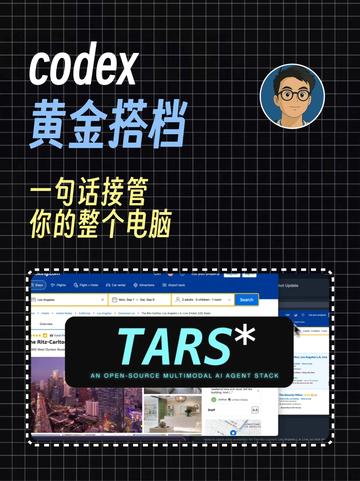
Image 1 — Record (original items readable)
A. Readable text (facts: verbatim or line-by-line legible text)
- codex
- 黄金搭档 (Golden Partner)
- 一句话接管 (One-sentence takeover)
- 你的整个电脑 (your entire computer)
- TARS*
- AN OPEN-SOURCE MULTIMODAL AI AGENT STACK
- Search
B. Interface steps / operation hints (facts)
- The image does not show clear, legible step-by-step instructions or a sequential UI flow (only a visible “Search” button text; no other explicit step text was found).
C. Chart/data (facts)
- No tables or numeric charts; no numeric data readable.
D. Visible phenomena / visual elements (facts)
- Background is a black grid (white grid lines).
- Top-left shows the English word “codex” in italic white font.
- “黄金搭档” (Golden Partner) appears in Chinese in yellow/gold color under “codex”.
- A circular avatar (cartoon person wearing glasses with a blue circular border) appears toward the center-right.
- A white dashed or dotted rectangle is centered lower; it contains a screenshot-like image.
- The screenshot has a black banner overlay with large “TARS*” text; below the banner is the subtitle “AN OPEN-SOURCE MULTIMODAL AI AGENT STACK”.
- Screenshot edges show typical browser UI elements (address bar, tab bar, a blue-style top bar); a blue “Search” button is visible on the right side.
- The left side of the screenshot shows thumbnails of city/building or interior images (a multi-image mosaic) — these are image contents, not textual data.
- Overall colors are mainly black/white/blue/yellow.
E. Unreadable or partially visible content (facts marked unreadable)
- Address bar and browser tab text in the screenshot are unreadable (except for “Search”).
- Text above or near the left thumbnails is incomplete and cannot be fully identified (possibly “Ritz-Carl…” or similar, uncertain).
- Other small-size English or Chinese text in the screenshot is not legible.
- Any text under or near the circular avatar is unreadable (if present).
F. Inferences (clearly marked as inferences, not direct image facts)
- The image may be a guide, poster, or cover art themed around a combination of “codex” and “TARS” (inference based on title text and the subtitle “AN OPEN-SOURCE MULTIMODAL AI AGENT STACK”).
- The Chinese subtitle “一句话接管你的整个电脑” suggests a product or method aimed at controlling or managing a whole computer via short instructions (inference).
- The circular cartoon avatar may represent the author, instructor, or brand identity (inference).
- The dashed rectangle with a browser screenshot likely demonstrates an example interface or feature (inference).
- The asterisk after “TARS*” might indicate a footnote or version marker, but no explanation is visible in the image (inference).
(The above omits any visible imperative or operative instructions in the image per requirements; it only records readable text, interface phenomena, and reasonable inferences. No addition or fabrication beyond unreadable content was made.)
SkillPI Creation Analysis
Purpose of the work (inference):
- The image appears to be promotional or cover-style artwork indicating a combination of “codex” and “TARS*”, with the subtitle “AN OPEN-SOURCE MULTIMODAL AI AGENT STACK” and a Chinese tagline roughly meaning “one sentence to take over your entire computer.” It likely aims to present or advertise an open-source multimodal AI agent project or demonstration UI rather than provide a full technical tutorial.
Image evidence highlights (facts):
- Readable terms include “codex”, “Golden Partner” (黄金搭档), “one-sentence takeover”, “your entire computer”, “TARS*”, “AN OPEN-SOURCE MULTIMODAL AI AGENT STACK”, and “Search.”
- The screenshot includes browser UI elements and a visible “Search” button, indicating a browser-based demo or frontend. However, the address bar and other small texts are unreadable, limiting direct traceability.
- The image does not contain step-by-step instructions, installation commands, or configuration details; most fine-grained text in the screenshot is illegible.
Associated skills and generalized usage steps (derived from visible concepts; these are generic, actionable steps rather than project-specific commands):
1. Define the use case: decide what the multimodal agent should do on the desktop (e.g., file operations, browser automation, multimodal search/display).
2. Prepare environment: set up required runtime environments (commonly Python, virtual environments, drivers for GPU if needed).
3. Install dependencies: install open-source libraries and model runtimes required by the agent and any web frontend or backend services.
4. Connect modalities: configure inputs/outputs such as vision (camera/screenshots), text, audio, and system control interfaces (keyboard/mouse or command execution), ensuring proper permissions.
5. Frontend/demo setup: deploy or launch a browser-based UI if needed to replicate a “Search” demo button and result rendering.
6. Test and validate: run sample queries or commands to confirm the agent responds and triggers intended local actions.
- Note: These steps are intentionally general because the image does not include concrete tool names, repository URLs, or installation commands.
Prerequisites and items to verify before attempting reproduction:
- Verify project identity and source: the image shows “codex” and “TARS*” text, but whether these refer to specific, publicly available projects or internal names must be confirmed by checking the original video page or the project’s repository/documentation.
- System permissions and security: any solution that executes local commands or controls input devices must be evaluated for security and privacy implications; the image provides no guidance on safety or permissions.
- Model/runtime requirements: the image does not specify model names, sizes, or hardware requirements (GPU vs CPU); these are necessary to plan resource allocation and must be found in the upstream documentation.
- Licensing and distribution: confirm whether the referenced components are fully open-source and under what license, since the image alone cannot verify this.
Source and verifiability:
- Original source URL: https://www.douyin.com/video/7663048469124320512
- The provided material is a source summary (not full source code or docs). To obtain reproducible instructions, installation commands, or repository links, one must consult the original video details or official project pages referenced by the video.
Conclusion (cautious):
- The image clearly signals an open-source multimodal AI agent concept and shows UI elements like a browser demo with a “Search” button, but it lacks actionable technical details. Specific tools, installation steps, model identifiers, and safety considerations are not present in the image and must be verified from the original project documentation before attempting to reproduce any functionality.