
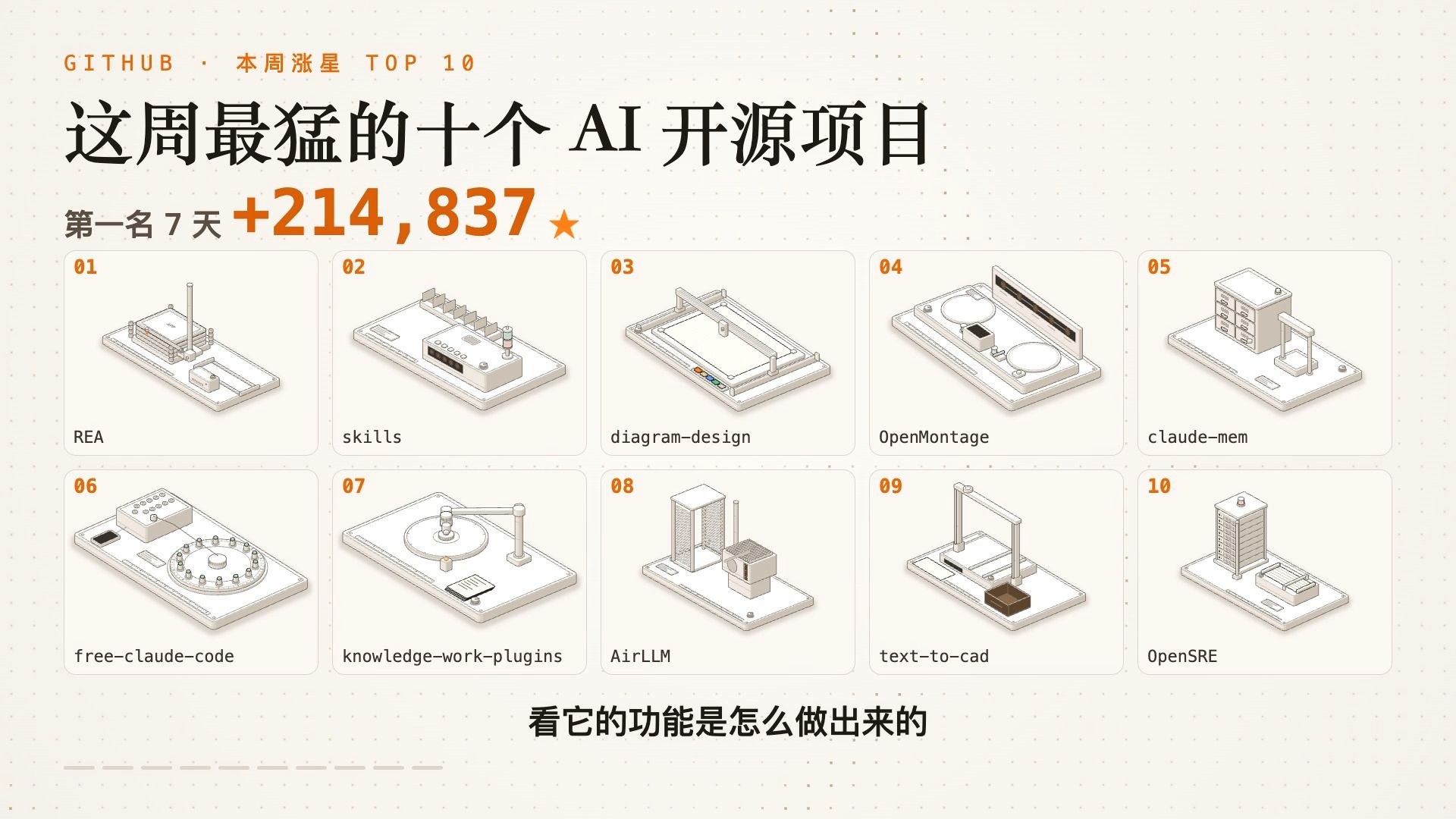
Top 10 AI open-source projects with the biggest star gains on GitHub this week
A practical quick-start for the week's top 10 rising AI open-source projects: how to clone repos, run demos, set up API keys or GPU resources, and verify functionality for REA, AirLLM, text-to-cad, OpenMontage and claude-mem. Includes what to check before testing and integration tips.
Image Analysis
Figure 1 — Evidence notes (recorded top-to-bottom, left-to-right in the image)
Facts (readable text, UI elements, visible data and phenomena in the image)
- Small top text (center-left): "GITHUB · This week's star gains TOP 10"
- Main title (center, large black text): "The 10 most explosive AI open-source projects this week"
- Subtitle (below main title, left): "#1 7 days +214,837 ★"
- "+214,837" is a prominent orange large number with a star symbol (★) to the right.
- "7 days" appears immediately after "#1" (i.e., "#1 7 days").
- The main area contains 10 numbered tiles (two rows; each tile is a light rounded panel with an isometric machine/device illustration inside):
- Each tile's top-left has an orange number (01 to 10).
- Each tile has a project name displayed beneath the panel (lowercase or mixed-case):
01 REA
02 skills
03 diagram-design
04 OpenMontage
05 claude-mem
06 free-claude-code
07 knowledge-work-plugins
08 AirLLM
09 text-to-cad
10 OpenSRE
- Each panel contains an isometric-style mechanical/device illustration; the palette is beige + light brown + orange.
- Panel appearance and layout: each tile has a thin border and rounded corners; the numbering and project names are shown outside or in the bottom margin of the panel per the layout.
- Center-lower black text: "See how its functions are built"
- Background is a beige dotted/grid texture; overall page uses beige background, orange accents, and black body text.
- Bottom-left has light dashed lines and small shapes (decorative or progress markers).
Not readable / unclear elements
- Very small text or labels on tile bases or illustrations are not legible (too small or low resolution).
- Small icons, numbers or scales inside the mechanical details are not readable.
- Tiny text/icons at far left or right corners (if present) cannot be read.
- Smaller annotations between or next to panels are not legible.
Inferred (based on visual context, not directly readable — marked as inference)
- "+214,837" likely indicates the number of stars the first-ranked project gained in 7 days (inference: 'star gain').
- The overall graphic is likely a "this week's top 10 GitHub star gains for AI open-source projects" list (inferred from title and header).
- The mechanical illustrations are symbolic visual metaphors for each project (illustrative, not screenshots).
- The orange numbering corresponds to rank (01 = #1 through 10).
- The bottom text "See how its functions are built" suggests a following section that explains implementation, which is not visible in this image.
Notes
- The image contains no clear interaction steps (button clicks or menu paths) or plotted axes/coordinates; aside from the subtitle "7 days +214,837★" no other numeric chart data is visible.
SkillPI Creation Analysis
Purpose and key points:
- The source is a visual summary/leaderboard that highlights the 10 AI open-source repos with the largest recent star increases on GitHub. Each listed project is presented with a one-minute explanation (what it does, why it's trending, and what capabilities it can add) plus an isometric mechanical animation illustrating the idea.
Image evidence to verify:
- The header shows "GITHUB · This week's star gains TOP 10" and a main title indicating "The 10 most explosive AI open-source projects this week."
- Subtitle shows "#1 7 days +214,837 ★" and the grid lists the 10 project names: REA, skills, diagram-design, OpenMontage, claude-mem, free-claude-code, knowledge-work-plugins, AirLLM, text-to-cad, OpenSRE.
Practical steps to try these projects (general quick-start pattern; consult each repo README for exact commands):
1) Clone the repository (git clone <repo URL>) using the links provided in the source.
2) Read the README to confirm purpose, license, demo requirements (models, API keys, hardware).
3) Install dependencies in a virtual environment (pip/conda/npm as specified).
4) Provide credentials or model files if required (e.g., Anthropic/Claude API keys, local model weights, or specific inference backends). For AirLLM, check the repo for quantization/back-end instructions needed to run large models on low-memory GPUs.
5) Run the provided demo or example script/notebook and compare outputs with the repository examples.
6) Integrate selectively into your workflow if the project meets your requirements (e.g., using diagram-design to auto-generate diagrams, OpenMontage for video workflows, OpenSRE for incident triage automation).
Prerequisites and verification items before attempting:
- Hardware constraints: projects that claim low-VRAM operation (e.g., AirLLM) typically rely on quantization or specific backends; verify required toolchains and actual memory footprints in the repo documentation and issues.
- API/model access: Claude-related projects likely require Anthropic API access or specific credentials; confirm account permissions, quota, and terms of use before testing.
- Licensing: confirm each repository's LICENSE to ensure permitted usage in your intended context (research, internal, commercial).
- Stability and maintenance: check repository activity (issues, recent commits) to gauge whether the repo is a maintained tool or an experiment that may lack production-ready support.
- Privacy/security: for projects that process production data (e.g., OpenSRE), evaluate data exposure and compliance implications before integration.
Direct links listed in the source (verify in original video description for any truncated links):
- REA: https://github.com/morluto/rea
- skills: https://github.com/mattpocock/skills
- diagram-design: https://github.com/cathrynlavery/diagram-design
- OpenMontage: https://github.com/calesthio/OpenMontage
- claude-mem: https://github.com/thedotmack/claude-mem
- free-claude-code: https://github.com/Alishahryar1/free-claude-code
- knowledge-work-plugins: https://github.com/anthropics/knowledge-work-plugins
- AirLLM: https://github.com/lyogavin/airllm
- text-to-cad: the link in the source is truncated — check the video's full description or the author page for the complete URL
Items to verify (recommended):
- Confirm whether "+214,837" is the actual star gain over 7 days and the data source/measurement method.
- Confirm per-repo runtime requirements (GPU VRAM, model weights, API access) and whether demos reproduce the claimed behaviors locally.
Caution: the above are conservative, reproducible-focused steps. For hands-on guidance on any one of these repositories (for example, step-by-step to run AirLLM on a 4GB GPU or to try text-to-cad outputs), I can produce a more detailed quick-start checklist and common troubleshooting commands after selecting the target repo.