
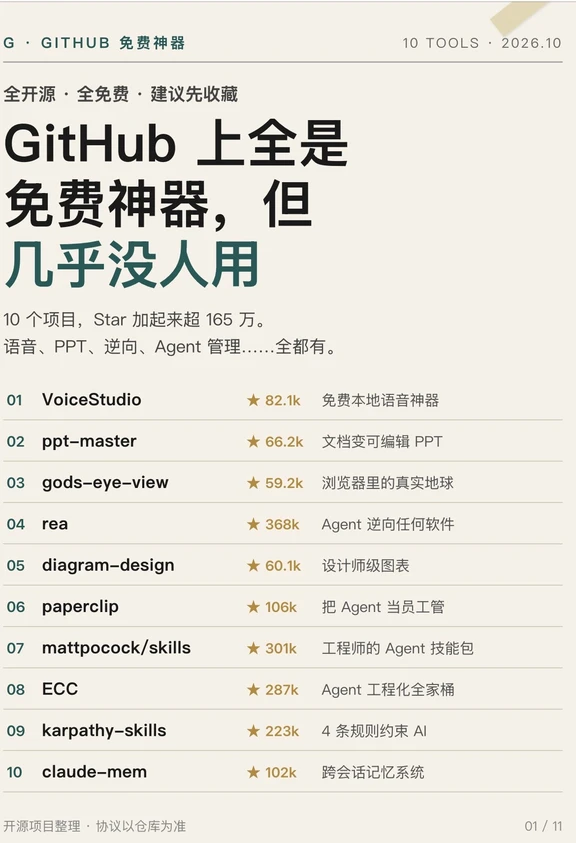
GitHub Is Full of Free Gems — But Almost Nobody Uses Them!
A practical guide to discovering, installing and validating 10 high-star open-source AI tools covering local voice cloning, document-to-editable-PPT conversion and multi-Agent management. Includes environment checks, general install/run steps and items to verify before production use.
Image Analysis
Page 1 — Facts (only readable text, UI elements, chart data and visible phenomena, in original order)
Top of page and overall info
- Top-left small title: G · GITHUB Free Tools
- Top-right small title: 10 TOOLS · 2026.10
- Slogan line (near the title): Fully open-source · Completely free · Save to favorites recommended
- Main title (multi-line, different font sizes and colors):
- Line 1 (large): GitHub is full of
- Line 2 (larger, part dark green): free gems,
- Line 3 (larger, green): but almost nobody uses them
- Subtitle/explanation (one line under the main title): 10 projects, stars total over 1.65M. Voice, PPT, reverse engineering, Agent management... all included.
- Bottom-left small text: Open-source project compilation · Agreement subject to each repo
- Bottom-right: 01 / 11 (page indicator, showing this is page 1 of 11)
Project list (index, name, star count, short description, in order)
01
- Name: VoiceStudio
- Stars: ★ 82.1k
- Description: Free local voice tool
02
- Name: ppt-master
- Stars: ★ 66.2k
- Description: Convert documents into editable PPT
03
- Name: gods-eye-view
- Stars: ★ 59.2k
- Description: Real Earth in browser
04
- Name: rea
- Stars: ★ 368k
- Description: Agent reverse-engineer any software
05
- Name: diagram-design
- Stars: ★ 60.1k
- Description: Designer-grade charts
06
- Name: paperclip
- Stars: ★ 106k
- Description: Manage Agents like employees
07
- Name: mattpocock/skills
- Stars: ★ 301k
- Description: Engineers' Agent skill pack
08
- Name: ECC
- Stars: ★ 287k
- Description: Agent engineering toolkit
09
- Name: karpathy-skills
- Stars: ★ 223k
- Description (image text): (see below “Unclear / uncertain”)
10
- Name: claude-mem
- Stars: ★ 102k
- Description: Cross-session memory system
Visible UI / design phenomena (facts)
- Background is beige/light cream; text uses dark colors and green as main palette; project numbers shown as green circular numbers.
- Each project row shows a two-digit index (01, 02, etc.) on the left; star icon and star count appear on the right, separated from the name.
- Project names use monospaced or sans-serif font; descriptions are smaller font size.
- Footer shows “01 / 11”, indicating this is the first page of a series (11 pages total).
- Horizontal separators visually separate project rows and left-side numbers (visual elements, not text).
Page 1 — Unclear / uncertain content (itemized)
- The exact number and spacing of ellipsis characters in the subtitle’s trailing dots (“.....”) are visual and do not affect understanding.
- The description for item 9 (karpathy-skills) has partly blurred or compressed text; visible character sequence suggests something like “4 rules … AI” but the middle words are not legible, so exact phrase cannot be determined.
Inferred (reasonable inferences marked as such, distinct from facts)
- The headline “GitHub is full of free gems, but almost nobody uses them” is likely the author’s viewpoint or page title introducing the 10 listed GitHub projects (inference, not directly stated in the image as fact).
- The item 9 description likely relates to the karpathy-skills repo and may state that the repo contains a “4 rules” methodology for constraining AI or similar (inference due to blurred text and lack of full phrase).
Notes
- This record strictly follows readable image text and visible UI elements; unclear or blurred text is labeled “uncertain/unclear” and reasonable inferences are listed separately. Any UI instructions or action prompts in the image were ignored per the user requirement.
SkillPI Creation Analysis
Purpose of the asset: The image and accompanying summary function as a curated one-page list to surface 10 high-star, free open-source GitHub projects across categories (local voice/voice cloning, document-to-PPT conversion, geospatial browser view, reverse engineering, and Agent-related engineering/skill tools). It is intended as a discovery checklist for users who want practical open-source tools to try.
Image evidence: The screenshot explicitly lists project names with star counts and short descriptions. It contains UI metadata (10 TOOLS · 2026.10, page index 01 / 11) supporting that this is part of a multi-page compilation. Item 9 (karpathy-skills) has a partially illegible description; all other names and star counts are legible.
Associated skills and generic steps to use them (actionable, repository-agnostic):
1) Find the repository by name or link and open its README to confirm purpose, requirements, usage examples, and license.
2) Clone or download the repo (git clone <repo-url>) and inspect code and example notebooks/demos.
3) Prepare the environment as specified (language runtimes such as Python/Node, package managers, virtual environments, or Docker).
4) Install dependencies and any optional model weights or data files documented by the repo.
5) Run the minimal demo example to validate outputs (e.g., synthesize a short audio clip, convert a sample PDF to PPT, launch a demo UI).
6) For Agent/automation tools, verify persistence settings, memory, and any external API integrations in a sandbox before production use.
Reproduction prerequisites (what to check before trying to reproduce results):
- Correct repository URL and network access to fetch code and any external data/models. The provided material does not include direct links; you must locate each repo by name.
- Local tooling: git, appropriate runtimes (Python, Node.js, Docker), and package managers.
- Resource requirements: some projects may require GPU or significant RAM for local models, or they may need external paid APIs—confirm in each repo.
- Legal and privacy checks: review repository license and any third-party data/model licenses or terms of service.
Items to verify (claims in the summary/image that need confirmation at source repos):
- VoiceStudio’s claim of being a “fully local ElevenLabs alternative” — verify whether it runs fully offline, requires model downloads, or uses third-party services.
- ppt-master’s ability to convert arbitrary PDF/Word inputs into truly editable native PPT (not image-based) — validate with representative documents.
- gods-eye-view’s scope for “real-time satellite view, tracking planes/ships/weather” — confirm data sources and real-time capabilities in the repo/demo.
- rea’s description that it can “reverse-engineer any software and output evidence-backed conclusions” — check the repo for exact capabilities, supported targets, and limits.
- karpathy-skills’ blurred description mentioning “4 rules” — visit the repository to confirm what those rules are and how they apply.
- For Agent frameworks listed (paperclip, mattpocock/skills, ECC, claude-mem), verify external dependencies (APIs, model providers), persistence options, and safety/privacy features.
Summary note: The supplied image and summary are a valid curated pointer to potentially useful open-source tools. They are suitable for discovery and initial prioritization, but every claim about local execution, real-time data, or integration should be validated by visiting each repository, reading its README, and testing the provided demos. The material does not include direct repo links, full readme contents, or technical prerequisites beyond the short descriptions, so do not assume full offline operation or zero external dependencies without verification.