
Skill Treasure List | Writing · Design · Paper · Development
Learn how to combine and orchestrate multiple Skills to expand an AI agent from a coding assistant into a modular workstation that supports paper writing, visual design, data analysis and PPT generation. Covers identifying needs, enabling skills, Jupyter integration for experiments, task decomposition with planning Skills, and chaining multi-skill workflows. Note: image source metadata requires verification.
Image Analysis
Source and image metadata: Source URL: https://www.xiaohongshu.com/explore/6aa7df66000000000d024693?xsec_token=YBB9CArnN4e0VilPMW-L_A-AbhEOMJg8glD9krWZWfc8k%3D; image evidence: image #1; image URL: not provided (incomplete)
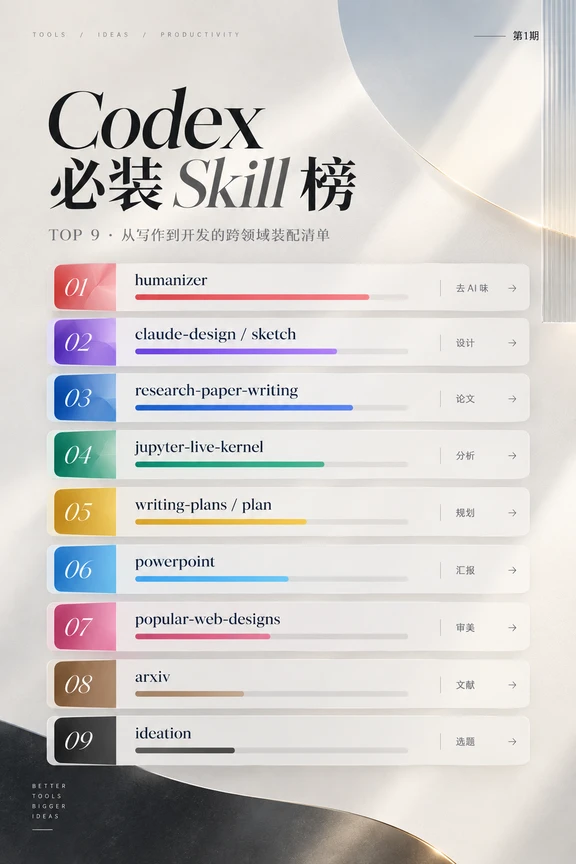
Readable facts from the image (interface elements and visible data):
- Small top text (English): "TOOLS / IDEAS / PRODUCTIVITY"
- Top-right Chinese: "第1期"
- Main title (mixed): "Codex 必装 Skill 榜"
- Subtitle (Chinese + English): "TOP 9 · 从写作到开发的跨领域装配清单"
- The list contains nine items numbered 01 to 09, each as a card with a colored left index and a right-pointing arrow (→). Each item shows an English main label and a one-word or short Chinese category on the right. Items as shown (verbatim from the image):
01. humanizer right-side Chinese: 去 AI 味 →
02. claude-design / sketch right-side Chinese: 设计 →
03. research-paper-writing right-side Chinese: 论文 →
04. jupyter-live-kernel right-side Chinese: 分析 →
05. writing-plans / plan right-side Chinese: 规划 →
06. powerpoint right-side Chinese: 汇报 →
07. popular-web-designs right-side Chinese: 审美 →
08. arxiv right-side Chinese: 文献 →
09. ideation right-side Chinese: 选题 →
- Each item has a horizontal progress bar beneath it (color matches the left index color) with varying fill lengths.
- Vertical left-bottom English text: "BETTER TOOLS BIGGER IDEAS"
- Visual style: rounded-rectangle cards, light backgrounds, soft shadows and highlights, a circular gloss decoration at card top-right. Overall tone is warm and bright, using gradients and shadows.
Visible approximate progress bar fill ratios (visual estimates):
- 01 humanizer: ~85%–90% filled (red)
- 02 claude-design / sketch: ~70%–75% filled (purple)
- 03 research-paper-writing: ~60%–65% filled (blue)
- 04 jupyter-live-kernel: ~50%–55% filled (green)
- 05 writing-plans / plan: ~40%–45% filled (yellow)
- 06 powerpoint: ~55%–60% filled (light blue)
- 07 popular-web-designs: ~30%–35% filled (pink)
- 08 arxiv: ~20%–25% filled (brown)
- 09 ideation: ~15%–20% filled (gray)
Unclear or unreadable items:
- Very small annotation text between labels and the Chinese category may exist but is too fine to read.
- The image lacks a complete image URL, publisher info, or timestamp; the recorded image source is incomplete and requires the original page for verification.
SkillPI Creation Analysis
Purpose and interpretation:
- The poster/note functions as a curated “Skills” recommendation list for extending an AI agent beyond coding into writing, design, academic paper work, data analysis, presentations and ideation. The text emphasizes that the model is the "brain" and Skills are stacked capability packages to make the agent a modular workstation.
Image evidence highlights:
- The image pairs each English Skill label with a short Chinese usage tag and visualizes a relative bar for each item, supporting the claim of a Top 9 curated list. The missing image metadata means the context (publish time, author) cannot be verified from the provided image alone.
Practical steps to apply the concept (based on common practice; not a claim of reproducing the original):
1) Define the target workflows (e.g., paper drafting, data experiments, slide deck generation, visual design references).
2) Locate and enable corresponding Skills or plugins in your agent platform (platform must support modular Skills/plugins).
3) Prepare environment and credentials for Skills that require external resources (e.g., Jupyter kernel access, file storage, APIs). Ensure the agent can execute or communicate with those environments.
4) Use a planning Skill (writing-plans / plan) to decompose complex tasks into steps; assign steps to appropriate Skills (e.g., research-paper-writing for drafting, jupyter-live-kernel for experiments, powerpoint for slide generation).
5) Chain outputs between Skills, converting formats as needed (experiment outputs → summaries → slides). Validate context and formatting at each handoff.
6) Apply style/refinement (humanizer or manual editing) for tone, academic conventions and readability.
Prerequisites for reproducing a similar workflow:
- The agent host must support installation/enabling of Skills or plugins and inter-skill communication.
- Access rights and connectivity for external tools (e.g., a Jupyter server, literature databases) must be configured.
- Clear task goals, data sources, and compliance constraints (citations, data privacy) are required.
Items to verify before operational use:
- Exact canonical names and availability of each Skill listed (e.g., whether “humanizer”, “claude-design / sketch”, etc. are published Skill names on a given platform).
- The meaning of the visual progress bars (recommendation strength, maturity, popularity, or other metric).
- Full image/page metadata (original page, publication time, author) since the provided image URL is incomplete.
- Compatibility between named Skills and the specific agent platform or model you intend to use.
Closing factual note: the above is based on the provided summary and the readable image evidence; missing image metadata and Skill origin details remain to be confirmed.