
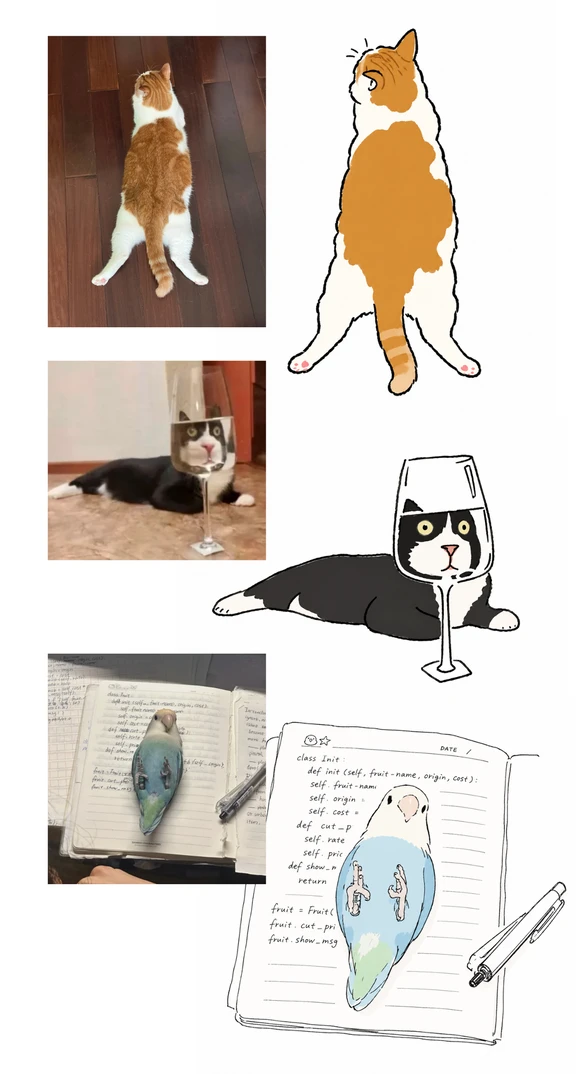
Created an Abstract-Style Skill
Learn how to use the photo-to-doodle skill to turn uploaded photos into relaxed, playful minimalist hand-drawn doodles. Steps covered: use an Agent that accepts images, upload your photo, enter the prompt “Use photo-to-doodle to convert the photo I upload into a relaxed, playful minimalist hand-drawn doodle”, then download the stylized output. Verify the skill download link and Agent compatibility before use.
Image Analysis
Image 1 (top-left photo)
Facts:
- Visible subject: an orange-and-white domestic cat lying on the floor with its back to the camera.
- Pose details: hind legs splayed outward in a frog-like or supine stretch; tail hangs down covering the space between the hind legs; head turned to the left, ears facing left.
- Background and material: dark wooden floor (narrow plank joins), wood has glossy reflections.
- Lighting: indoor lighting, soft light from above or side (no strong shadows).
Not identifiable:
- No readable text or UI elements.
Speculation (marked as speculation):
- The cat is likely resting/relaxed; floor is likely a living-room or bedroom hardwood floor.
Image 2 (top-right illustration)
Facts:
- Visible subject: a cartoon/line-art illustration corresponding to Image 1, depicting the same orange-and-white cat pose (back, splayed hind legs, tail down).
- Illustration details: black outline strokes, orange fill areas on back and tail, short lines above the head indicating motion or surprise; pink dots on paw pads.
- No readable text or UI elements.
Not identifiable:
- No text to recognize on the illustration.
Speculation:
- The illustration is an artistic redraw of Image 1 (pose and color blocks correspond).
Image 3 (middle-left photo)
Facts:
- Visible subject: a black-and-white cat lying on a floor with a stemmed glass placed between the camera and the cat.
- Optical effect: liquid and glass in the stemmed glass refract/magnify the cat's face, making the face appear framed or distorted within the glass.
- Pose and background: cat lying on a light-colored (possibly stone or tile) floor; background shows a light wall and darker doorframe or furniture edge.
- No readable text or UI elements.
Not identifiable:
- Whether there is liquid in the glass (it appears there may be a transparent liquid, but uncertain).
Speculation:
- The photo uses the glass refraction for a humorous visual effect; environment likely an indoor tile/stone floor area.
Image 4 (middle-right illustration)
Facts:
- Visible subject: an illustration corresponding to Image 3, showing a black-and-white cat and a stemmed glass; the glass outline is clear and the cat's face appears wrapped by the glass.
- Illustration details: enlarged-looking eyes, clear white of the eyes, cat body represented by black/white color blocks, glass drawn with linework including a base and stem.
- No readable text or UI elements.
Not identifiable:
- No text to recognize on the illustration.
Speculation:
- The illustration is an artistic redraw of Image 3, preserving the visual gag of the glass refraction.
Image 5 (bottom-left photo)
Facts:
- Visible subject: a small parrot (blue-green tonal mix, possibly a budgerigar or similar small parrot) lying on an open notebook page.
- Pose and position: bird is prone or sideways on the right-hand page, head toward the upper/upper-left of the page, body covering part of handwritten text.
- Stationery: a pen is visible at the right side of the notebook (metal clip or cap visible); the left page contains dense cursive handwriting in dark ink.
- Notebook detail: ruled paper (single horizontal lines), page edge shows coil binding or notebook edge (not fully clear).
Not identifiable:
- The handwriting on the left page is not legible (cursive, small, and partially covered by the bird).
- The language of the handwriting is not fully certain (appears to be English or other Latin alphabet but uncertain).
Speculation:
- The notebook is for study or notes; the bird is a pet casually resting on it.
- The pen is likely a ballpoint or gel pen.
Image 6 (bottom-right illustration)
Facts:
- Visible subject: an illustration corresponding to Image 5, showing a blue-and-white small bird on an open notebook with a pen to the right.
- The illustration page contains printed/handwritten-style English code or pseudocode fragments; several words or code tokens are directly readable (see list below).
- Readable English words/tokens (fragments directly visible in the image):
- "DATE /" (near the top-right or header area, "DATE" is clear)
- "class" (visible near top)
- "def" (appears multiple times)
- "self" (appears multiple times)
- "fruit" (appears multiple times)
- "origin" (visible)
- "cost" (visible)
- "return" (visible in middle or lower page)
- Code structure hints: the page shows Python-like class and method definitions (use of "class", "def", "self"), and fragments such as "fruit = Fruit(" suggesting an instantiation pattern (full text not complete).
Not identifiable:
- Complete lines of code are not fully legible (only local words are readable; punctuation, underscores, hyphens, and full parameter lists are not fully clear).
- Other short header/footer text is unclear.
Speculation:
- The illustration intends to show the bird on notes containing object-oriented example code; the code appears illustrative/pseudocode and may not be syntactically complete.
- "DATE /" indicates a date field on the page.
Overall composite image notes
Facts:
- The composite image pairs three photos with their corresponding illustrations: orange-and-white cat, black-and-white cat + glass, and small blue bird + notebook; each pair shows photo (left) and illustration (right).
- Each illustration preserves main composition and the humorous element from its photo (pose, glass refraction, bird-on-notes) and renders them with linework and flat color blocks.
- Only the bottom-right illustration (Image 6) contains readable English text fragments (code-related); other parts contain no readable text or UI steps/data.
Not identifiable (overall):
- Photographer, timestamps, or any watermark/source URLs are not visible or discernible in the image.
- Handwritten content on the notebook in Image 5 is not readable as full words or sentences.
Speculation (overall):
- The composite likely serves to demonstrate a photo→illustration conversion, showing how real pet moments can be stylized into the author's illustration style.
SkillPI Creation Analysis
Intended use:
- The post demonstrates a photo-to-illustration workflow using the author's custom abstract/messy doodle style bundled as a skill named photo-to-doodle. It is presented as a visual before/after showcase for turning pet photos into minimalist, playful hand-drawn doodles.
Key image evidence summarized:
- Three photo/illustration pairs: orange-and-white cat, black-and-white cat with stemmed glass (refraction gag), and a blue-green small parrot on a notebook (notebook shows code fragments in the illustration). Only the bird-notebook illustration contains readable English code tokens (class, def, self, return, etc.).
- The author notes some example photos came from the web and offers to remove infringing images on request; copyright status should be checked before reuse.
Verified steps to use the skill (as explicitly stated in the source):
1) Use an Agent that accepts image input and can call the skill (the source states "使用任意Agent" / "Use any Agent");
2) Upload the photo you want to convert;
3) Enter the prompt: "Use photo-to-doodle to convert the photo I upload into a relaxed, playful minimalist hand-drawn doodle" (source prompt translated to English);
4) Receive the style-transformed image output from the Agent and save/download it.
- These steps are taken directly from the source text. The source also mentions a "red skill" link for viewing or downloading the skill, but that link is not included in the provided material.
Prerequisites and items to verify before attempting reproduction:
- Prerequisites: an Agent capable of image input and invoking external/custom skills; the photo-to-doodle skill must be available to that Agent (download/installation or platform-specific availability). The source does not provide technical details like input image size, accepted formats, or output resolution.
- To verify: where to access/download the photo-to-doodle skill (the post references "red skill" but no URL was provided in the excerpt), which Agents/platforms support it, licensing/usage terms for the skill, and whether example images used in the post are cleared for reuse.
Caveats and limitations:
- The description and usage instruction in the source are limited to a single prompt and a general "use any Agent" statement. No implementation details, model names, parameter settings, or compatibility notes are provided, so operational success depends on platform-specific support which must be confirmed.
Source reference (exact URL preserved):
- https://www.xiaohongshu.com/explore/6a8ebf750000000028006a3e?xsec_token=YBwo5GqIQO60MpAJif2Kq7uq0DdHNt-v1--o1W3HUxR3Q%3D
Note: This interpretation follows only the information explicitly present in the provided summary. The post’s claim that the author has made a downloadable "red skill" is not verifiable from the excerpt alone; do not assume public availability or exact platform compatibility without checking the original post or the author's download link.