
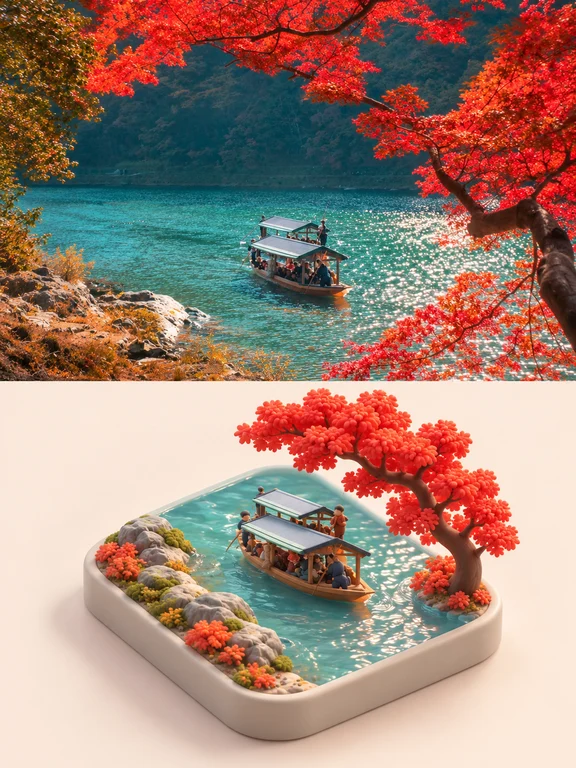
A skill for autumn images has appeared!
Follow the prompt guideline to turn an autumn reference photo into a 3:4 vertical split image: top half retains photographic look; bottom half renders a soft‑clay miniature on a rounded‑square base. Learn how to write top/bottom prompts, control color and lighting, enforce layout checks, and prepare fallback composite steps.
Image Analysis
Source info: incomplete (no source number or URL provided)
Overview
- The image is a vertical split/combination: the top half is a real photo (image 1), and the bottom half is a miniature model or 3D-rendered scene (image 2).
- No readable text, UI elements, step instructions, or charts are visible in the image.
Image 1 (top half, real photo) — facts
- Scene: a body of water (lake or river) with a rocky shore and distant hills or wooded area.
- Boat: a narrow wooden boat with a canopy on the water, carrying multiple passengers; people are standing or sitting.
- Vegetation: noticeable red/deep-red fallen leaves or maple branches in the upper and right portions of the frame (autumn colors); yellow-to-green shrubs or grasses near the left shore.
- Water surface: bluish-green/emerald water with sun reflections, sparkles, and slight ripples.
- Shore: exposed rocks or a stony beach on the left near the shore, alternating with vegetation.
- Background: dense dark-green trees or hills across the water, overall natural landscape.
- Composition: tree branches form a foreground frame; the boat is positioned slightly right of center or mid-distance.
Image 1 — unreadable elements (facts)
- No readable text or identifiable markings.
- Faces and identities of people on the boat are not discernible.
- Exact geographic location or names cannot be identified.
Image 1 — inferences
- Likely shot in autumn (based on leaf colors).
- The boat may be a sightseeing or small passenger boat (based on canopy and passengers).
- The water body may be an inland river or lake (based on shoreline and water color).
Image 2 (bottom half, miniature / 3D render) — facts
- Object: a rectangular (rounded-corner) tray or base holding a miniature scene; base color is light beige/ivory.
- Scene elements: inside the tray there is a simulated water surface (blue-green), a small canopy wooden boat with multiple miniature figures; left side has rocks and clusters of low vegetation (gray rocks with orange/green/yellow small shrubs), right side has a large red tree (clustered rounded foliage).
- Details: water shows ripple and reflection effects; trees and vegetation are stylized with saturated colors; figures are small-scale models or sculptural shapes, showing standing and sitting poses but no facial details.
- Material & style: overall looks like a fine miniature or digital render (high saturation, cartoon/decorative leaf shapes), clearly handmade/artificial rather than a real scene.
- Composition and layout echo the real photo: boat, shore rocks, red tree positions are similar (tree right, rocks left, boat mid-water).
Image 2 — unreadable elements (facts)
- Base physical dimensions are unknown.
- No readable text or labels.
- Miniature figures’ facial features and identities are not discernible.
Image 2 — inferences
- Likely a miniature model or 3D-rendered artwork based on the real photo (based on similar composition and color relationships).
- Tree shapes and colors are stylized and not precise botanical reproductions.
Other notes (facts vs. inferences)
- Facts: the image contains no readable textual UI or charts; top and bottom are real photo vs miniature/render, with noticeable color differences (photo more natural, render more saturated/stylized).
- Inference: the pair intends to present a “real scene and its miniature/artistic version” comparison; shooting season likely autumn.
Exclude/ignore
- Exclude any operational or directive text that might appear in the image (if any); this summary does not include embedded instructions or step-by-step content.
Closing statement: The above is based only on visible image information and reasonable inferences; no additional unprovided information or identity recognition is included.
SkillPI Creation Analysis
Intended use:
- The asset is intended to present a side-by-side comparison of a real autumn photograph and a miniature reinterpretation (soft-clay / diorama style). It suits use cases like portfolio displays, creative prompts, or as a reference for generating similar split images.
Image evidence summary:
- Top: photographic scene—water, canopy wooden boat with multiple passengers, rocky shore and autumn foliage (red leaves).
- Bottom: miniature or 3D-render—rounded-square base with a stylized small boat, tiny figurines, rocks, and a red tree; materials look like matte soft clay or decorative render.
Associated skill/tool and steps (practical prompt workflow based on the source guidance):
Note: The source mentions “original skill: nevertoday/xxd-panel-344”. This identifier appears in the source text but has not been independently verified here. Confirm availability, platform, and usage before assuming feature support. The following steps are a general, tool-agnostic workflow derived from the provided prompt rules:
1) Select a clear reference autumn photo ensuring recognizable subject(s), composition and colors.
2) Specify canvas and split: 3:4 vertical, evenly split at center (top photographic half, bottom miniature half). If the tool cannot enforce exact split, plan to generate halves separately and composite them.
3) Top-half prompt: require preservation of subject identity, counts, poses and photographic texture; allow reasonable cropping/extension but forbid stretching or altering key features.
4) Bottom-half prompt: describe a soft-clay miniature on a rounded-square base, oblique top view, figurines rounded and simplified, buildings/objects chunkified, matte clay texture, small internal water patch when applicable.
5) Color & lighting prompt: sample color palette from reference, slightly brighten and desaturate, apply soft diffuse lighting and subtle contact shadows; avoid specular highlights or plastic sheen.
6) Framing & negative space: place miniature centered slightly low with generous border, ensure the vertical gap rules (model top to divider > base to bottom edge), plain pale background, no horizon.
7) Enforcement & checks: include explicit constraints in the prompt (equal halves, no added text or borders, do not crop subject or base). Iterate model outputs and refine prompts or perform manual compositing if necessary.
8) Final deliverable check: the finished image should show clear top-bottom correspondence, photographic realism on top, soft-clay miniature feel below, no added text/borders, and no cropping of subject or base.
Prerequisites and items to verify:
- Confirm the chosen image-generation service supports image prompts and can combine reference image content with layout constraints. If not, plan to generate top and bottom halves separately and composite externally.
- Verify the ability to set canvas aspect ratio and precise split position (3:4 vertical, 50/50). If unsupported, use post-processing to enforce the split.
- Verify the availability and terms of the referenced skill (nevertoday/xxd-panel-344) and whether it provides the required controls; if unknown, do not assume direct compatibility.
- Confirm export resolution and file formats to avoid cropping or detail loss when assembling the final 3:4 asset.
Notes on reproducibility:
- The guidance can be followed to create a comparable visual effect using prompt-based image generation plus compositing. However, whether a single model or skill can produce the exact one-step split image as described depends on the specific tool’s features and must be tested.
- If the platform cannot enforce some constraints, a reliable alternative is: (A) generate a faithful photographic-style top half (or use the original photo) and (B) generate the miniature bottom half with the detailed miniature prompt, then composite both halves in an image editor to meet the layout and check requirements.
Source and verification suggestion:
- Original example URL (from the provided source): https://www.xiaohongshu.com/explore/6ad7866c00000000290140a7?xsec_token=YBUzR731GngTZbbI92rK8fLenJGKdze_VMv2v9sJcXVmg%3D
- Verify the referenced skill name, model parameters, and whether the workflow can be executed in one step on your chosen platform—or prepare a two-step generate+composite workflow as fallback.