
How to Turn a Photo into a City Collage Animation (Citywalk Style)
Learn the general workflow to convert a single photo into a Citywalk-style city collage animation: prepare the photo, choose or create a collage template, add city assets (Eiffel Tower, double-decker bus, Big Ben), set torn-paper and sticker outline effects, animate walking/motion paths, and export a short video. Confirm the specific skill/app, asset licensing, and supported export formats before reproducing.
Image Analysis
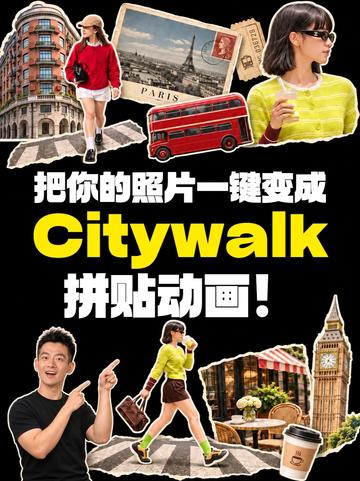
Image 1 — Readable text, interface elements, chart data and visible phenomena (organized as “Facts / Speculation / Unreadable” as required)
Facts (only record what is directly readable or visually obvious)
- Readable text (verbatim from image):
- 把你的照片一键变成
- Citywalk
- 拼贴动画!
- Visual composition and visible objects (objective description):
- Overall black background, with large “Citywalk” text (yellow, bold) centered slightly below center.
- Chinese large text “把你的照片一键变成” and “拼贴动画!” are above and below “Citywalk”, in white ("Citywalk" is English, yellow).
- Multiple collage-style cutout images with white outlines and torn-paper effect:
- Top left: a curved-facade apartment building (multi-storey).
- Upper center-left: a postcard/image containing the Eiffel Tower (recognizable tower silhouette), with a stamp on the postcard.
- Upper center: a red double-decker bus (London-style double-decker bus appearance).
- Upper right: a woman wearing black sunglasses and a yellow-striped top holding a beverage (half-body side view).
- Middle left-lower: a walking woman wearing a red top, white shorts, and a hat, located at a crosswalk.
- Center lower: a woman wearing bright yellow/fluorescent green top, dark short skirt, carrying a bag, walking on a crosswalk (walking pose, green shoe sole visible).
- Lower left: a man in a black top pointing upward with both hands (appears to present or direct attention).
- Lower right area: Big Ben (clock tower) and an outdoor café seating area (tables, chairs, floral decorations).
- Bottom right corner: a takeaway coffee cup (with a sleeve; sleeve shows a circular logo/pattern).
- The overall image conveys a travel/city-walk collage theme using multiple city scenes and people cutouts.
- Interface steps and chart data: the image shows no interface step prompts, numbered process steps, or chart data (no visible tables, charts, or step lists).
Unreadable / Insufficiently determinable items (specific parts noted)
- Small text on the postcard (aside from "PARIS" or the tower shape) and small text on the stamp are not legible for exact transcription.
- Details of the circular logo/pattern on the coffee sleeve are not legible; cannot confirm brand or lettering.
- Some small objects (e.g., outdoor café table surfaces, fine text on building facades) are not legible.
- Whether pictured people are real known individuals or models is indeterminable; do not make identity claims.
Speculation (reasonable inferences from the image content, not direct facts)
- The image is likely a promotional poster/advertisement for an app or service that promises to quickly turn a photo into a city-walk style collage animation (inferred from the text “把你的照片一键变成 Citywalk 拼贴动画!” together with visuals).
- The city elements used (Eiffel Tower, red double-decker bus, Big Ben) likely intend to represent different cities (Paris, London, etc.) to emphasize a travel/city-walk theme.
- The visual style (sticker/cutout collage) suggests use for social media promotion or as a mobile app promo cover.
Notes and limitations
- This record only compiles visible text and visual phenomena from the image; no in-image instructions were executed or followed (per user requirement to ignore in-image directives).
- No source ID or URL was provided in the image text; if citing the source, provide the corresponding reference.
SkillPI Creation Analysis
Intended use and deliverables:
- Intended use: Based on the image and text, the item appears to demonstrate or advertise a feature that converts a single photo into a “Citywalk” style city collage animation, aimed at creators of travel/city-walk short videos, social content, or collage animation assets.
- Deliverable examples (grounded in what the image shows, not a claim about a specific tool): a short video of a city collage animation, layer-based collage files or templates featuring sticker/torn-paper edges, templates including city motifs (Eiffel Tower, double-decker bus, Big Ben).
Key evidence from the image_text:
- The image explicitly contains the copy “把你的照片一键变成 Citywalk 拼贴动画!” and visual examples of a collage with identifiable city motifs (Eiffel Tower, London double-decker bus, Big Ben) rendered as sticker-like cutouts with white outlines and torn-paper aesthetics.
Associated Skill / tool steps (generic, require concrete tool confirmation before execution):
1. Prepare input photo: choose a clear portrait or city-scene photo where the subject can be placed within a collage template.
2. Select or load a Citywalk collage template that includes torn-paper and sticker outlines.
3. Fit and crop the photo into the template’s placeholder(s), adjusting subject position for intended motion paths.
4. Add or swap city assets (Eiffel Tower, double-decker bus, Big Ben, coffee cup) and arrange layer order and white-outline effects.
5. Configure animation: set walking/motion paths for people, entrance/exit transitions for stickers, torn-paper reveals, and any looping behavior.
6. Export as a short video or image sequence; verify resolution and format.
Reproduction prerequisites (items to confirm/obtain):
- The actual skill or application name, platform (mobile app, web service, desktop software), and acquisition path are required to reproduce the exact effect. Reference source URL given: https://www.douyin.com/video/7703949543049661696.
- Access to the collage templates and city asset library used by the skill; licensing or subscription may be necessary.
- Input photos need appropriate resolution and composition to integrate with templates.
Items to verify (do not invent):
- The material does not include a specific Skill name, platform, pricing, or UI screenshots—these must be confirmed with the content owner.
- Confirm export formats, availability of editable project files (e.g., layered PSD, AE project), and whether custom user assets are supported.
- Verify whether any included city artwork, logos, or stamps are subject to copyright, trademark, or usage restrictions for commercial use.
Facts, operational results, or verification notes:
- Visual evidence supports that a Citywalk-themed collage animation is being promoted, and the image lists recognizable city symbols and sticker-style visuals. However, full replication requires obtaining the actual skill/app and confirming its capabilities, parameters, and licensing (source reference: https://www.douyin.com/video/7703949543049661696).