
docker-patterns
预览截图
安装方式
先用 Prompt 核对来源与依赖。
用 AI 助手安装
复制提示词,让助手先核对固定版本和依赖。
查看 Prompt收起 Prompt
先检查当前 Agent 是否已安装 SkillPI Skill Finder。如果尚未安装,请按官方仓库的说明安装并启用:https://github.com/Findskills/skillpi。然后使用 Skill Finder 打开此 SkillPI 详情页并定位 "docker-patterns":https://skillpi.com/zh/skills/deepskill-18d3fbeb52b6a6bef361140037539ebb23dbe49f617662b392727ef7c3c740e8。安装前核对上游来源和版本:https://github.com/affaan-m/ECC。来源不一致时停止并说明差异。核对通过后,用 Skill Finder 安装目标 Skill,并报告安装路径和来源版本。
当前版本的下载许可尚未确认或受限。
来源与配置
github.com
配置方式待核实
请查看原始来源中的适用工具、依赖和权限要求。
安装实测待补充
关于 Docker 和 Docker Compose 的模式,涵盖本地开发、加固的 CLI 安装程序框架、容器安全、网络、卷和多服务编排。用于创建或审阅 Doc 时参考。
介绍来源: third_party · affaan-m · 0.0.1 参考来源
SkillPi 解读
- 能完成的任务
- Docker和Docker为本地开发绘制图案,硬化的CLI安装器套装,容器安全,网络,量,以及多服务管弦乐. 在创建或审查 Dockerfiles 和 Compose 服务时使用,在 Linux 分布处测试安装器,或规划准确的本地macOS 和 Windows 验证.
- 适合谁
- 来源文档未说明。
- 输入和输出
- 来源文档未说明。
- 软件、账号及付费要求
- 使用 `docker/plugin-setup/compose.yaml` 作为参考执行。 它规定: `fixture-tests` 用于对焦的安装显示器、目标和执行器套件。 `real-cli` 用于基于Debian的通用Linux图像。 `real-cli-ubuntu` 对于钉住的Ubuntu图像。 构建前验证 Compose 模型: 构建两个真实的 Linux 图像: 运行每个图像中的安全默认流量 : 干运行执行当前公共命令合同 : 在命令运行之前, 容器会创建本地装入的 npm 文物 。 `npm pack --ignore-scripts` 它提取自制的柏油球 `/tmp` ,验证 `ecc-universal` 软件包名称, 需要安装 manif
- 限制与区别
- 来源文档未说明。
- 实测状态
- 未测试
文件浏览
本站暂无可核验的版本文件清单。
在原站浏览文件 ↗Frontmatter
name: docker-patterns
description: Docker and Docker Compose patterns for local development, hardened CLI installer harnesses, container security, networking, volumes, and multi-service orchestration. Use when creating or reviewing Dockerfiles and Compose services, testing installers across Linux distributions, or planning accurate native macOS and Windows validation.
Docker Patterns
Docker and Docker Compose best practices for containerized development.
Docker Compose for Local Development
Standard Web App Stack
# docker-compose.yml
services:
  app:
    build:
      context: .
      target: dev                     # Use dev stage of multi-stage Dockerfile
    ports:
      - "3000:3000"
    volumes:
      - .:/app                        # Bind mount for hot reload
      - /app/node_modules             # Anonymous volume -- preserves container deps
    environment:
      - DATABASE_URL=postgres://postgres:postgres@db:5432/app_dev
      - REDIS_URL=redis://redis:6379/0
      - NODE_ENV=development
    depends_on:
      db:
        condition: service_healthy
      redis:
        condition: service_started
    command: npm run dev

  db:
    image: postgres:16-alpine
    ports:
      - "5432:5432"
    environment:
      POSTGRES_USER: postgres
      POSTGRES_PASSWORD: postgres
      POSTGRES_DB: app_dev
    volumes:
      - pgdata:/var/lib/postgresql/data
      - ./scripts/init-db.sql:/docker-entrypoint-initdb.d/init.sql
    healthcheck:
      test: ["CMD-SHELL", "pg_isready -U postgres"]
      interval: 5s
      timeout: 3s
      retries: 5

  redis:
    image: redis:7-alpine
    ports:
      - "6379:6379"
    volumes:
      - redisdata:/data

  mailpit:                            # Local email testing
    image: axllent/mailpit
    ports:
      - "8025:8025"                   # Web UI
      - "1025:1025"                   # SMTP

volumes:
  pgdata:
  redisdata:
Development vs Production Dockerfile
# Stage: dependencies
FROM node:22-alpine AS deps
WORKDIR /app
COPY package.json package-lock.json ./
RUN npm ci

# Stage: dev (hot reload, debug tools)
FROM node:22-alpine AS dev
WORKDIR /app
COPY --from=deps /app/node_modules ./node_modules
COPY . .
EXPOSE 3000
CMD ["npm", "run", "dev"]

# Stage: build
FROM node:22-alpine AS build
WORKDIR /app
COPY --from=deps /app/node_modules ./node_modules
COPY . .
RUN npm run build && npm prune --production

# Stage: production (minimal image)
FROM node:22-alpine AS production
WORKDIR /app
RUN addgroup -g 1001 -S appgroup && adduser -S appuser -u 1001
USER appuser
COPY --from=build --chown=appuser:appgroup /app/dist ./dist
COPY --from=build --chown=appuser:appgroup /app/node_modules ./node_modules
COPY --from=build --chown=appuser:appgroup /app/package.json ./
ENV NODE_ENV=production
EXPOSE 3000
HEALTHCHECK --interval=30s --timeout=3s CMD wget -qO- http://localhost:3000/health || exit 1
CMD ["node", "dist/server.js"]
Override Files
# docker-compose.override.yml (auto-loaded, dev-only settings)
services:
  app:
    environment:
      - DEBUG=app:*
      - LOG_LEVEL=debug
    ports:
      - "9229:9229"                   # Node.js debugger

# docker-compose.prod.yml (explicit for production)
services:
  app:
    build:
      target: production
    restart: always
    deploy:
      resources:
        limits:
          cpus: "1.0"
          memory: 512M
# Development (auto-loads override)
docker compose up
# Production
docker compose -f docker-compose.yml -f docker-compose.prod.yml up -dNetworking
Service Discovery
Services in the same Compose network resolve by service name:
# From "app" container:
postgres://postgres:postgres@db:5432/app_dev    # "db" resolves to the db container
redis://redis:6379/0                             # "redis" resolves to the redis container
Custom Networks
services:
  frontend:
    networks:
      - frontend-net

  api:
    networks:
      - frontend-net
      - backend-net

  db:
    networks:
      - backend-net              # Only reachable from api, not frontend

networks:
  frontend-net:
  backend-net:
Exposing Only What's Needed
services:
  db:
    ports:
      - "127.0.0.1:5432:5432"   # Only accessible from host, not network
    # Omit ports entirely in production -- accessible only within Docker network
Volume Strategies
volumes:
  # Named volume: persists across container restarts, managed by Docker
  pgdata:

  # Bind mount: maps host directory into container (for development)
  # - ./src:/app/src

  # Anonymous volume: preserves container-generated content from bind mount override
  # - /app/node_modules
Common Patterns
services:
  app:
    volumes:
      - .:/app                   # Source code (bind mount for hot reload)
      - /app/node_modules        # Protect container's node_modules from host
      - /app/.next               # Protect build cache

  db:
    volumes:
      - pgdata:/var/lib/postgresql/data          # Persistent data
      - ./scripts/init.sql:/docker-entrypoint-initdb.d/init.sql  # Init scripts
Container Security
Dockerfile Hardening
# 1. Use specific tags (never :latest)
FROM node:22.12-alpine3.20

# 2. Run as non-root
RUN addgroup -g 1001 -S app && adduser -S app -u 1001
USER app

# 3. Drop capabilities (in compose)
# 4. Read-only root filesystem where possible
# 5. No secrets in image layers
Compose Security
services:
  app:
    security_opt:
      - no-new-privileges:true
    read_only: true
    tmpfs:
      - /tmp
      - /app/.cache
    cap_drop:
      - ALL
    cap_add:
      - NET_BIND_SERVICE          # Only if binding to ports < 1024
Secret Management
# GOOD: Use environment variables (injected at runtime)
services:
  app:
    env_file:
      - .env                     # Never commit .env to git
    environment:
      - API_KEY                  # Inherits from host environment

# GOOD: Docker secrets (Swarm mode)
secrets:
  db_password:
    file: ./secrets/db_password.txt

services:
  db:
    secrets:
      - db_password

# BAD: Hardcoded in image
# ENV API_KEY=sk-proj-xxxxx      # NEVER DO THIS
Hardened CLI Installer Harnesses
Use containers to test installer behavior against disposable project copies without allowing the test to mutate the source checkout.
Respect the Platform Boundary
- Run real containers for Linux distributions such as Debian and Ubuntu.
- macOS cannot run as a Docker container because Docker shares a Linux kernel. Run the same shell-free test entry point natively on macOS.
- Windows containers require a Windows Docker engine. Run platform-independent logic on a native Windows CI runner and reserve Windows containers for a Windows host.
- Keep a native Ubuntu/macOS/Windows CI matrix for host-specific paths, command shims, quoting, and filesystem behavior.
Do not claim that a Linux container validates macOS or Windows behavior.
Enforce the Isolation Contract
- Pin base images by immutable digest and pin installed CLI versions.
- Run as a non-root numeric UID/GID when distro account names differ.
- Mount the repository and source project read-only.
- Copy the source project into a writable
tmpfsworkspace before any mutation. - Mount
/workspacewithnoexec, UID/GID 1000, andmode=0700so only the container user can inspect project data. - Keep npm and npx's executable cache at
NPM_CONFIG_CACHE=/tmp/npm-cacheon the executable/tmpmount. Its default size is 2 GiB and can be adjusted withECC_TMPFS_SIZE;ECC_WORKSPACE_SIZEseparately controls the private workspace mount. - Set
read_only: true,no-new-privileges:true,cap_drop: [ALL], and a finitepids_limit. - Keep the default real-CLI services on
network_mode: none. Add network access only through a visibly named opt-in service for an authenticated provider session; never make it an accidental environment-driven default. - Create only the writable temporary paths the tool needs.
- Do not pass host credentials into the container by default.
- Default to a dry run and whitelist only the explicit
dry-run,install,plugin, andshellmodes. - Use argument arrays or
spawnSync(..., { shell: false })for cross-platform runners. Never interpolate project paths into a shell command.
Exercise the ECC Plugin Setup Harness
Use docker/plugin-setup/compose.yaml as the reference implementation. It provides:
fixture-testsfor the focused install manifest, target, and executor suite.real-clifor the pinned Debian-based generic Linux image.real-cli-ubuntufor the pinned Ubuntu image.
Validate the Compose model before building:
docker compose -f docker/plugin-setup/compose.yaml config --quietBuild both real Linux images:
docker compose -f docker/plugin-setup/compose.yaml \
  build real-cli real-cli-ubuntu
Run the safe default flow in each image:
docker compose -p ecc-plugin-debian-test \
  -f docker/plugin-setup/compose.yaml \
  run --rm -T real-cli dry-run

docker compose -p ecc-plugin-ubuntu-test \
  -f docker/plugin-setup/compose.yaml \
  run --rm -T real-cli-ubuntu dry-run
The dry run executes the current public command contract:
ecc install --profile core --target claude-project --dry-run --jsonBefore that command runs, the container creates a locally packed npm artifact
from the read-only checkout with npm pack --ignore-scripts. It extracts the
self-created tarball under /tmp, validates the ecc-universal package name,
required install manifests, and the confined package.json bin.ecc mapping,
then invokes the extracted ecc executable. The runtime stays on
network_mode: none, does not execute package lifecycle scripts, and does not
rely on host node_modules; its exact pinned production dependencies are
already present in the image.
The harness rejects an empty plan, a non-claude-project target, any operation
outside /workspace/project/.claude, or any dry run that creates the target
directory. install performs the isolated apply twice, checks its managed
install state, lists the installed target, and runs doctor.
Start, Open, Reconnect, and Clean Up a Named Session
Start a detached container without --rm so leaving a terminal does not remove
the session:
docker compose -p ecc-plugin-session \
  -f docker/plugin-setup/compose.yaml \
  run --detach --name ecc-plugin-shell real-cli shell
The container copies the read-only fixture to the stable private directory
/workspace/project. Confirm it is running, then emit the Docker side of the
terminal-opener v1 data contract:
docker inspect --format '{{.State.Running}}' ecc-plugin-shell
node docker/plugin-setup/interactive-plan.js \
  --container ecc-plugin-shell \
  --workdir /workspace/project \
  --json \
  -- bash
The JSON result has exactly an executable and argv boundary (plus
contractVersion: 1): the executable is docker, and argv begins with
exec, -it, and -w. Pass that data to the separate terminal-opener skill
when it is installed. This Docker harness deliberately does not import a
terminal adapter, interpolate a shell command, or manage a host GUI process.
Until then, open the same PTY in the current host terminal directly:
docker exec -it -w /workspace/project ecc-plugin-shell bashExit the shell without stopping the detached container. Reconnect with the
same docker exec -it command. When finished, remove the exact named container
and its Compose project resources:
docker rm --force ecc-plugin-shell
docker compose -p ecc-plugin-session \
  -f docker/plugin-setup/compose.yaml \
  down --remove-orphans
Host credentials are absent by default and credential directories are never
mounted. The default service also has no network access. When an authenticated
provider session genuinely needs a network, build real-cli first and then opt
in visibly with docker compose --profile networked run real-cli-networked shell. Prefer authenticating inside that disposable session. If a CI run must
inherit a host environment credential, make that opt-in at invocation with an
explicit Compose --env NAME flag, understand that the value is inspectable
and can be exfiltrated for the container lifetime, and remove the exact named
container immediately after.
Run the same focused suite natively on the host:
npm run test:plugin-setup-platformInspect the produced identity and environment before trusting the image:
docker image inspect ecc-plugin-setup:debian ecc-plugin-setup:ubuntuClean each named test project without deleting unrelated volumes or images:
docker compose -p ecc-plugin-debian-test \
  -f docker/plugin-setup/compose.yaml down --remove-orphans
docker compose -p ecc-plugin-ubuntu-test \
  -f docker/plugin-setup/compose.yaml down --remove-orphans
.dockerignore
node_modules
.git
.env
.env.*
dist
coverage
*.log
.next
.cache
docker-compose*.yml
Dockerfile*
README.md
tests/
Debugging
Common Commands
# View logs
docker compose logs -f app           # Follow app logs
docker compose logs --tail=50 db     # Last 50 lines from db

# Execute commands in running container
docker compose exec app sh           # Shell into app
docker compose exec db psql -U postgres  # Connect to postgres

# Inspect
docker compose ps                     # Running services
docker compose top                    # Processes in each container
docker stats                          # Resource usage

# Rebuild
docker compose up --build             # Rebuild images
docker compose build --no-cache app   # Force full rebuild

# Clean up
docker compose down                   # Stop and remove containers
docker compose down -v                # Also remove volumes (DESTRUCTIVE)
docker system prune                   # Remove unused images/containers
Debugging Network Issues
# Check DNS resolution inside container
docker compose exec app nslookup db

# Check connectivity
docker compose exec app wget -qO- http://api:3000/health

# Inspect network
docker network ls
docker network inspect <project>_default
Anti-Patterns
# BAD: Using docker compose in production without orchestration
# Use Kubernetes, ECS, or Docker Swarm for production multi-container workloads

# BAD: Storing data in containers without volumes
# Containers are ephemeral -- all data lost on restart without volumes

# BAD: Running as root
# Always create and use a non-root user

# BAD: Using :latest tag
# Pin to specific versions for reproducible builds

# BAD: One giant container with all services
# Separate concerns: one process per container

# BAD: Putting secrets in docker-compose.yml
# Use .env files (gitignored) or Docker secrets版本历史
-
v2.2.3
GitHub ↗
原版更新说明
# ECC 2.2.3 ECC 2.2.3 is a naming and release-reliability update. The project is called ECC everywhere it ships, starting with the `pi/core` profile, and the release workflow now waits long enough for npm to serve a freshly published version. ## Naming - `pi/core` no longer expands the project name: its README and the bundled `blueprint` skill refer to ECC only. The profile contents are otherwise unchanged: 123 curated skills and 24 prompt commands, 35,006 characters of skill description text. - Downstream packagers need no changes. The package is still `ecc-pi-core`, the directory is still `pi/core/`, and existing install paths keep working. ## Release workflow - After `npm publish`, the release workflow polls the registry for up to five minutes before verifying the published artifact. In 2.2.2 it gave up after about 30 seconds while npm was still processing the upload, so the run failed before promoting `latest` and creating the GitHub Release, and had to be re-run. Downstream consumption is unchanged: poll `/releases`, download `archive/refs/tags/vX.Y.Z.tar.gz`, pin its sha256, copy `pi/core/`, and load it offline.
-
v2.2.2
GitHub ↗
原版更新说明
# ECC 2.2.2 ECC 2.2.2 adds `pi/core`, a curated Pi-native skills+prompts-only profile built for downstream packagers that mirror GitHub Releases, plus a set of packaging, memory, hooks, and Windows compatibility fixes. ## Pi core profile `pi/core/` is a self-contained package (`ecc-pi-core`) that downstream mirrors of the release tarball can copy directly: no build step, no extensions, no hooks, no runtime downloads, and no network or SaaS dependencies. - 123 curated skills (language and framework patterns, testing/TDD, code review, non-offensive security review, planning, refactoring, docs, and git/PR workflows) and 24 prompt commands that are pure prompt workflows. - Generated deterministically from the explicit include/exclude lists in `manifests/pi-core.json` by `scripts/build-pi-core.js` and committed, so the release tarball contains it verbatim. `pi/core/CURATION.md` lists every excluded skill and command with its reason; the `council` skill ships as `ecc-council` inside pi/core to avoid catalog name clashes. - The build fails on safety violations: non-allowlisted URL hosts, pipe-to-shell or fetch-and-run download forms, secrets or tokens, absolute per-user home paths, symlinks, invalid SKILL.md frontmatter, and duplicate skill names. - CI rebuilds pi/core on every PR and verifies it is up to date, then installs the Pi coding agent CLI and proves the profile loads fully offline (`PI_OFFLINE=1`), asserting that every curated command actually registers. - The release workflow additionally verifies that `VERSION` matches the tag and that pi/core is current before publishing. Downstream consumption: poll `/releases`, download `archive/refs/tags/vX.Y.Z.tar.gz`, pin its sha256, copy `pi/core/`, and load it offline with `pi --offline --skill pi/core/skills --prompt-template pi/core/commands`. ## Packaging - The compiled OpenCode payload is explicitly included in the npm package, and packing is verified from a clean state with lifecycle scripts enabled. ## Memory and MCP - Incomplete memory reads are distinguished from missing records, and directory traversal failures are classified. - The reserved `_meta` parameter is accepted on memory MCP ping requests. ## Hooks and Windows compatibility - `hooks.json` stays within Claude Code's schema; stable hook metadata moved into a validated sidecar. - The no-verify guard handles stuck optional values and long-option prefixes. - Windows linter paths and ESLint 9 are supported, and settings updates tolerate missing Windows device IDs while retaining full-precision inode checks. ## Workflow guidance, catalog, and dependency security - Epic sync filters issues by label; dependency bumps no longer document auto-merge; naming and Boolean guidance is language-neutral; the `prp-pr` command alias is distinguished; Rails skill discovery, invoice tax calculation order, and framework documentation were corrected; Serply and Squish catalog entries were removed. - `lru` updated to 0.18.2 (RUSTSEC-2026-0253) and `js-yaml` to 4.3.2 (GHSA-2883-xcg3-v3hh).
-
v2.2.1
GitHub ↗
原版更新说明
# ECC 2.2.1 ECC 2.2.1 is a bug and security patch for ECC 2.2. It keeps the published `v2.2.0` history immutable. These notes describe the prepared patch; publication and signing evidence are tracked separately in the release checklist. ## Security and data protection - GateGuard and governance capture recognize destructive PowerShell commands, including the native PowerShell tool path. Dynamic command handling prevents later variable assignments from concealing earlier unresolved invocations ([#2961](https://github.com/affaan-m/ECC/pull/2961)). - Relative GateGuard exemption globs stay within the project root. Explicit absolute exemptions remain supported ([#2921](https://github.com/affaan-m/ECC/issues/2921)). - Installer writes reject collisions with untracked user-owned files. Failed installs refresh ownership hashes only for files they actually wrote, preserving the previous ownership hashes of untouched managed files ([#2964](https://github.com/affaan-m/ECC/issues/2964)). - Guided setup revalidates its preview before ownership filtering, so files appearing between preview and apply cause a clear retry instead of a false success. Existing identical user files stay outside ECC ownership. - Uninstall respects `ECC_DRY_RUN=1`, including legacy Codex paths, and rejects invalid dry-run values instead of silently allowing deletion ([#2952](https://github.com/affaan-m/ECC/issues/2952)). - Observer analysis retains observations on unsuccessful or unconfirmed processing. Exit code zero alone no longer permits archival ([#2971](https://github.com/affaan-m/ECC/pull/2971)). - The Yarn lockfile updates `toml` to 4.3.0, matching the npm lockfile and removing the affected older resolution. ## Hooks and installation - Manual Claude installs register ECC-owned hook entries in Claude settings. Repair, consent changes, and uninstall reconcile those entries while preserving unrelated settings. Atomic settings updates check directory identity and retry detected concurrent edits ([#2992](https://github.com/affaan-m/ECC/pull/2992)). - Direct hook entrypoints handle larger JSON payloads with bounded, UTF-8-safe reads instead of silently truncating valid inputs. Existing production wrapper limits remain unchanged ([#2924](https://github.com/affaan-m/ECC/issues/2924)). - The Pi adapter selects an actual Node runtime instead of recursively executing a compiled OMP host as Node ([#2909](https://github.com/affaan-m/ECC/issues/2909)). - Installer listing and control-pane help avoid eager third-party dependency loading. Features that require absent runtime packages report the missing dependency explicitly ([#2994](https://github.com/affaan-m/ECC/pull/2994)). - Autonomous harness setup documentation replaces nonexistent package names and unsupported CLI flags with documented interfaces, and distinguishes session scheduling from a durable external scheduler ([#2957](https://github.com/affaan-m/ECC/issues/2957)). ## Installer and release-surface hardening - Public and packaged install docs now consistently point at the published `ecc-universal` commands instead of stale or unrelated package names. - The AdaL adapter docs use the correct `npx ecc-universal doctor --target adal` command. - Claude setup preflights `git` before provider-specific work starts, so missing prerequisites fail fast with the right action. - Guided setup dry runs use isolated HOME, config, XDG, temp, and Windows app data roots to avoid ambient host state affecting review or tests. - The exact packed artifact now has stronger lifecycle coverage for Claude and Kimi setup, update, doctor, repeat install, uninstall, and dry-run flows. - Identifier regression coverage blocks stale `ecc`, `ecc-install`, and other mismatched release-path commands from creeping back into user-facing docs. ## Current-main documentation included in this patch - The canonical Itô workflow now documents `ecc ito accept <ticket-id>` and the `ito_accept` MCP tool. - Acceptance is explicitly bounded to buyer-authority routing. It routes the active desk quote to human review and does not claim to place a trade. ## Provenance boundary - `v2.2.1` is intended to be a signed annotated tag on exact green `main`. - `v2.2.0` remains the immutable historical unsigned exception. Do not move, recreate, or reuse that tag. ## Scope and limitations - Plugin dependency handling does not bundle or automatically install missing modules. Database and schema-validation features require their declared runtime dependencies. - Ownership protection covers untracked collisions and failed-install checkpoints. Successful upgrades retain the existing contract for replacing previously managed files. Back up intentional edits before upgrading. - This patch does not introduce new harness platforms or claim that every open community issue is resolved. ## Upgrade After the release workflow publishes 2.2.1 and verifies registry integrity, install or update the package, then run the same ECC command path you already use. Until publication completes, the exact-version command below returns E404. ```bash npm install -g [email protected] ecc doctor ``` For first-time or guided terminal setup: ```bash npx ecc-universal setup ``` The native Claude marketplace path remains supported: ```text /plugin marketplace add https://github.com/affaan-m/ECC /plugin install ecc@ecc ```
-
v2.2.0
GitHub ↗
原版更新说明
ECC 2.2 is here, led by one guided installer for Claude Code, Codex, and Kimi. It also adds native Antigravity 2.0 support and an experimental, opt-in Nasiko CLI lifecycle bridge. The release pipeline is stricter too: the exact npm archive must pass lifecycle tests on Linux, macOS, and Windows before `latest` moves. ## One guided path into ECC  Start the guided installer with: ```bash npx --yes [email protected] install --guided ``` The installer checks every selected harness before writing files, then applies the setup as one operation. Provider-owned model and authentication settings stay under the provider's control. The terminal welcome appears only after a successful interactive install. ## Nasiko: experimental, opt-in, and explicit  ECC 2.2 can inspect, install, and remove one pinned Nasiko `v0.1.0` CLI build: ```bash npm install -g [email protected] ecc nasiko status --json ecc nasiko install --version v0.1.0 --dry-run --json ecc nasiko install --version v0.1.0 --yes --json ``` Downloads are content-addressed and SHA-256 verified, status is read-only, and uninstall protects modified or unqualified binaries. The dashboard above is Nasiko's own product. ECC does not connect agents, start a server, enable telemetry, share data, or operate that control plane. The bridge remains experimental and opt-in. Learn more in the [Nasiko repository](https://github.com/Nasiko-Labs/nasiko). ## More reliable across every harness - **Native Antigravity 2.0:** ECC installs to `.agents/{rules,workflows,skills,agents}` and safely migrates legacy ownership. - **Reliable uninstall:** repeated selective installs keep a complete ownership ledger, so unchanged ECC-managed files can be removed cleanly. - **Safer migrations:** OpenCode uses `~/.config/opencode`, while OpenCode and Codex preserve edited or untracked files during cleanup. - **More workflows:** Pi, Itô, agent evaluation, multi-model council, dev-team, living docs, secure terminal, TasteForge, and `skill-comply` all expand the shipped distribution. ECC 2.2 ships **68 agents, 286 skills, and 94 command shims**, plus the rules, hooks, memory, continuous-learning, and installation surfaces around them. ## Release assurance The tagged commit must match `origin/main`. One npm archive is packed, hashed, and tested on all three operating systems, then published under a staging tag. Registry integrity must match before `latest` moves. The prior 2.1.0 package remains the immediate rollback target. ## Install or upgrade For the native Claude Code plugin: ```text /plugin marketplace add https://github.com/affaan-m/ECC /plugin install ecc@ecc ``` Existing Claude installs can run `/plugin update ecc`. ## Thank you A special thank you to returning contributors [@gaurav0107](https://github.com/gaurav0107), [@Seekers2001](https://github.com/Seekers2001), and [@t0kubetsu](https://github.com/t0kubetsu) for substantial work on learning workflows, collaborative skills, and shared testing. Among our first-time contributors, [@renan-tiberio](https://github.com/affaan-m/ECC/pull/2759) brought Pi support, [@romanclaudersoai1](https://github.com/affaan-m/ECC/pull/2664) repaired `/evolve`, and [@djpjronline-netizen](https://github.com/affaan-m/ECC/pull/2405) hardened hook parsing. Eighteen people made their first ECC contribution in 2.2. Thank you to everyone who tested the installer, reported issues, and helped harden the release across harnesses and operating systems. ### New contributors - @AlbertChiu777 in [#2483](https://github.com/affaan-m/ECC/pull/2483) - @djpjronline-netizen in [#2405](https://github.com/affaan-m/ECC/pull/2405) - @shanujans in [#2538](https://github.com/affaan-m/ECC/pull/2538) - @HouMinXi in [#2609](https://github.com/affaan-m/ECC/pull/2609) - @agent-jeong in [#2670](https://github.com/affaan-m/ECC/pull/2670) - @karimfarahat in [#2462](https://github.com/affaan-m/ECC/pull/2462) - @romanclaudersoai1 in [#2664](https://github.com/affaan-m/ECC/pull/2664) - @Peopleoftech in [#2668](https://github.com/affaan-m/ECC/pull/2668) - @alejandorosumah-mansa in [#2700](https://github.com/affaan-m/ECC/pull/2700) - @imkp1 in [#2637](https://github.com/affaan-m/ECC/pull/2637) - @shivaG5 in [#2446](https://github.com/affaan-m/ECC/pull/2446) - @vitalii-novikov in [#2520](https://github.com/affaan-m/ECC/pull/2520) - @etisamhaq in [#2364](https://github.com/affaan-m/ECC/pull/2364) - @phumchai1515-prog in [#2723](https://github.com/affaan-m/ECC/pull/2723) - @cagrisolakoglu in [#2618](https://github.com/affaan-m/ECC/pull/2618) - @brianjkelly in [#2703](https://github.com/affaan-m/ECC/pull/2703) - @renan-tiberio in [#2759](https://github.com/affaan-m/ECC/pull/2759) - @ronimuliawan in [#2793](https://github.com/affaan-m/ECC/pull/2793) Join us in the [ECC Discord](https://discord.gg/36yGMHGFbR). Full changelog: <https://github.com/affaan-m/ECC/compare/v2.1.0...v2.2.0>
-
v2.1.0
GitHub ↗
原版更新说明
# ECC 2.1.0: Plan Canvas, Kimi Harness, and Self-Hosted Compute ECC 2.1 turns plan review into a visual loop and opens the harness to self-hosted models. Plan Canvas lets you review agent plans in the browser. Point at the part you mean instead of retyping it in chat. A new Kimi Code install target and a verified Itô GPU path make ECC + open-source models a first-class setup, backed by our public sponsors: Moonshot AI (Kimi), Itô, and Atlas Cloud. ## Plan Canvas: review plans by pointing, not retyping 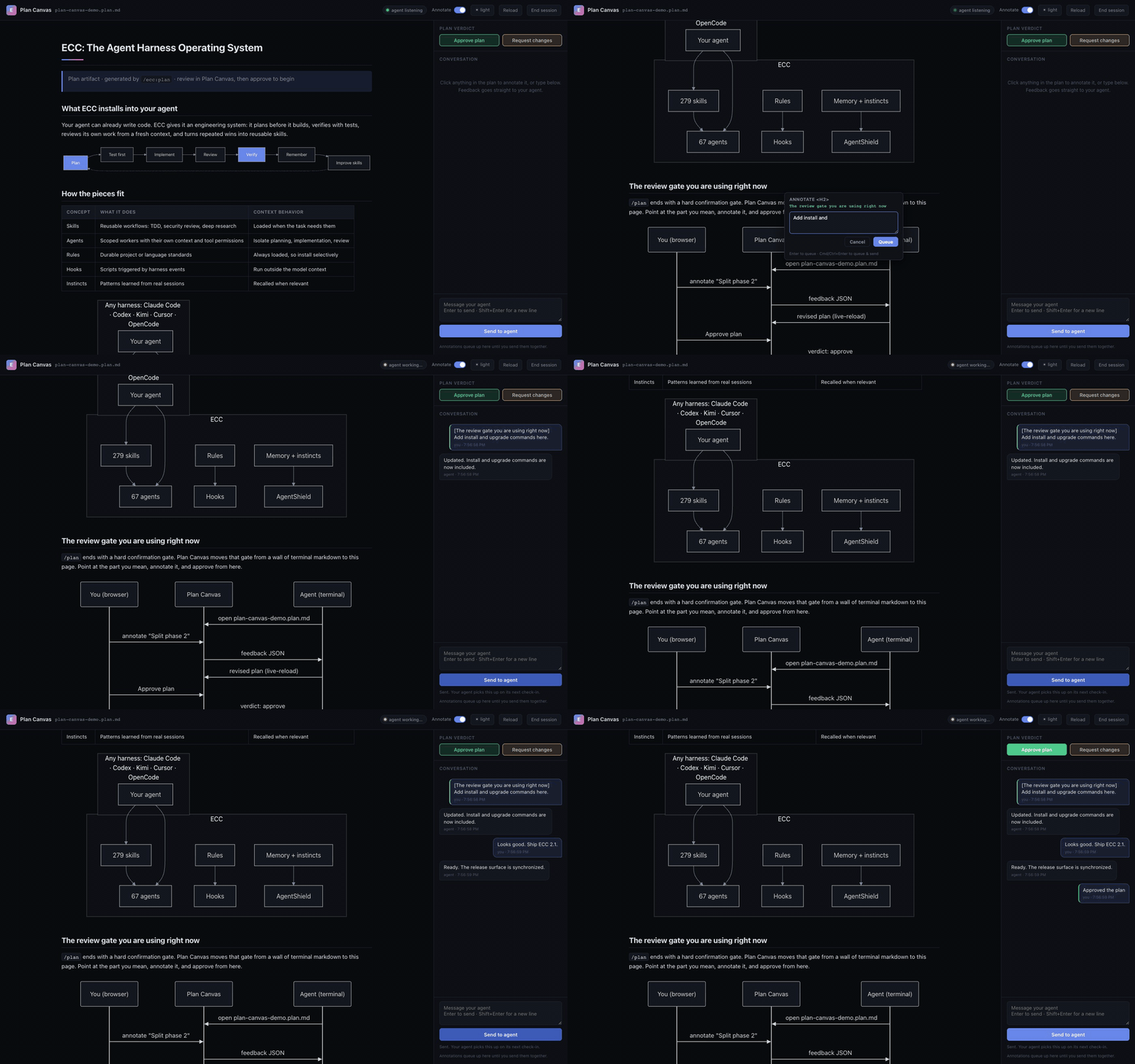 [Download the MP4 demo](https://raw.githubusercontent.com/affaan-m/ECC/main/docs/releases/2.1.0/assets/ecc-plan-canvas-demo.mp4) `/plan` ends with a confirm gate, and until now that review was a wall of markdown in the terminal. Now the agent opens the plan in a loopback-only browser canvas: - Click elements or select text to attach numbered annotations - Chat with the agent from a side rail while it works in the terminal - **Approve plan** / **Request changes** buttons map directly onto `/plan`'s CONFIRM gate - Mermaid diagrams, tables, and task lists render natively; file edits live-reload the page - Model- and harness-agnostic: a plain CLI + JSON protocol (`ecc-plan-canvas`), no Claude-only dependency ## Kimi harness: Moonshot AI partnership ECC now installs directly into [Kimi Code](https://moonshotai.github.io/kimi-cli/) (`--target kimi`). Kimi Code discovers the installed `.kimi/AGENTS.md` instructions and `.kimi/skills/` workflows natively: ```bash bash ./install.sh --target kimi --profile minimal npx ecc doctor --target kimi kimi ``` ## Self-host on Itô GPUs Run ECC against any self-hosted open-source model. If you need GPU capacity, [Itô](https://compute.itomarkets.com) is ECC's preferred compute sponsor. The integration shipped guarded end to end: - `ecc ito find`: opt-in bridge to the canonical Itô CLI that submits a live, authenticated RFQ (it does not reserve capacity) - Guarded live node qualification and read-only compute handoff - Credential-bearing CLI shims are rejected outright The sponsorship link itself is passive: it does not invoke an RFQ, reserve capacity, provision compute, or configure serving. Managed inference through Itô is not live yet. Any GPU provider works, and ECC stays provider-agnostic. ## Partners [Moonshot AI (Kimi)](https://www.moonshot.ai), [Itô](https://compute.itomarkets.com), and [Atlas Cloud](https://www.atlascloud.ai) are now public sponsors of ECC. The README documents a recommended self-host path: Itô for GPU capacity, a Kimi checkpoint served behind a compatible endpoint, then Kimi Code + ECC on top. Each choice remains separate and swappable. ## Also in 2.1 - **Hermes and OpenClaw install targets**: two more harnesses join Claude Code, Codex, OpenCode, Cursor, Gemini, Zed, Copilot, and Kimi - **Codex ECC navigation guide**: find the right skill/command surface from inside Codex - **GateGuard path exemptions** (`GATEGUARD_EXEMPT_GLOBS`) and configurable instinct injection (count + confidence threshold) - **PostToolUse hooks consolidated** into sync/async dispatchers, with fewer processes per tool call - **Supply-chain hardening**: the installer runtime passes strict vetting, and the pre-commit secret scan now catches Anthropic API keys (`sk-ant-...`) - A long tail of community fixes across OpenCode, Windows, bun lockfiles, the dashboard, and project detection The catalog now stands at **67 agents, 281 skills, and 94 command shims** (2.0.0 shipped 64/261/84), plus hooks, rules, memory, continuous learning, and AgentShield. ## Install or upgrade ```text /plugin marketplace add https://github.com/affaan-m/ECC /plugin install ecc@ecc ``` Existing installs: `/plugin update ecc` ## Community Join the ECC community for release announcements, questions, and Show and Tell: <https://discord.gg/36yGMHGFbR> Full changelog: <https://github.com/affaan-m/ECC/compare/v2.0.0...v2.1.0> ## New Contributors * @legeZZZ made their first contribution in https://github.com/affaan-m/ECC/pull/2200 * @tongshu2023 made their first contribution in https://github.com/affaan-m/ECC/pull/2216 * @mohameddsh3ban made their first contribution in https://github.com/affaan-m/ECC/pull/2195 * @fiedler-itlabs made their first contribution in https://github.com/affaan-m/ECC/pull/2240 * @daiki75 made their first contribution in https://github.com/affaan-m/ECC/pull/2245 * @wellkilo made their first contribution in https://github.com/affaan-m/ECC/pull/2194 * @rameshvr made their first contribution in https://github.com/affaan-m/ECC/pull/2144 * @aaronjmars made their first contribution in https://github.com/affaan-m/ECC/pull/2185 * @orbisai0security made their first contribution in https://github.com/affaan-m/ECC/pull/2149 * @xwang4-svg made their first contribution in https://github.com/affaan-m/ECC/pull/2186 * @kriptoburak made their first contribution in https://github.com/affaan-m/ECC/pull/2199 * @lamenting-hawthorn made their first contribution in https://github.com/affaan-m/ECC/pull/2235 * @mdayan8 made their first contribution in https://github.com/affaan-m/ECC/pull/2100 * @Naominour made their first contribution in https://github.com/affaan-m/ECC/pull/2188 * @Malphite10 made their first contribution in https://github.com/affaan-m/ECC/pull/2197 * @cogiwimute367-create made their first contribution in https://github.com/affaan-m/ECC/pull/2251 * @z3tz3r0 made their first contribution in https://github.com/affaan-m/ECC/pull/2250 * @rockwellwindsor made their first contribution in https://github.com/affaan-m/ECC/pull/2258 * @stroland02 made their first contribution in https://github.com/affaan-m/ECC/pull/2202 * @hretheum made their first contribution in https://github.com/affaan-m/ECC/pull/2221 * @BERORINPO made their first contribution in https://github.com/affaan-m/ECC/pull/2234 * @Victor-Casado made their first contribution in https://github.com/affaan-m/ECC/pull/2236 * @itkdm made their first contribution in https://github.com/affaan-m/ECC/pull/2241 * @leoeletronics made their first contribution in https://github.com/affaan-m/ECC/pull/2267 * @Seekers2001 made their first contribution in https://github.com/affaan-m/ECC/pull/2118 * @lucaszhu-hue made their first contribution in https://github.com/affaan-m/ECC/pull/2279 * @kapil971390 made their first contribution in https://github.com/affaan-m/ECC/pull/2292 * @danielnguyenfinhub made their first contribution in https://github.com/affaan-m/ECC/pull/2342 * @gpitrella made their first contribution in https://github.com/affaan-m/ECC/pull/2355 * @Angad2005 made their first contribution in https://github.com/affaan-m/ECC/pull/2366 * @quadcent made their first contribution in https://github.com/affaan-m/ECC/pull/2133 * @SiaoZeng made their first contribution in https://github.com/affaan-m/ECC/pull/2383 * @Tahiti18 made their first contribution in https://github.com/affaan-m/ECC/pull/2307 * @phobicdotno made their first contribution in https://github.com/affaan-m/ECC/pull/2343 * @sshworld made their first contribution in https://github.com/affaan-m/ECC/pull/2358 * @cd1amond made their first contribution in https://github.com/affaan-m/ECC/pull/2346 * @Tanaka-VivereGratis made their first contribution in https://github.com/affaan-m/ECC/pull/2388 * @KyawZinLatt made their first contribution in https://github.com/affaan-m/ECC/pull/2319 * @dieudonneAwa made their first contribution in https://github.com/affaan-m/ECC/pull/2288 * @carloscarvallo made their first contribution in https://github.com/affaan-m/ECC/pull/2273 * @mc856 made their first contribution in https://github.com/affaan-m/ECC/pull/2274 * @jvirgovic made their first contribution in https://github.com/affaan-m/ECC/pull/2338 * @m18897829375 made their first contribution in https://github.com/affaan-m/ECC/pull/2336 * @jack-finance-able made their first contribution in https://github.com/affaan-m/ECC/pull/2390 * @yerros made their first contribution in https://github.com/affaan-m/ECC/pull/2275 * @YuhaoLin2005 made their first contribution in https://github.com/affaan-m/ECC/pull/2377 * @Cb2i made their first contribution in https://github.com/affaan-m/ECC/pull/2437 * @28winz-bot made their first contribution in https://github.com/affaan-m/ECC/pull/2422 * @sutazca made their first contribution in https://github.com/affaan-m/ECC/pull/2425 * @nidelson made their first contribution in https://github.com/affaan-m/ECC/pull/2420 * @juujb made their first contribution in https://github.com/affaan-m/ECC/pull/2416 * @Zalasyu made their first contribution in https://github.com/affaan-m/ECC/pull/2432 * @Lxcardoza993 made their first contribution in https://github.com/affaan-m/ECC/pull/2433 * @haelyra made their first contribution in https://github.com/affaan-m/ECC/pull/2467 * @thejesh23 made their first contribution in https://github.com/affaan-m/ECC/pull/2515 * @nankingjing made their first contribution in https://github.com/affaan-m/ECC/pull/2501 * @samartomar made their first contribution in https://github.com/affaan-m/ECC/pull/2503 * @fletcherm-hub made their first contribution in https://github.com/affaan-m/ECC/pull/2460 * @someiyoshino-lab made their first contribution in https://github.com/affaan-m/ECC/pull/2471 * @WinterSold1er made their first contribution in https://github.com/affaan-m/ECC/pull/2511 * @EmadDoughan made their first contribution in https://github.com/affaan-m/ECC/pull/2543 * @Oleksandr-Kh4 made their first contribution in https://github.com/affaan-m/ECC/pull/2529 * @latreon made their first contribution in https://github.com/affaan-m/ECC/pull/2536 **Full Changelog**: https://github.com/affaan-m/ECC/compare/v2.0.0...v2.1.0
此处仅展示最近 5 个版本。 在原站查看完整版本历史 ↗
当前收录版本
0.0.1
安全与评测信息
质量评测
满分100 · 来自 SkillPi LAB 实验室的评测报告。
亮点
- 提供完整的 Docker 生产环境最佳实践体系
- 覆盖开发到部署的全生命周期场景
- 包含可复用的 Compose 模板和安全加固方案
亮点
- 触发词精准覆盖 Docker 核心使用场景
- 明确区分开发/生产环境需求
- 边界清晰无歧义
亮点
- Phase 划分清晰,逻辑连贯
- 每节含完整可执行示例
- frontmatter 完整,文档长度合理
亮点
- 工具来源明确,参数配置正确
- 覆盖健康检查、权限控制等关键异常场景
- 不可逆操作有明确警告和确认机制
取前四项原始分值的算术平均,四舍五入取整。可通过收录报告核对各项评分与说明,运行记录需单独查证。
正文静态检测
100 / 100 · skillpi-20261123-no-r3-v1
正文未命中当前规则。
分数仅反映正文中的规则命中,供使用前参考。附件与运行行为不在此评分范围内。
权限与使用前检查
根据当前主文档自动整理,命中内容可能是示例或防护说明;不是实际权限声明,也未覆盖附件、外部依赖或运行行为。
-
删除文件
先确认绝对路径及作用范围,保留可恢复备份;不要直接对重要目录运行示例命令。
主文档提及 · 第 403 行 -
安装或获取外部依赖
使用官方来源并锁定版本,在隔离环境检查安装脚本。当前文档检查不覆盖后续下载的代码。
主文档提及 · 第 296 行 -
账号、密钥或授权
使用专用、最小权限账号,不把密钥粘贴到公开内容或命令日志;核对接收数据的服务与租户。
主文档提及 · 第 259, 272, 305, 409, 414 行
文档引用的域名或地址
这些地址可能用于文档链接或示例,不是已批准的联网清单。使用前核对实际目的地及发送的数据。
- api
- localhost
安全评级与访问范围
risk · 静态证据核验,不代表运行安全保证。
使用 `docker/plugin-setup/compose.yaml` 作为参考执行。 它规定: `fixture-tests` 用于对焦的安装显示器、目标和执行器套件。 `real-cli` 用于基于Debian的通用Linux图像。 `real-cli-ubuntu` 对于钉住的Ubuntu图像。 构建前验证 Compose 模型: 构建两个真实的 Linux 图像: 运行每个图像中的安全默认流量 : 干运行执行当前公共命令合同 : 在命令运行之前, 容器会创建本地装入的 npm 文物 。 `npm pack --ignore-scripts` 它提取自制的柏油球 `/tmp` ,验证 `ecc-universal` 软件包名称, 需要安装 manif
使用前请由宿主核对并授权实际文件读写、外部服务和联网目的地;本站的核验不会授予任何运行权限。
用户讨论
还没有已核实的点评。