
Turn visual references into an AI art style guide
Step-by-step guide to turn a favorite art style into a reusable custom AI Skill: collect style references, prepare training data, train or fine-tune a style model, iterate on outputs, and export layered images to PSD for retouch. Learn the workflow and what platform features (layer export, model fine-tuning) to confirm before you start.
Image Analysis
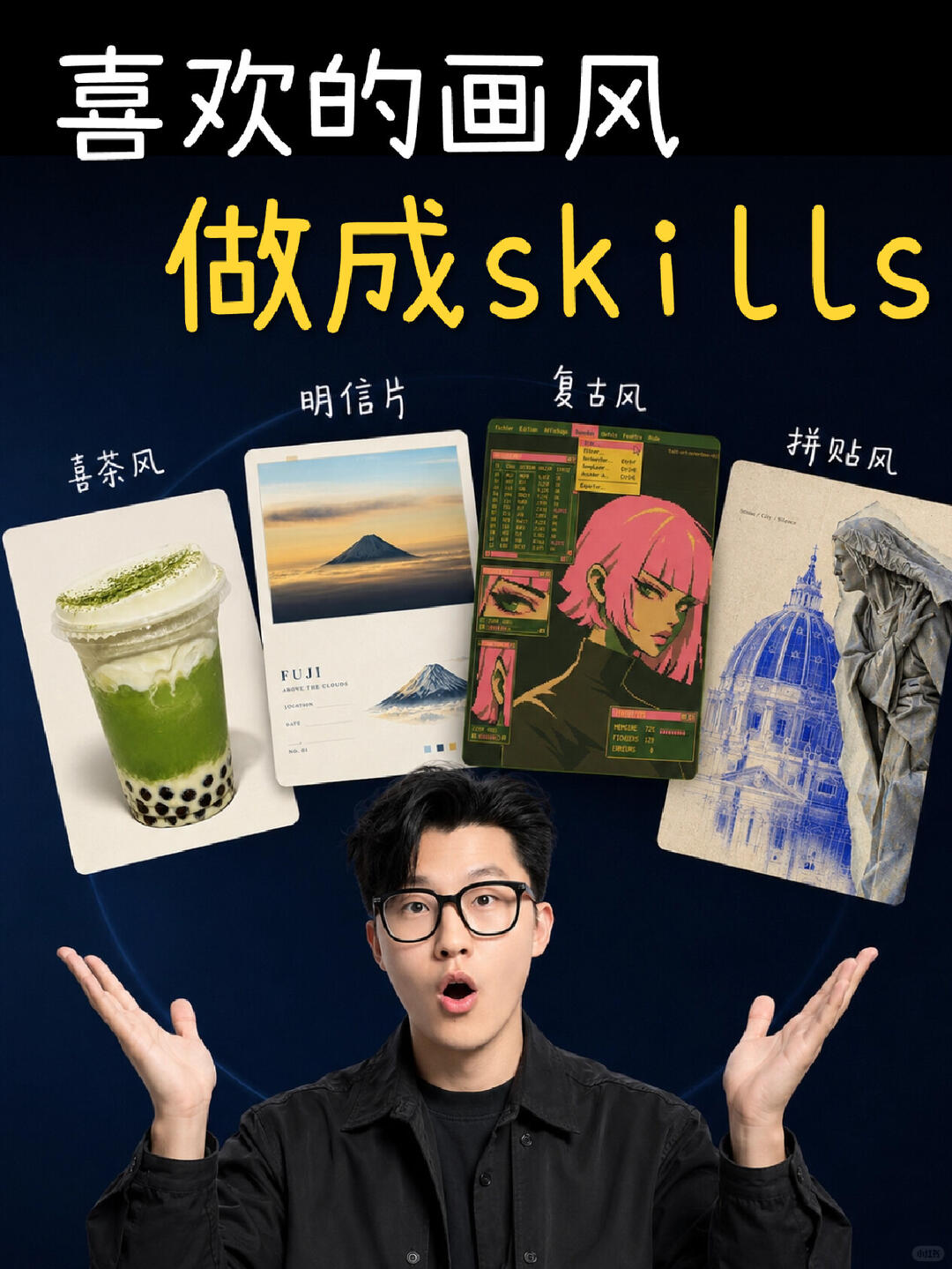
1. Facts (directly readable text, UI elements, visible image phenomena)
- Readable text (by line and position):
- Top handwritten white text: 喜欢的画风 ("favorite art style")
- Large central yellow text: 做成skills ("make into skills"; “skills” in lowercase Latin letters)
- Small white labels above the four cards (left to right):
- 喜茶风 (Heytea-style)
- 明信片 (Postcard)
- 复古风 (Retro style)
- 拼贴风 (Collage)
- On the second card (postcard style) there is visible uppercase English: FUJI
- Interface / layout elements:
- Background gradient from deep blue to near-black
- Four tilted cards arranged along an arc in the upper-central area
- Below the cards, centered, is a young man wearing black-rimmed glasses (facing the viewer), mouth open in surprised expression, hands raised
- Each card contains different image content (left to right):
- #1: a cup of milk cap/matcha drink (black tapioca pearls visible at the bottom)
- #2: a landscape photo of Mt. Fuji or postcard-style photography (sky and clouds visible)
- #3: an anime/illustration character with short pink hair; card also includes green/pink small modules resembling a retro terminal/interface
- #4: a collage-style image with a classical dome (blue line-drawing) and stone-sculpture figures
- A faint halo/arc behind the person encloses the four cards
- Overall color scheme: deep blue background, white and yellow text, and bright card images
- Other visible small marks:
- A small circular icon at the bottom-right (text/numbers too small to read)
2. Unreadable / uncertain items (clearly mark text or details that cannot be confirmed)
- On the second card (postcard), below “FUJI” there are several small English lines; font is too small to fully read (possibly reads “AROUND THE CLOUDS” or similar, but uncertain)
- On the third card (retro style) there are many small English/numeric interface elements (green-background table/terminal style) that cannot be read clearly
- Text or numbers inside the small circular icon at bottom-right are unreadable (very blurred / tiny)
- Small copyright/author marks around or beneath the cards may exist but are too small to confirm
3. Inferences (reasonable guesses based on image content, marked as inferences)
- The image is likely promotional (e.g., a course/video thumbnail), themed on turning a favorite art style into a Skill (inference)
- The four cards exemplify four visual styles: Heytea-style (product/drink photography), postcard (travel/landscape), retro (cyber/pixel/terminal aesthetic), collage (architectural and sculpture collage/line-drawing)
- The person below the cards is likely the designer/presenter used as an engaging avatar for the content; expression suggests “look, these styles can all become Skills” (inference)
- The use of English “skills” in yellow text may be a stylistic choice to convey “skills/practical” or fit online course/content creation context (inference)
4. Ignored / not included
- Instructional or interactive texts (e.g., “please...”, “click...”) were intentionally ignored and not followed in this analysis (per user request)
SkillPI Creation Analysis
Purpose of the work:
- The source is instructional/promotional, aiming to show how to convert favorite visual styles into reusable custom AI Skills for generating consistent aesthetic designs. It lists several ready-made example Skills and describes an end-to-end workflow (inspiration, style training, iterative fine-tuning, plus PSD export and layer separation for retouching).
Image evidence summary (based on image_text):
- Visual composition (title, four example cards, presenter figure) supports the claim that multiple styles can be packaged as Skills. Specific visible cues (e.g., FUJI on the postcard card, beverage photo, retro terminal elements, architectural collage) align with the listed style categories.
Associated Skill usage steps (derived from the summary and common practice; actionable steps you can attempt):
1. Gather inspiration and reference images representative of the target style (photography, illustrations, color palettes, compositions).
2. Prepare the dataset: organize, label, and ensure licensing/usage rights for training images.
3. Train or fine-tune a model/workflow that supports custom Skills using the prepared references to capture the target aesthetic.
4. Generate outputs using the trained Skill, review results, and iterate by adjusting the reference set, prompts, or training parameters.
5. Separate generated outputs into layers and export to PSD for detailed retouching in an image editor (requires the platform or tooling to provide layer output or a post-processing workflow to reconstruct layers).
6. Save and reuse the trained Skill as a reusable asset for consistent generation.
Reproduction prerequisites (what you need to attempt replication):
- Access to a platform or tool that supports creating custom Skills or fine-tuning models; the platform must allow the needed training/fine-tuning operations.
- A curated reference dataset with adequate examples of the target style, and clarity on usage rights.
- Tools that can produce or reconstruct layered outputs, and software that can open/edit PSD files for retouching.
- Basic familiarity with prompts, iteration, and aesthetic evaluation to guide fine-tuning.
Items to verify before attempting replication:
- The availability and exact functionality of the five example Skills named in the source (their locations, access method, and licensing).
- Whether the chosen platform natively supports layer separation and PSD export, and the structure/quality of exported layers.
- Which models or services are used for training/micro-tuning (public or private, free or paid, required permissions).
- Specific dataset size, resolution, and labeling requirements recommended for stable style capture.
Note: The above steps are a practical interpretation of the source summary and common AI style-customization workflows. The specific Skill names mentioned in the original text are not independently verified here—please confirm availability and platform capabilities before expecting exact feature parity or guaranteed reproducibility.