
I Open‑Sourced a Tool That Forces Me to Actually Understand Papers
Step-by-step: copy the repo's system-prompt.md into a ClaudeProject system prompt; send /sensemaking profile: with a one-line identity plus the full paper; follow the interactive three-part walkthrough (Comprehension → Collision → Reconstruction); then paste the AI's JSON output into sensemaking-canvas.html to render a visual trace of structure, conflicts, and cognitive change. Verify repo URL, files, and model compatibility before use.
Image Analysis
The following records visible contents from Image 1 item by item. First list “facts” (directly readable or visually apparent), then list “guesses/uncertain items.”
SkillPI Creation Analysis
Intended use: The project (referred to as paper-sense-making and described as a Claude skill) is designed to convert passive paper summaries into an active, reproducible understanding trace. The deliverable is not another abstract summary but a record of how a paper changed the reader: structured core claims, identified collisions with prior beliefs, and a reconstruction/plan for cognitive change.
Image evidence highlights (from Image 1):
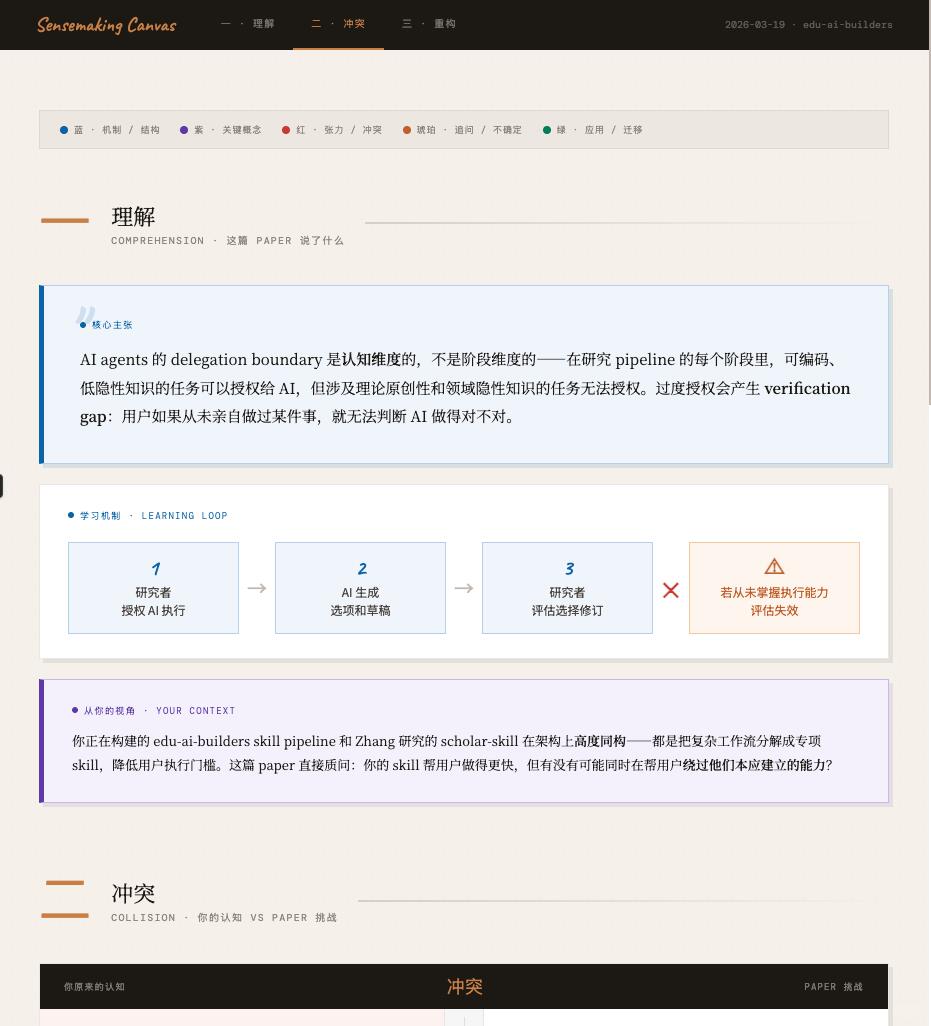
- The interface is labeled “Sensemaking Canvas” and shows top navigation items for 理解 / 冲突 / 重构 (Comprehension / Collision / Reconstruction). The header includes the tag “2026-03-19 · edu-ai-builders.”
- The main “core claim” blue box contains a readable sentence asserting: “AI agents’ delegation boundary is a cognitive dimension, not a stage dimension… over-delegation creates a verification gap: if a user has never personally done something, they cannot judge whether the AI did it correctly.”
- The LEARNING LOOP flow is explicit: 1 researcher delegates → 2 AI generates options/drafts → 3 researcher evaluates/chooses/edits; a warning notes evaluation fails if the researcher has never mastered the execution ability.
- A YOUR CONTEXT box references “edu-ai-builders skill pipeline” and “Zhang research’s scholar-skill,” posing the reflective question whether the skill speeds users but also causes loss of abilities.
Steps to use the associated Skill (actionable, as described in the source):
1) Locate and open the repository files (the source mentions system-prompt.md and sensemaking-canvas.html). NOTE: the repository URL is referenced in the source (“已开源,见图4”) but the URL is not provided in the excerpt; you must obtain the repo link to proceed.
2) Copy the contents of system-prompt.md into your ClaudeProject system prompt (author uses ClaudeProject as the example environment). Whether other LLM platforms accept the same prompt format is not guaranteed and must be tested.
3) Trigger the pipeline by sending: /sensemaking profile: <one-sentence profile> followed by the full paper text. The one-line profile should state who you are and your context (e.g., “I am a middle school math teacher building an AI feedback tool”).
4) Follow the three-act interactive session: (A) comprehension from your perspective, (B) collisions with your prior beliefs—state your agreement/disagreement and reasons, (C) record cognitive change and intended adjustments. Each act requires user response, making it an interactive sensemaking process rather than a one-shot summary.
5) After finishing the conversation the AI will output a JSON in the specified sensemaking schema. Open sensemaking-canvas.html (local or from the repo), paste the JSON, and render the Canvas visualization that shows structure, collisions, and reconstruction.
Prerequisites to reproduce (explicit):
- Access to the repository files (system-prompt.md and sensemaking-canvas.html). The excerpt references these filenames but does not include the repo URL—this must be located.
- Access to an LLM environment that can accept a project/system prompt (author uses ClaudeProject). Confirm whether your environment supports the same prompt injection or project-level system prompt behavior.
- Ability to paste or otherwise provide the full paper text to the model (consider token limits and privacy/compliance constraints).
- Ability to load and render a local HTML page (sensemaking-canvas.html) and paste JSON into it.
- Human willingness to engage: the workflow requires responding to AI prompts; it depends on active user participation.
Items to verify (not fully specified in the source):
- Exact repository URL, branch, and file paths for system-prompt.md and sensemaking-canvas.html (source says “已开源,见图4” but no link was included in the provided excerpt).
- Open-source license and usage terms for the repo (affects reuse and redistribution).
- Compatibility with other LLMs (OpenAI ChatGPT, different Claude versions, self-hosted models). The source demonstrates Clair/Claude usage but does not claim cross-platform compatibility.
- Token/length handling for full-paper inputs and any recommended chunking strategy.
- Data privacy and compliance implications of pasting full papers into a cloud LLM.
- Current Canvas UI/UX dependencies or required front-end assets (source notes UIUX is still being polished).
Preserved identifiers and commands: system-prompt.md, ClaudeProject, /sensemaking profile:, sensemaking-canvas.html, Sensemaking Canvas, LEARNING LOOP, delegation boundary, verification gap, edu-ai-builders, Zhang research, 2026-03-19.
Summary note: The approach advocates a mandatory interactive reflection loop (structure → conflict → reconstruction) to make “understanding” explicit and traceable. The image verifies the presence of those UI elements and the flow, but to reproduce the full pipeline you must fetch the repository (URL not included here), confirm the JSON schema, and validate model/platform compatibility.