
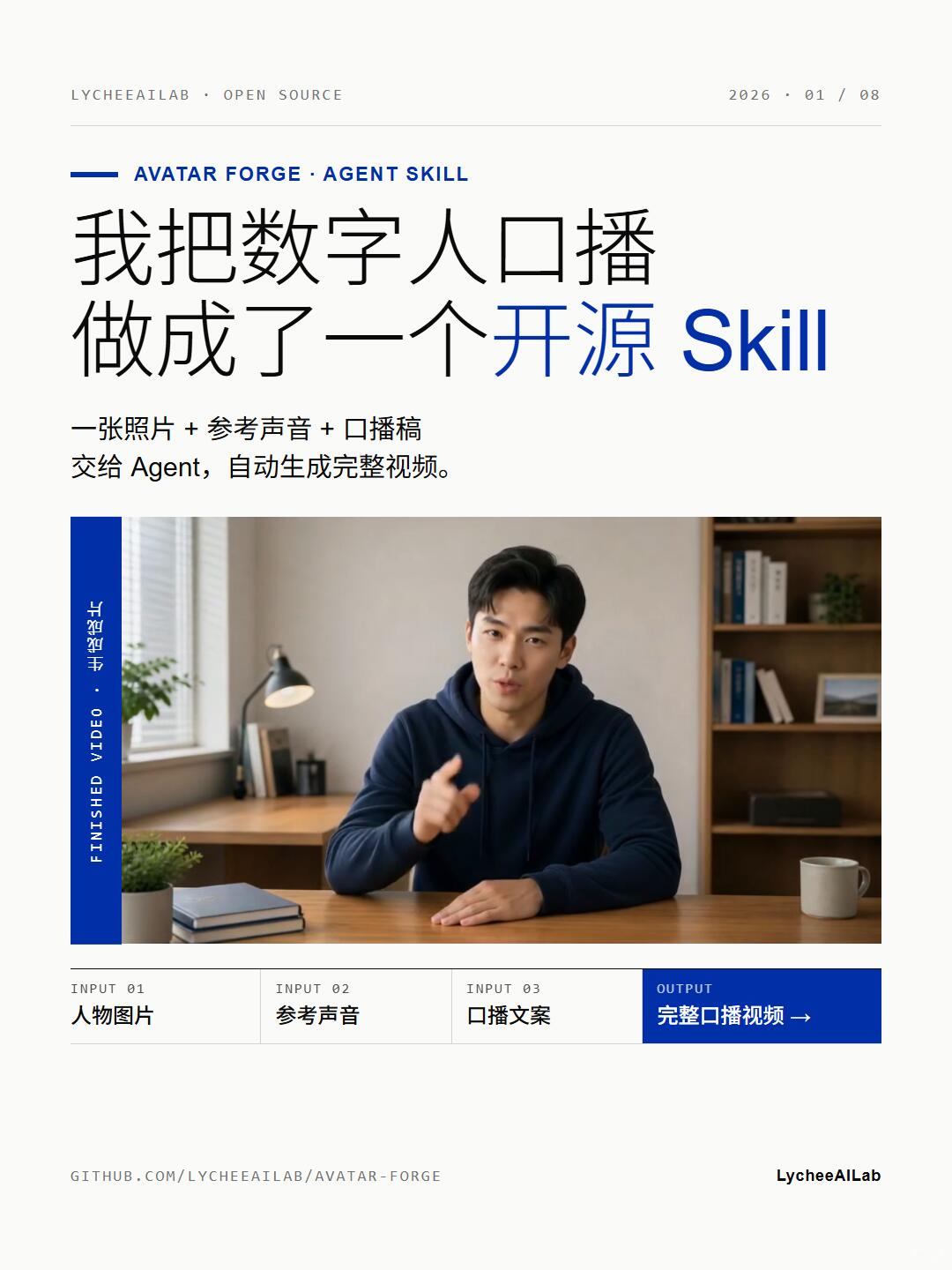
I Turned a Digital Spokesperson into an Open-Source Skill
Learn how to turn a photo + reference voice + script into a complete talking-avatar (digital spokesperson) video using the open-source Avatar Forge (LycheeAILab/avatar-forge). This covers what inputs to prepare, expected outputs, demo location on GitHub, and legal/permission considerations; see the repo README for installation and examples.
Image Analysis
Image 1 — Facts and整理
1. Readable text (listed roughly top-to-bottom, left-to-right)
- Top-left header: LYCHEEAILAB · OPEN SOURCE
- Top-right header: 2026 · 01 / 08
- Horizontal subtitle (under blue short line, English): AVATAR FORGE · AGENT SKILL
- Main title (Chinese + English, some blue emphasis): “我把数字人口播做成了一个 开源 Skill”
- Note: the words “开源” and “Skill” are blue (“Skill” in English capitalization)
- Subheading/explanation (Chinese): “一张照片 + 参考声音 + 口播稿 交给 Agent,自动生成完整视频。”
- Left vertical strip (blue background, white text, vertical English + Chinese): “FINISHED VIDEO · 完整视频”
- Three columns/steps across the bottom (left to right):
- INPUT 01 (top) / Person image (below)
- INPUT 02 (top) / Reference voice (below)
- INPUT 03 (top) / Script copy (below)
- Right-side area styled like an output button (blue background, white text):
- OUTPUT (top) / Complete spokesperson video → (below, arrow to the right)
- Footer left (lowercase URL): GITHUB.COM/LYCHEEAILAB/AVATAR-FORGE
- Footer right: LycheeAILab
2. UI steps / functional flow (presented as inputs/outputs in the image)
- Three input items (INPUT 01/02/03): person photo, reference voice, script text.
- One output item (OUTPUT): complete spokesperson video (button style, blue).
- The subheading directly describes the flow: give the photo, reference voice, and script to an Agent to automatically generate a complete video.
3. Chart/data
- No numerical tables or charts; the page is a promo/demo poster, no statistics included.
4. Visible phenomena / image content (visual elements only, no identity claims)
- Center shows a photo/video frame of a man sitting at a desk:
- Wearing a dark (navy/black) hoodie
- Right hand (relative to left of image) pointing toward the camera, left hand on desk
- Facing the camera, appears to be talking or presenting
- Desk items: one or two stacked small notebooks, a cup (right side), a light-colored potted plant (left side)
- Background: window at left with a desk lamp and small vertical items; bookshelf with books and decor at right
- Overall color: blue for titles and emphasis, blue output button with white text; clean layout with white space
5. Facts vs. inferences
- Facts (directly observable):
- The on-image text items listed above (headers, title, subheading, input/output labels, footer URL).
- The page shows three inputs (person image / reference voice / script) and one output (complete spokesperson video).
- The center contains a person photograph/video frame: a man in a study/office setting with the listed desk objects.
- Footer shows the repository path "GITHUB.COM/LYCHEEAILAB/AVATAR-FORGE" and the credit "LycheeAILab".
- Inferences (possible but not directly proven by the image):
- The page is likely a project presentation or promo image from LycheeAILab, showcasing an open-source Skill/tool named "Avatar Forge."
- The page intends to describe a workflow that turns a static photo + reference voice + script into a complete spokesperson video via an Agent.
- The vertical blue strip labeled "FINISHED VIDEO · 完整视频" may denote a generated video sample or result.
- The input/output bars are probably a conceptual flow or UI mockup rather than a live application screenshot.
6. Unclear or indiscernible items
- Some fine typographic details or very small decorative text may be unreadable due to resolution, but main text is legible.
- The identity of the person in the image (name, whether author or actor) cannot be determined from the image.
- Whether the image is an actual UI screenshot or a design/mockup cannot be definitively concluded from a single image; it appears more like a demo poster.
Note: I ignored any actionable UI elements in the image and only recorded visible text and phenomena.
SkillPI Creation Analysis
Purpose: The poster/demonstration indicates a workflow or tool (Avatar Forge) that claims to generate a complete talking-avatar/spokesperson video from three inputs: a person photo, a reference voice sample, and a script. It is intended for developers or creators who want to convert static portraits into synchronized speaking videos, provided they have rights to the materials.
Image evidence: The image explicitly shows the label “AVATAR FORGE · AGENT SKILL,” a subheading that reads (in Chinese) “one photo + reference voice + script → give to Agent, auto-generate full video,” and a footer with the repository path GITHUB.COM/LYCHEEAILAB/AVATAR-FORGE. These visual elements support that the project is an open-source Agent Skill named Avatar Forge and that the advertised inputs/outputs are photo, voice, script → video.
Suggested steps to use the associated Skill (outline to be verified in the repo README):
1. Visit the GitHub repository (GITHUB.COM/LYCHEEAILAB/AVATAR-FORGE) and read the README and license information.
2. Prepare authorized input assets: a person photo (or frame), a reference voice audio file, and the script text.
3. Install required dependencies as specified (check for Python/Node versions, model downloads, container/Docker instructions).
4. Follow repository examples or API/CLI instructions to supply the three inputs to the Agent Skill and configure output options (resolution, audio settings, lip-sync/speech parameters).
5. Export and review the generated video, verifying audio-visual sync, lip movement alignment, and compliance with licenses and permissions.
Reproduction prerequisites and considerations:
- Legal: ensure you have clear permission to use the photo, voice, and any third-party content.
- Technical: sufficient compute (CPU/GPU), environment matching repo requirements, and network access to download model weights if needed.
- Documentation: ability to follow the repository’s README and example scripts.
Items that must be verified in the repository (not assumed from the poster):
- Exact implementation details (which specific models or third-party services are used, and whether any are closed-source).
- Supported input/output file formats, multi-image workflows, and maximum resolution.
- Licensing and any restrictions on commercial use or redistribution of generated content.
- Concrete installation commands, example scripts or API endpoints, and expected resource requirements (GPU/CPU hours).
Compliance note: the poster includes an explicit warning to use only legally authorized images, voices, videos and copy. Before attempting to run or apply the tool, confirm authorization and license terms in the repository and any dependent models or datasets.