
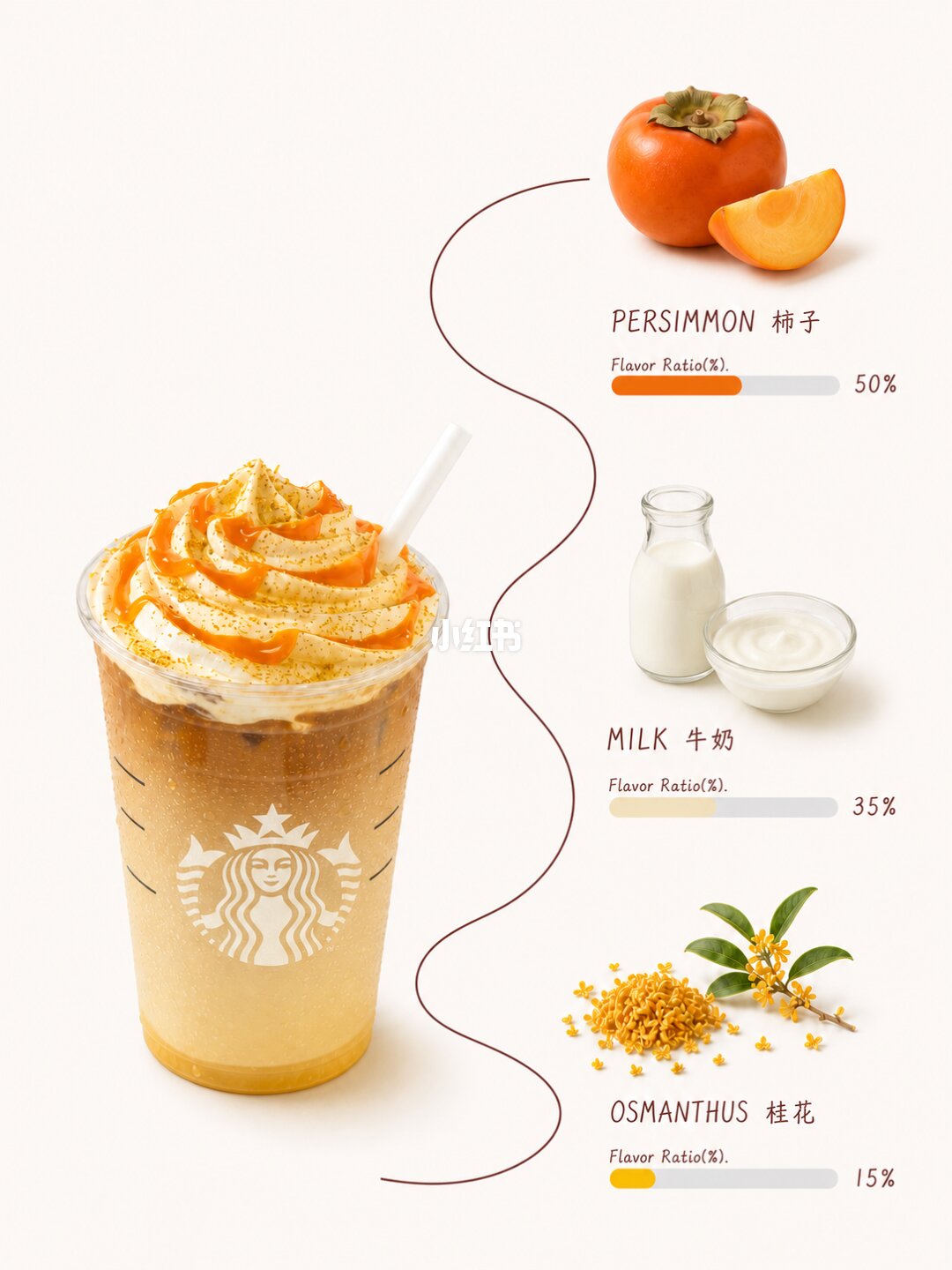
Beverage flavor-curve poster skill created with Codex
Learn how to install and use flavor-curve-beverage-poster: in an Agent/Red Skill-enabled environment upload a beverage photo or describe its theme, then generate a breakdown poster that extracts three main flavors and renders item images, bilingual labels, percent ratio bars and a continuous flavor curve. Suitable for menus, product pages, and flavor notes. Note: outputs are creative flavor expressions if no real recipe is supplied.
Image Analysis
Image 1
Facts (readable text, UI elements, chart data, visible phenomena; described top-to-bottom, from the right-side ingredient column to the left beverage):
- Top right image and text:
- A whole persimmon and a sliced piece are visible (orange flesh).
- Text (Latin and Chinese shown side-by-side):
- "PERSIMMON 柿子"
- A smaller line below: "Flavor Ratio(%)"
- To the right is a horizontal progress bar (left half orange, right half gray), with text at the right end: "50%"
- Middle right image and text:
- A bottle of milk and a shallow bowl of a dairy product (yogurt or cream) are visible.
- Text:
- "MILK 牛奶"
- Smaller line below: "Flavor Ratio(%)"
- To the right is a horizontal progress bar (left side pale yellow/milk color, right side gray), right-end text: "35%"
- Bottom right image and text:
- Osmanthus (small yellow flowers) with stems/leaves are visible.
- Text:
- "OSMANTHUS 桂花"
- Smaller line below: "Flavor Ratio(%)"
- To the right is a horizontal progress bar (left side yellow, right side gray), right-end text: "15%"
- Left large image (beverage):
- A clear plastic cup is visible (with a white mermaid/Starbucks logo). Inside is layered liquid (lower layer pale yellow/gel or fruit purée, upper layer dark brown/coffee color), cup rim has cream/top and orange sauce drizzle with yellow fine粒 sprinkle, and a white straw inserted.
- There are several short horizontal tick lines on both sides of the cup body (no numeric labels visible, only the lines).
- The beverage surface shows noticeable cream swirl and an orange sauce streak; yellow granular topping on the cream.
- Visual connection and layout:
- The three ingredient images on the right are visually connected to the left beverage by a brownish-red winding curve.
- Watermarks / marks:
- A white Chinese watermark text "小红书" (Xiaohongshu) is visible near the cup center (semi-transparent, overlaid on the cup body).
- The white mermaid/Starbucks logo is visible on the cup (the full logo is discernible).
- Colors and contrast:
- Background is light beige/cream.
- The left sides of the progress bars use colors matching the ingredient tones (persimmon orange, milk pale cream, osmanthus yellow).
- Typography/layout:
- Ingredient names are uppercase English (e.g., "PERSIMMON", "MILK", "OSMANTHUS") shown alongside Chinese names.
- Percentages under the progress bars use Arabic numerals with a percent sign ("50%", "35%", "15%").
Unreadable or partially visible items:
- It is not possible to discern whether the tick lines at the cup body have adjacent numeric labels (no numbers visible).
- Some very small detail texts or marks (e.g., on the cup lid edge or on the cream surface) are unreadable.
- It is unclear whether there are extra labels at the lower endpoints of the curve (the area appears blank or only the curve end is visible).
- Any smaller text beneath the white "小红书" watermark on the cup cannot be read.
Inferred (reasonable visual inferences, not directly readable text or data):
- The image appears to show a cold beverage or smoothie composed mainly of persimmon, milk, and osmanthus, with a breakdown of component ratios (inferred from ingredient images and "Flavor Ratio(%)" labels).
- Progress bar left-side colors match ingredient images' dominant tones and likely indicate relative proportions in flavor (the image shows 50%/35%/15%).
- The orange sauce and yellow sprinkle on top may come from persimmon jam and osmanthus granules/sugar respectively (inference only).
- Layered colors in the cup may indicate ice or cold brew/tea/coffee layered with fruit purée or a milk base (inference).
Notes (source information):
- The image did not provide an image source index or URL — source information is incomplete.
SkillPI Creation Analysis
Intended use:
- The flavor-curve-beverage-poster skill is intended to convert a beverage photo or a described beverage theme into a visual breakdown poster that highlights three main flavor components using item photos, bilingual (Chinese/English) labels, percent ratio bars, and a continuous flavor curve. Typical use cases: menu visuals, beverage description pages, flavor notes, and product-series images.
Image evidence summary (from image_text):
- The right column lists three ingredients in order: PERSIMMON (柿子, 50%), MILK (牛奶, 35%), OSMANTHUS (桂花, 15%), each accompanied by an item photo, uppercase English and Chinese labels, a small-line caption "Flavor Ratio(%)", and a color-coded horizontal progress bar showing the percentage.
- The left side shows a clear plastic cup with layered liquids and cream topping; the cup displays a white mermaid/Starbucks logo and a semi-transparent "小红书" watermark. A brownish-red winding curve visually connects the right-side ingredients to the beverage image. Background is light beige.
Steps to use the skill (based on source instructions and verifiable actions):
1. Install the skill in a platform that supports Agent/Red Skill. The source provides this Chinese install command:
"帮我安装一下 flavor-curve-beverage-poster这个 skill" (supply link if required).
2. Upload a beverage photo or provide a textual theme/description to the skill. Example prompt from the source:
"使用 flavor-curve-beverage-poster,把这张饮品照片做成三材料风味曲线配方图。"
3. The skill processes input and outputs a poster containing three extracted main flavors (with item images), bilingual labels, percentage ratio bars, and a continuous flavor curve. The exact output format (image file type, resolution) depends on the skill implementation.
Reproduction prerequisites:
- An Agent/Red Skill-capable environment or platform (the source says “any Agent”).
- Access to the code or package identified as GitHub "yvonnechen202608-byte" (verify repository URL, install instructions and license before use).
- Input image files in supported formats and necessary upload permissions/APIs.
- Rendering/export capability (whether the skill directly generates a downloadable high-resolution image or returns layout data for external rendering must be confirmed).
Items to verify (not confirmed by the source):
- Whether the implementation actually uses "Codex" as claimed in the user title (the summary does not list the technical stack explicitly).
- Exact GitHub repository location and contents for "yvonnechen202608-byte", including dependencies, build/install steps and license.
- Supported input/output formats, maximum image resolution, and language options for labels.
- Copyright and commercial-use constraints, especially regarding third-party logos visible in examples (the image contains a mermaid/Starbucks logo and a "小红书" watermark).
- Whether generated "flavor ratios" are based on any ingredient analysis or purely creative/heuristic visualizations (the source already cautions that outputs are creative if no real recipe is provided).
Closing verification note:
- To use outputs publicly or in production, review the GitHub repository (yvonnechen202608-byte) and confirm license, dependencies, and the runtime environment required to install and run flavor-curve-beverage-poster.